
Back to plugins 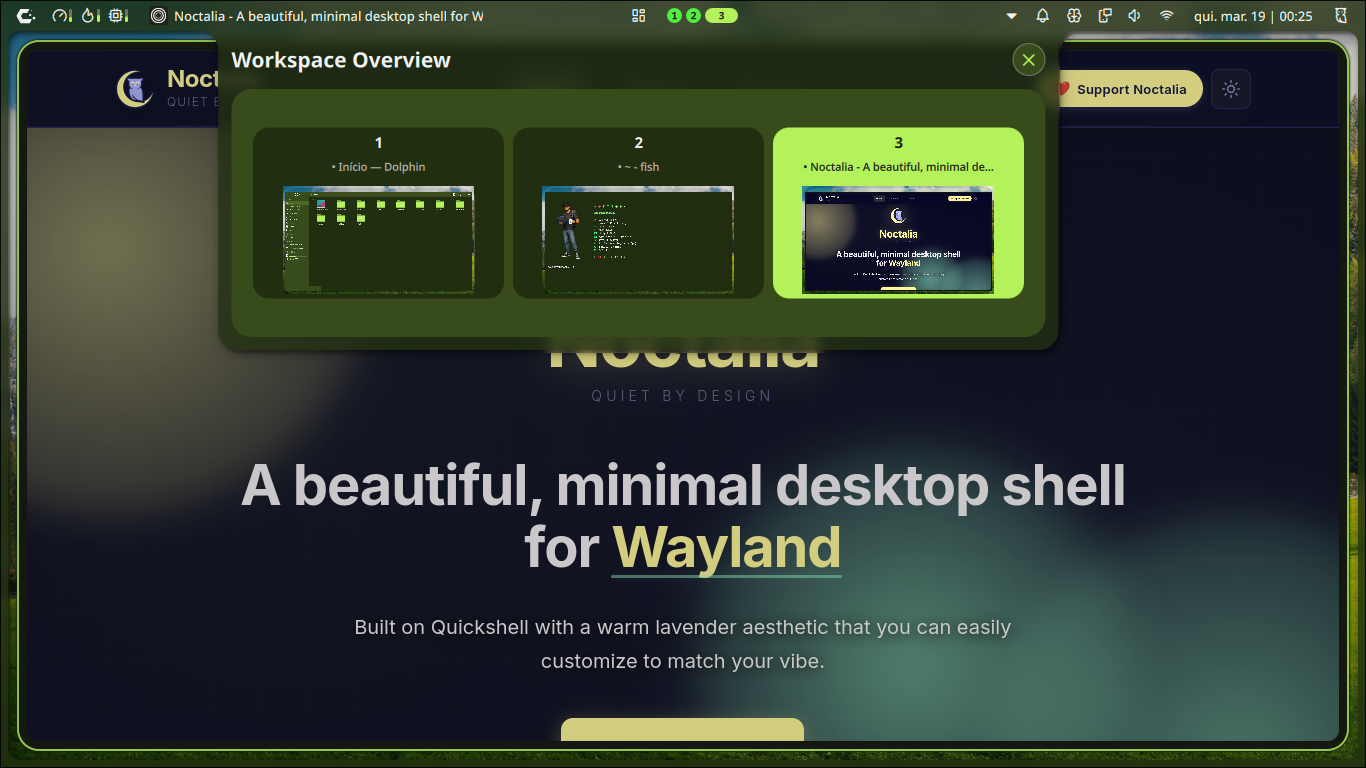
Workspace Overview for Hyprland
Workspace overview with live window previews and wallpaper backgrounds for Hyprland.
v1.0.3 doughbran MIT Apr 29, 2026
About
Workspace Overview Plugin for Noctalia
A visually stunning workspace overview with real-time window previews and wallpaper integration, designed perfectly for Hyprland and Noctalia Shell.
✨ Features
- Panoramic View: A balanced 3-column grid that fills your panel with a professional, symmetrical layout.
- Live Previews: Real-time rendering of all your open windows using
ScreencopyView. - Dynamic Sizing: The panel height automatically adjusts to the number of active workspaces.
- Wallpaper Backgrounds: Automatically pulls your desktop wallpaper to show "life" in every workspace preview.
- Drag & Drop: Effortlessly move windows between workspaces by dragging their previews.
- Clean Aesthetic: No visible scrollbars—just your windows and your work.
Installation
Ensure you have the plugin files in:
~/.config/noctalia/plugins/workspace-overview/
Usage
Via Bar Widget
Add the "Workspace Overview" widget to your Noctalia bar.
Via IPC (Keybindings)
You can toggle the overview using the Noctalia IPC interface. This is ideal for assigning to a keyboard shortcut.
Command:
qs -c noctalia-shell ipc call plugin:workspace-overview toggle
Hyprland Keybind Example
Add the following to your hyprland.conf:
bind = SUPER, TAB, exec, qs -c noctalia-shell ipc call plugin:workspace-overview toggle
Requirements
- Noctalia Shell: 3.6.0 or later
- Hyprland: For workspace and window tracking
- Quickshell: The framework powering Noctalia