
Web Search
Search the Internet from the Launcher.
About
Web Search
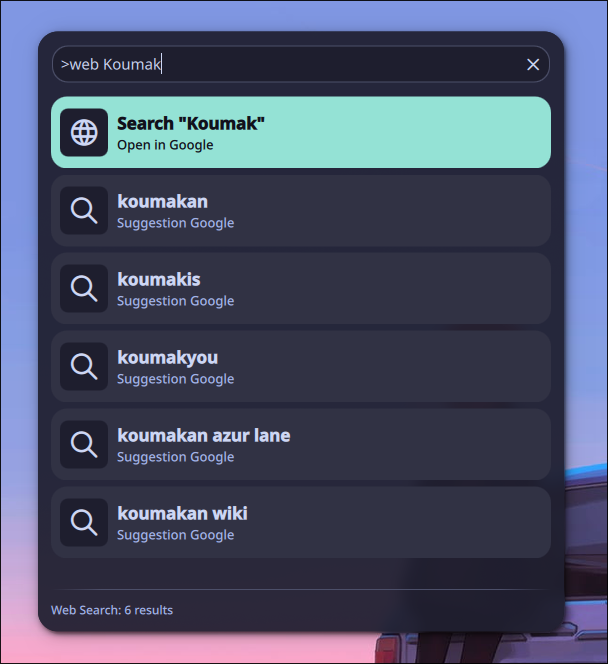
A launcher provider plugin that allows you to quickly search the internet directly from the Noctalia launcher, complete with live autocomplete suggestions.
Features
- Quick Web Searching: Search the web instantly without opening a browser first
- Live Autocomplete: Get search suggestions from your preferred engine as you type
- Multiple Search Engines: Support for Google, DuckDuckGo, Bing, Brave, and Yandex
- Smart URL Detection: Automatically detects URLs, IP addresses, and localhost and opens them directly in the browser
- Smart Priorities: Web search acts as a fallback when searching for apps, or takes absolute priority when using the explicit
>webcommand
Usage
- Open the Noctalia launcher
- Type
>webfollowed by your query to enter web search mode exclusively - Or just type your query directly. Web search results appear as fallbacks below matched applications
- Live suggestions populate underneath the main result as you type
- Press Enter on any result to open it in your default browser
Examples
Search with the >web command:
>web chocolate cake recipe
This bypasses all local apps/files and shows only web search results. The top result will open a search for "chocolate cake recipe" in your configured engine, with autocomplete suggestions listed below.
Fallback search:
discord
Type a query normally. If it matches an installed app, the app appears first. Web search results appear at the bottom as fallbacks, so you can still search for "discord" on the web if the app isn't what you wanted.
Direct URL navigation:
>web github.com/noctalia-dev
When Direct URL Opening is enabled, the plugin detects that github.com/noctalia-dev is a URL and offers to open it directly in your browser, alongside the regular search result.
Open localhost or IP addresses:
>web localhost:3000
>web 192.168.1.1
Local addresses and IPs are detected as URLs and offered for direct opening. Localhost and IP addresses default to http://, while domain names default to https://.
IPC Commands
You can control the web search plugin via the command line using the Noctalia IPC interface.
Available Commands
| Command | Description | Example |
|---|---|---|
toggle |
Opens or closes the launcher on the current screen | qs -c noctalia-shell ipc call plugin:web-search toggle |
Configuration
You can configure the plugin directly via Noctalia's Plugin Settings:
| Setting | Description | Default |
|---|---|---|
| Search Engine | Choose between Google, DuckDuckGo, Bing, Brave, or Yandex | |
| Direct URL Opening | Automatically detect URLs and open them directly in the browser instead of searching | Enabled |
| Show Search Suggestions | Fetch real-time autocomplete suggestions while typing | Enabled |
| Maximum Results | Number of autocomplete suggestions shown in the launcher (1–10) | 5 |
Requirements
- Noctalia 3.9.0 or later
- Internet connection (for search suggestions)
Changelog
1.1.1
- Fix protocols other than http/https not recognized as URL
- Support for middle domain with only one character (e.g., www.a.com)
- Support for hostname without dot with port (e.g., hostname:8080)
- If you want to enter hostname without port and dot, you have to type the protocol manually
1.1.0
- Added Direct URL Opening. Automatically detects URLs, IP addresses, and localhost and opens them directly in the browser
- Added configurable toggle for the Direct URL feature
- Smart protocol handling
1.0.2
- Added French translation
1.0.1
- Added German translation
1.0.0
- Initial release
- Live autocomplete suggestions from the selected search engine
- Support for Google, DuckDuckGo, Bing, Brave, and Yandex
- Configurable suggestion count and toggle
- Fallback results when typing normally in the launcher
- English translation