
Back to plugins 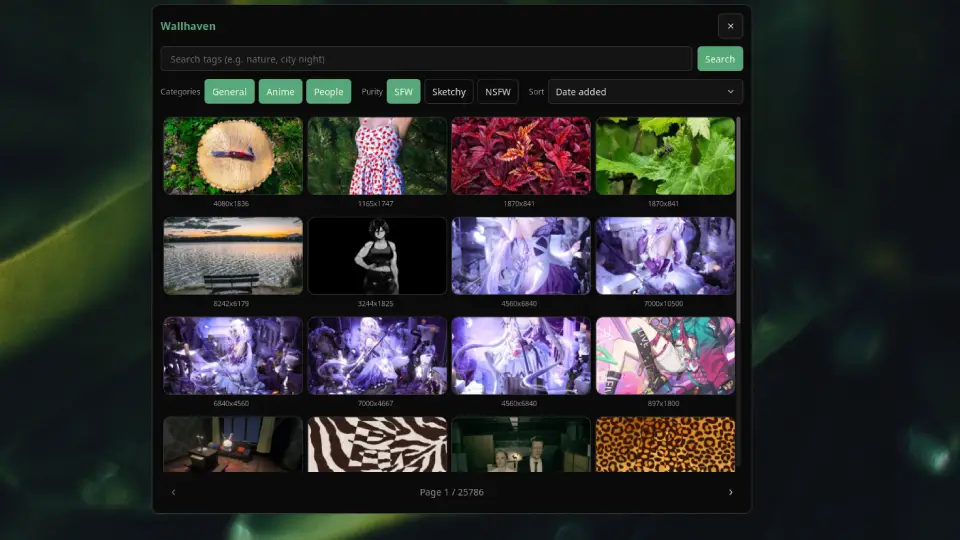
Wallhaven
Browse Wallhaven wallpapers.
v1.0.3 noctalia Requires Noctalia 5.0.0+
About
Wallhaven
Browse Wallhaven, download a wallpaper into your Noctalia wallpaper directory, and apply it to all monitors.
Plugin
| Field | Value |
|---|---|
| ID | noctalia/wallhaven |
| Version | 1.0.2 |
| Minimum Noctalia | 5.0.0 |
| Entries | Panel: browser; bar widget: wallhaven |
Usage
Enable the plugin in Settings → Plugins.
Add the
wallhavenbar widget, or run:noctalia msg panel-toggle noctalia/wallhaven:browserSearch by tags, adjust category and purity filters, paginate results, then click a wallpaper to download and apply.
Settings
| Setting | Type | Default | Description |
|---|---|---|---|
api_key |
string |
(empty) | Optional Wallhaven API key for higher rate limits and NSFW access. |
download_dir |
string |
(empty) | Optional download override; defaults to your configured wallpaper directory. |
Thumbnail previews are cached under cache/thumbs/ in the plugin install directory.
Notes
- Requires network access (
[shell].offline_modemust be off). - NSFW results require a Wallhaven API key.
- Applied wallpapers use
noctalia msg wallpaper-set <path>so they persist like any other wallpaper.