
Back to plugins 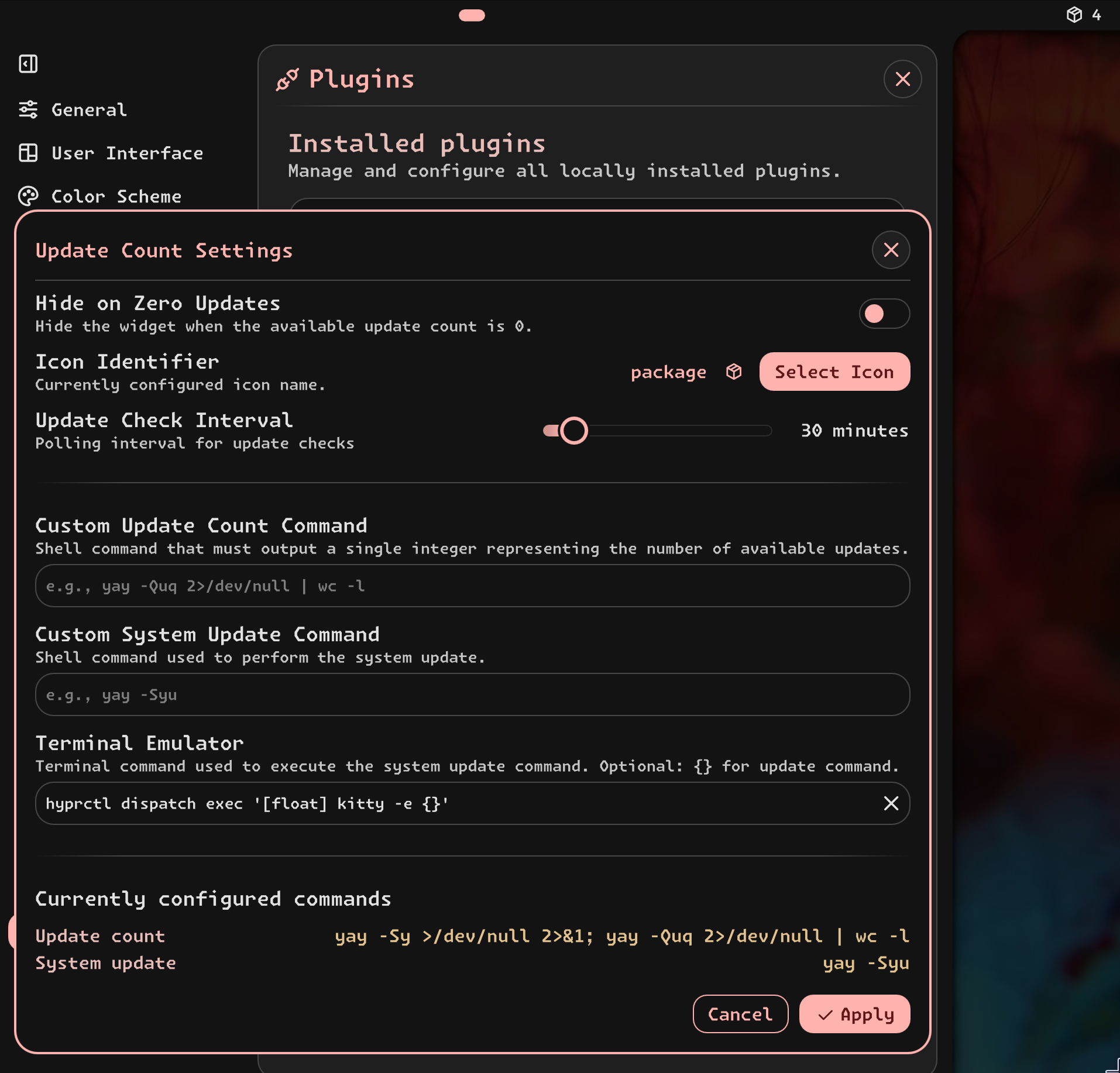
Update Count
Checks for system updates and shows the update count. Click to run update command in a terminal.
v1.0.14 BukoMoon GPLv3 Mar 29, 2026
About
Update Count Plugin
A compact Noctalia bar widget that periodically checks for available system updates and displays the current update count. Clicking the widget spawns a terminal to execute the configured system update command.
Features
- Periodic Update Checks: Polls at a configurable interval and updates the displayed count.
- Package Manager Detection: Supports common update-check/update flows for supported distros (see Requirements).
- Click to Update: Launches a terminal to execute the configured system update command.
- Custom Commands: Optional custom commands for both “get number of updates” and “do system update”.
Installation
This plugin is part of the noctalia-plugins repository.
Configuration
Configure the plugin in Noctalia settings:
- Hide on Zero Updates: Hides the widget when the available update count is
0. - Update Check Interval: Polling interval used for update checks.
- Icon Identifier / Select Icon: View and change the currently used icon name.
- Custom Update Count Command: Shell command that must output a single integer.
- Custom System Update Command: Shell command used to perform the update.
- Terminal Emulator: Command used to spawn a terminal for the update action.
- If the value contains
{}, it will be replaced with the update command. - If
{}is not present, the update command is appended.
- If the value contains
Usage
- Display: Shows an icon and the current update count.
- Click: Spawns the configured terminal command and executes the system update command.
- Hover: Shows a tooltip indicating whether updates are available or not.
Requirements
- Noctalia Shell: 3.6.0 or later.
- Update backend: one of the supported package managers defined in
updaterConfigs.json(recommended, but not required).- Paru/Yay: Default
updaterConfigs.jsonrequirescheckupdates
- Paru/Yay: Default
Technical Details
Updater selection:
- Built-in update handling is driven by
updaterConfigs.json, which defines the commands used to:- determine the number of available updates (
cmdGetNumUpdates), and - perform the system update (
cmdDoSystemUpdate).
- determine the number of available updates (
- At runtime, the plugin selects the first available updater whose required executable checks succeed.
- If no updater matches, the plugin relies on the custom command settings.
- Built-in update handling is driven by
Supported package managers / tools:
- Arch Linux:
pacman;yay,paru(AUR helpers) - Fedora:
dnf - Void Linux:
xbps
- Arch Linux: