
Back to plugins 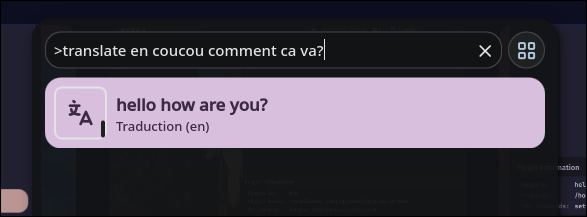
Translator
Quick translate in launcher
v1.2.6 Cleboost MIT Apr 10, 2026
About
Translator
A launcher provider plugin that allows you to quickly translate text directly from the Noctalia launcher.
Features
- Quick Translation: Translate text instantly from the launcher
- 100+ Languages: Support for over 100 languages including major European, Asian, African, and Middle Eastern languages
- Auto-detect Source: Automatically detects the source language
- Translation Cache: Caches translations for faster repeated queries
- Clipboard Integration: Copy translations to clipboard with a single click
Usage
- Open the Noctalia launcher
- Type
>translateto enter translation mode - Select a target language (or type the language code directly)
- Type the text you want to translate
- Click the result to copy it to clipboard
Examples
# Translate to French
>translate fr Hello world

# Translate to Spanish
>translate es How are you?

# Translate to German
>translate de Good morning
Supported Languages
The plugin supports over 100 languages. Here are some of the most popular:
European Languages:
- fr - French (français)
- en - English
- es - Spanish (espagnol)
- de - German (allemand)
- it - Italian (italien)
- pt - Portuguese (portuguais)
- ru - Russian (русский)
- nl - Dutch (néerlandais)
- pl - Polish (polski)
- sv - Swedish (svenska)
- da - Danish (dansk)
- no - Norwegian (norsk)
- fi - Finnish (suomi)
- cs - Czech (čeština)
- hu - Hungarian (magyar)
- ro - Romanian (română)
- tr - Turkish (türkçe)
- uk - Ukrainian (українська)
- el - Greek (ελληνικά)
- he - Hebrew (עברית)
- And many more...
Asian Languages:
- ja - Japanese (日本語)
- zh - Chinese (中文)
- ko - Korean (한국어)
- hi - Hindi (हिन्दी)
- th - Thai (ไทย)
- vi - Vietnamese (Tiếng Việt)
- id - Indonesian (Bahasa Indonesia)
- ar - Arabic (العربية)
- fa - Persian (فارسی)
- And many more...
African Languages:
- sw - Swahili
- zu - Zulu
- xh - Xhosa
- yo - Yoruba
- And more...
You can use either the language code (e.g., fr, ja, ru) or the language name in English or French (e.g., french, japanese, russian, français, japonais, russe).
Configuration
- Translation Backend: Choose the translation service to use (currently supports Google Translate and DeepL/DeepL Free)
- Realtime Translation: Toggle between translating as you type or only upon pressing Enter (useful for saving API usage)
- API Key: The API key required for premium backends like DeepL
IPC Commands
You can quickly open the translator via IPC, which is useful for keybindings:
# Toggle the translator launcher (opens with >translate )
# Pass empty string "" to use default (no language pre-selected)
qs -c noctalia-shell ipc call plugin:translator toggle "" ""

# Open translator with a specific language (e.g., French)
qs -c noctalia-shell ipc call plugin:translator toggle "fr" ""

# You can use language codes or names (fr, french, français, etc.)
qs -c noctalia-shell ipc call plugin:translator toggle "english" ""

# Open translator with text to be translated (e.g. selected text)
qs -c noctalia-shell ipc call plugin:translator toggle "english" "$(wl-paste -n -p)"
Integration with Keybindings
Add this to your Window Manager's keybinds configuration:
Niri
spawn
Super+T { spawn "qs" "-c" "noctalia-shell" "ipc" "call" "plugin:translator" "toggle" "" "" }
Super+Shift+T { spawn "qs" "-c" "noctalia-shell" "ipc" "call" "plugin:translator" "toggle" "fr" "" }
spawn-sh
Super+T { spawn-sh "qs -c noctalia-shell ipc call plugin:translator toggle \"\" \"\"" }
Super+Shift+T { spawn-sh "qs -c noctalia-shell ipc call plugin:translator toggle \"fr\" \"\"" }
Sway
bindsym Super+t exec qs -c noctalia-shell ipc call plugin:translator toggle "" ""
bindsym Super+Shift+t exec qs -c noctalia-shell ipc call plugin:translator toggle "fr" ""
- With empty string
"": Opens the launcher with>translatealready entered, ready for you to select a language and type text to translate. - With a language parameter: Opens the launcher with
>translate [language]already entered, ready for you to type text to translate to that language. - With both language and text parameter: Opens the launcher with
>translate [language] [text]already entered, ready for you to hit the enter or to see the result (if you enabled realtime translation)
Requirements
- Noctalia 4.4.1 or later
- Internet connection (for translation requests)