
Back to plugins 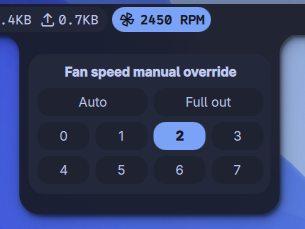
Noctalia Fan & Thermal Control Plugin (
ThinkPad - Fan & Thermal Control
Monitors system temperatures and provides manual overrides for fan speed profiles via sysfs.
v1.0.0 Piero-93 GPLv3 May 18, 2026
About
Noctalia Fan & Thermal Control Plugin (thinkpad-fan)
A resilient system utility plugin designed for the Noctalia desktop shell environment. It monitors embedded system temperatures and maps hardware overrides to manual fan speeds directly through secure sysfs platform pathways without escalation prompts.
Features
- Dynamic Fan Speed Indicator: Embedded status bar module reporting realtime revolutions per minute (
RPM) telemetry, updating cycles safely every 2 seconds. - Thermal Zone Inspector: Contextual diagnostic popup panel tracking active primary sensor clusters.
- Stateful Micro-Pill Alerts: Custom visual states that color-shift dynamically based on active overrides:
- Turns Solid Crimson Red if safety limits are bypassed by forcing the fans off (
level 0). - Shifts to system
mPrimarypalette states when explicit constant numeric thresholds are locked down.
- Turns Solid Crimson Red if safety limits are bypassed by forcing the fans off (
Prerequisites
- ACPI Drivers: Ensure driver hooks are mapped correctly (e.g.,
thinkpad_acpiloaded with control permission flags allowed:options thinkpad_acpi fan_control=1). - Udev Mapping Rules: Write permissions are required to execute adjustments inside
/proc/acpi/ibm/fanwithout utilizing full root escalation pipelines.
Installation and Setup
1. Run Local Security Mapping Adjustments
Grant group write parameters over systemic thermal interfaces by applying the setup script:
cd ~/.config/noctalia/plugins/thinkpad-fan/
chmod +x setup_permissions.sh
./setup_permissions.sh
2. Session Reset
Log out of your graphical target environment session completely to ensure the hardware communication group attachments lock successfully into place before restarting your window manager layout.