
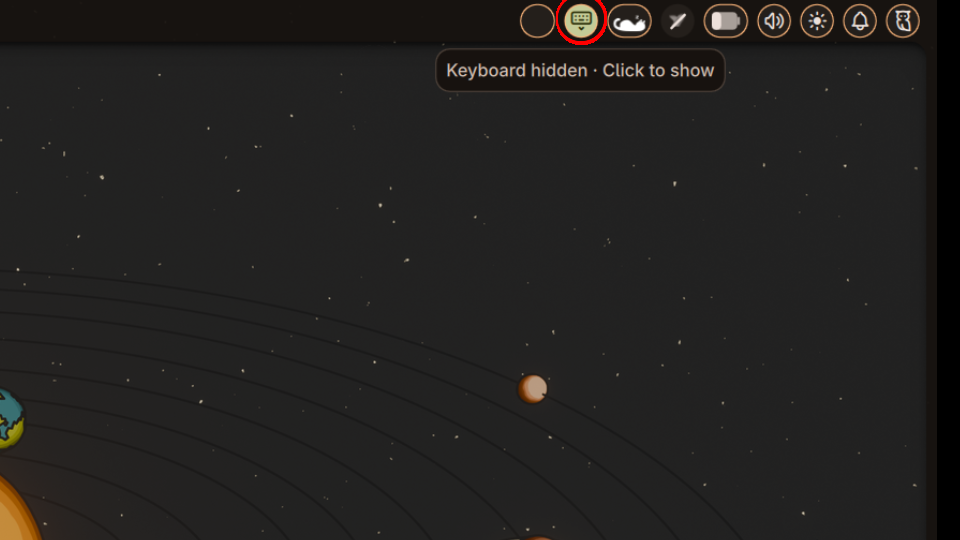
Squeekboard Toggle
Toggle the Squeekboard on-screen keyboard with live availability detection, hover icons, and configurable settings. Note: This plugin is deprecated and got consolidated in osk-toggle.
About
Squeekboard Toggle
Deprecated: This plugin is superseded by osk-toggle Please use that instead, since it handles both Squeekboard and wvkbd from a single widget.
A Noctalia plugin / bar widget that adds a bar widget to toggle the Squeekboard on-screen keyboard. Works with 2-in-1 Linux devices.
Features
- One-click toggle — Left-click the widget to show/hide Squeekboard
- Visual indicator — Icon reflects current keyboard state (active/hidden)
- Hover icons — Icon previews the action on hover (shows what will happen on click); can be disabled in settings
- Live state sync — Monitors gsettings changes from external sources (tablet mode, accessibility settings)
- Squeekboard availability detection — Monitors the D-Bus session to detect whether Squeekboard is running; shows an error state when it is not
- Hide when unavailable — Optionally hide the widget entirely when Squeekboard is not running (settings)
- Tooltip support — Hover to see keyboard status, or an error message if Squeekboard is not available
- Non-intrusive — Works alongside automated tablet-mode switching without conflicts
Settings
| Setting | Description |
|---|---|
| Hide when unavailable | Hide the widget entirely when Squeekboard is not running |
| Disable hover icon | Always show the current state icon instead of a hover icon |
A Recheck state button is available in settings to manually re-sync Squeekboard availability.
How it works
The widget uses gsettings to read and write the GNOME accessibility setting org.gnome.desktop.a11y.applications screen-keyboard-enabled, which controls Squeekboard's visibility. It continuously monitors this setting via dconf watch, so manual toggles and automated tablet-mode events stay in sync.
Squeekboard availability is tracked by monitoring the sm.puri.OSK0 D-Bus name via dbus-monitor. If Squeekboard stops or starts, the widget updates its state immediately without requiring a restart.
Requirements
- Squeekboard installed and running
- gsettings and dconf available (GNOME accessibility settings)
- dbus-monitor and busctl available (for availability detection)
- Noctalia ≥ 4.4.3 (for bar widget support)
Tested on
- Niri window manager with
switch-eventsconfigured
Tablet Mode (2-in-1 Laptops)
This widget complements automated tablet-mode switching. Configure Niri's switch-events in ~/.config/niri/config.kdl to auto-toggle the keyboard:
switch-events {
    tablet-mode-on { spawn "bash" "-c" "gsettings set org.gnome.desktop.a11y.applications screen-keyboard-enabled true"; }
    tablet-mode-off { spawn "bash" "-c" "gsettings set org.gnome.desktop.a11y.applications screen-keyboard-enabled false"; }
}
The widget will reflect these changes in real-time without conflicts. Manual toggles via the widget work independently of tablet-mode automation.
License
MIT