
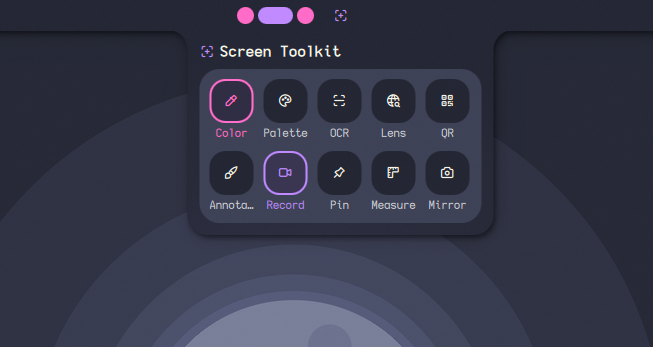
Screen Toolkit
A set of screen tools: color picker, annotate, record, pin, OCR, QR scanner, palette, measure, and webcam mirror (deps: README).
About
Screen Toolkit
A unified collection of screen utilities for the Noctalia Shell, designed to streamline screenshotting, annotation, recording, and visual inspection workflows.
Overview
Screen Toolkit provides a single integrated panel for advanced screen interaction tools, including capture, annotation, OCR, recording, and color analysis.
Included Tools
| Tool | Description |
|---|---|
| Color Picker | Inspect any pixel and retrieve HEX, RGB, HSV, and HSL values instantly. |
| Annotate | Draw on screenshots using pens, highlights, arrows, shapes, text, and blur effects. |
| Measure | Measure precise pixel distances using on-screen line tools. Hold Alt while dragging to constrain to horizontal or vertical axis. |
| Pin | Pin screenshots or local media as floating overlays on the screen. |
| Palette Extraction | Extract dominant color palettes from selected regions. |
| OCR | Extract text from images with multilingual support and translation. |
| QR Scanner | Detect and decode QR codes and barcodes from screen regions. |
| Google Lens | Send a selected region to Google Lens for reverse image search. |
| Screen Recorder | Record fullscreen or selected regions as MP4 or GIF (with optional audio). |
| Webcam Mirror | Floating webcam preview with resizing, flipping, and capture support. |
Color Picker + Annotation
You can use the color picker tool to select any color, and it will be automatically applied to annotations.
Annotation – Shortcuts
- Ctrl + C: Copy current annotation to clipboard and close overlay.
Annotation – Sharing
You can quickly upload screenshots and get a shareable link.
- Default (no setup): uses https://uguu.se/ — links expire after ~3 hours
- Want more control: get a free API key from https://up.x02.me/ to increase upload limits and choose expiry from settings:
1h | 1d | 7d | 30d | permanent(default: 7d).
Recording UI behavior
When recording is active, the plugin icon shows a red pulsing dot. Clicking the icon stops the recording.
Webcam Mirror Features
- Take screenshots from mirror view
- Automatically pin screenshots on screen (pin/unpin button)
- Record video from mirror overlay
- Optional microphone audio recording (on/off)
Requirements
Core Dependencies
grim— screenshotsslurp— region selectionwl-clipboard— clipboard integrationtesseract— OCR engineimagemagick— image processingzbar— QR/barcode scanningcurl— network requestsffmpeg— video processingjq— JSON parsingwl-screenrec(preferred) orwf-recorder(fallback)python3+ PyGObject (system file picker support)xdg-desktop-portal(File picker for Pin Image/Video)
Color Picker
hyprpicker— primary picker (Hyprland / Niri compatible)- Zoom lens, live preview, multiple formats
- Fallback:
slurp+grim
Optional Features
translate-shell— OCR translationgifski— high-quality GIF encodingzenity/kdialog— fallback for Pin Image/Video
Installation
Arch Linux
sudo pacman -S grim slurp hyprpicker wl-clipboard tesseract tesseract-data-eng imagemagick zbar curl translate-shell ffmpeg jq python python-gobject xdg-desktop-portal
yay -S gifski wl-screenrec-git
Debian / Ubuntu
sudo apt install grim slurp wl-clipboard tesseract-ocr tesseract-ocr-eng imagemagick zbar-tools curl translate-shell ffmpeg jq python3 python3-gi xdg-desktop-portal
cargo install gifski
Fedora
sudo dnf install grim slurp hyprpicker wl-clipboard tesseract tesseract-langpack-eng ImageMagick zbar curl translate-shell ffmpeg jq wl-screenrec python3 python3-gobject xdg-desktop-portal
cargo install gifski
NixOS
environment.systemPackages = with pkgs; [
  grim slurp hyprpicker wl-clipboard tesseract imagemagick zbar curl
  translate-shell wl-screenrec ffmpeg gifski jq
  python3 python3Packages.pygobject xdg-desktop-portal
];
Optional languages for OCR:
# programs.tesseract.languages = [ "eng" "deu" "fra" ];
Structure:
Screen-Toolkit/
├── i18n/
│   ├── en.json
│   ├── fr.json
│   └── tr.json
│
├── scripts/
│   ├── annotate.sh
│   ├── capture.sh
|   ├── color-picker.sh
│   ├── lens-upload.sh
|   ├── measure.sh
|   ├── mirror-record.sh
|   ├── mirror-screenshot.sh
│   ├── ocr.sh
│   ├── pick-file.py
│   ├── pick-file.sh
│   ├── record.sh
│   └── share-upload.sh
├── overlays/
│   ├── Annotate.qml
│   ├── Mirror.qml
│   ├── Record.qml
│   ├── Measure.qml
│   ├── Pin.qml
│   └── RegionSelector.qml
├── tools/
│   ├── ColorPicker.qml
│   ├── Lens.qml
│   ├── Ocr.qml
│   ├── Palette.qml
│   └── Qr.qml
│
├── widgets/
│   ├── ResultColor.qml
│   ├── ResultOcr.qml
│   ├── ResultPalette.qml
│   └── ResultQr.qml
│
├── shaders/
│   ├── dimming.frag
│   └── dimming.frag.qsb
│
├── utils/
│   └── utils.js
│
├── Main.qml
├── BarWidget.qml
├── ControlCenterWidget.qml
├── Panel.qml
├── Settings.qml
├── manifest.json
└── README.md
Compatibility
| Compositor | Status | Notes |
|---|---|---|
| Hyprland | Fully supported | All features enabled |
| Niri | Fully supported | Active window annotation is disabled (Niri API limitation) |
| Other Wayland compositors | Partial support | Feature availability may vary |
Configuration
All settings are configurable via the plugin settings panel.
| Setting | Description | Default |
|---|---|---|
| Screenshot Path | Directory for screenshots and annotations | ~/Pictures/Screenshots |
| Video Path | Directory for recordings | ~/Videos |
| Filename Format | Timestamp template for generated files | %Y-%m-%d_%H-%M-%S |
| x0.2 API Key | API key for uploading and sharing captures | — |
| x0.2 Link Expiry | How long shared links remain valid | 7d |
| Skip Share Popover | Share immediately without confirmation popup | false |
| Skip Recording Confirmation | Start recording immediately | false |
| Copy Recording to Clipboard | Copy output after recording | false |
| GIF Max Seconds | Maximum GIF duration | 30 |
| Search Engine URL | URL used when searching OCR text. Leave empty to use Google. Examples: https://duckduckgo.com/?q= or https://search.brave.com/search?q= |
Google (default) |
Files automatically receive appropriate extensions (.png, .mp4, .gif).
IPC Commands
Control Screen Toolkit via scripts or keybindings:
qs -c noctalia-shell ipc call plugin:screen-toolkit <command>
Replace <command> with any of the following:
General
| Command | Description |
|---|---|
toggle |
Open or close the main panel |
Annotation
| Command | Description |
|---|---|
annotate |
Annotate a selected region |
annotateFullscreen |
Annotate full screen |
annotateWindow |
Annotate active window (Hyprland only) |
Pin
| Command | Description |
|---|---|
pin |
Pin a selected region |
pinImage |
Pin an existing image or video |
Recording
| Command | Description |
|---|---|
record |
Record region as GIF |
recordMp4 |
Record region as MP4 |
recordFullscreen |
Record fullscreen as GIF |
recordFullscreenMp4 |
Record fullscreen as MP4 |
recordStop |
Stop recording |
Mirror
| Command | Description |
|---|---|
mirror |
Open webcam mirror (supports capture) |
Utilities
| Command | Description |
|---|---|
colorPicker |
Pick pixel color |
ocr |
Extract text via OCR |
qr |
Scan QR/barcodes |
palette |
Extract color palette |
lens |
Send region to Google Lens |
measure |
Measure screen distances |
Troubleshooting
File picker does not open (Pin Image/Video)
Ensure:
xdg-desktop-portalis installed and running- A fallback picker is available (
zenityorkdialog)
Recording does not work
Check:
wl-screenrecorwf-recorderis installed- Your compositor supports screen capture
OCR not working
Ensure:
tesseractis installed- Language packs are installed (e.g.
tesseract-data-eng)
GIF issues
Install:
gifskifor improved encoding quality
QR scanner not detecting codes
Ensure:
zbaris installed- The region has sufficient contrast and clarity
License
MIT License
Contributing
Contributions, issues, and feature requests are welcome.
Repository: https://github.com/noctalia-dev/noctalia-plugins