
Back to plugins 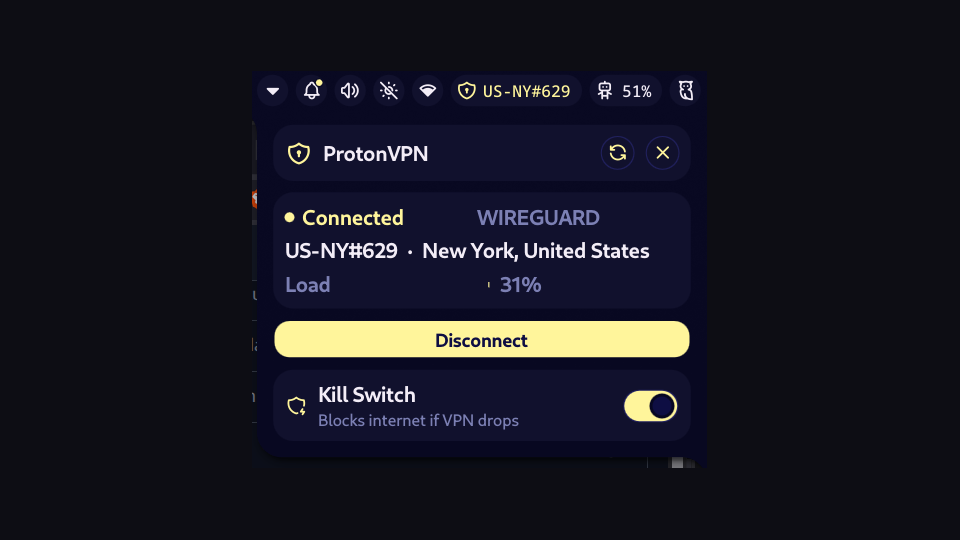
ProtonVPN Status
Shows ProtonVPN connection status in the bar with a panel for connect/disconnect, kill switch toggle, and quick connect options. Requires the ProtonVPN CLI (protonvpn-cli) installed and authenticated.
v1.0.0 blessonmathewsam MIT May 26, 2026
About
ProtonVPN Status
A Noctalia bar widget and panel for monitoring and controlling ProtonVPN.
Features
- Bar widget — shield icon shows connected/disconnected state; server name displayed when connected
- Panel — full control surface with:
- Live connection status with server name, location, and protocol
- Animated server load bar (colour-coded: green → amber → red)
- Connect Fastest / Disconnect button
- Kill Switch toggle (off / standard)
- Quick-connect buttons: Secure Core, P2P
Requirements
protonvpnCLI installed and authenticated
Settings
| Key | Type | Default | Description |
|---|---|---|---|
displayMode |
"alwaysShow" | "alwaysHide" |
"alwaysShow" |
Whether to always show the bar pill |
connectedColor |
color key | "primary" |
Pill colour when connected |
disconnectedColor |
color key | "none" |
Pill colour when disconnected |
pollInterval |
number (ms) | 5000 |
How often to poll VPN status |
How it works
Uses Quickshell's Process to run protonvpn status and protonvpn config list on a configurable timer. Actions (connect, disconnect, config set) are run via the same mechanism with an isActing guard to prevent concurrent commands.