
Back to plugins 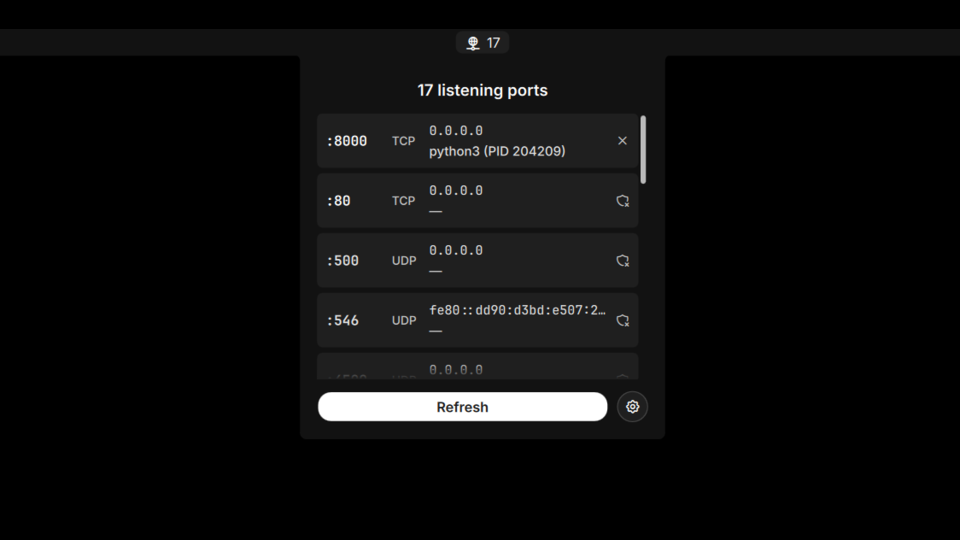
Port Monitor
Monitor listening ports and their processes. Shows TCP/UDP ports with process info and kill functionality.
v1.0.1 adriamartin91 MIT Apr 19, 2026
About
Port Monitor
Monitor listening ports and their processes. Shows TCP/UDP ports with process info and kill functionality.
Features
- Bar Widget: Network icon with listening port count, tooltip with port summary
- Panel: Scrollable list of ports with address, protocol, process name, and PID
- Kill Process: Kill user-owned processes directly, or open a terminal with
sudofor system processes - Auto-refresh: Polls
ssat a configurable interval (default 5 seconds) - Filtering: Option to hide system ports (< 1024) and hide bar widget when no ports are listening
- Terminal Auto-detect: Detects installed terminal emulator for elevated kill operations
How It Works
The plugin executes ss -tlnp (TCP) and ss -ulnp (UDP) to scan listening ports. Process info (name and PID) is available for user-owned processes. System processes show without process details due to Linux kernel restrictions without root.
User-owned ports are listed first, followed by system ports.
Usage
- Bar widget: Left click to open panel, right click for context menu, middle click to refresh
- Panel: Each port row shows address, protocol, and process info. Click
xto kill user processes, orshieldicon to open a terminal withsudo fuser -kfor system processes
Settings
| Setting | Default | Description |
|---|---|---|
| Refresh interval | 5 seconds | How often to scan for listening ports |
| Hide system ports | false | Exclude ports below 1024 |
| Hide when empty | false | Hide bar widget when no ports are listening |
IPC Commands
# Refresh port scan
qs -c noctalia-shell ipc call plugin:port-monitor refresh

# Toggle panel
qs -c noctalia-shell ipc call plugin:port-monitor toggle
Requirements
- Linux with
ss(part of iproute2) - A terminal emulator for elevated kill operations (ghostty, alacritty, kitty, foot, etc.)