
Parallax Wallpaper
A customizable parallax effect for the wallpaper based on the active workspace.
About
Parallax Wallpaper
A Noctalia Shell plugin that adds a parallax effect to the wallpaper.
Features
- Workspace-based parallax — wallpaper moves in response to workspace changes
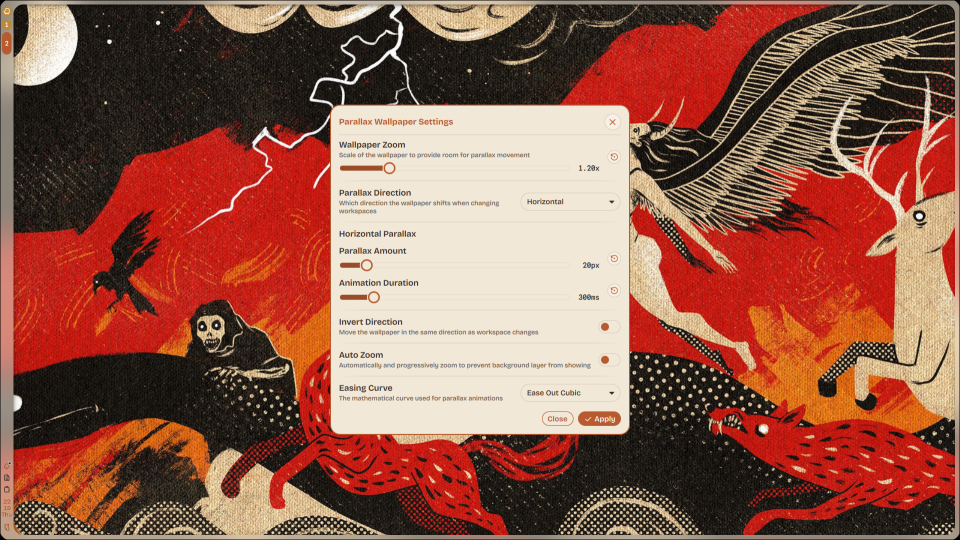
- Separate horizontal & vertical control — independent parallax amount and animation duration per axis
- Direction modes — horizontal, vertical, both or none (Why would you want none though?)
- Invert direction — flip the parallax movement direction
- Customizable easing curves — 13 easing options
- Adjustable zoom — controls how much the wallpaper should be zoomed in to create room for parallax
- Real-time preview — settings update the wallpaper instantly
- Auto zoom — optionally auto-increases zoom to prevent wallpaper edges from showing on distant workspaces
- Full wallpaper engine — supports all of Noctalia's wallpaper transitions
- Wallpaper selector stays functional — change wallpapers normally while the plugin is active
Requirements
- Noctalia Shell (duh.)
- Any Wayland compositor supported by Noctalia (Hyprland, Niri etc.)
No additional dependencies or other plugins required.
Installation
Copy the parallax-wallpaper folder into your Noctalia plugins directory:
~/.config/noctalia/plugins/
Then enable the plugin from Noctalia's plugin manager.
Or just use the Noctalia's plugin manager, like any sane human being would.
How It Works
The plugin creates its own wallpaper window on the WlrLayer.Background layer, sitting on top of Noctalia's native wallpaper. It's essentially a clone of Noctalia's wallpaper engine with parallax additions.
When you switch workspaces, the plugin reads the active workspace ID from Noctalia's CompositorService and calculates a pixel offset:
offset = (workspaceId - 1) * parallaxAmount * direction
This offset is applied as a Translate transform on the wallpaper shader, and the zoom setting scales the wallpaper slightly larger than the screen to provide room for the movement. A Behavior animation smoothly interpolates between positions using the configured duration and easing curve.
The plugin doesn't disable Noctalia's built-in wallpaper engine, they co-exist. The parallax window renders above the native one, and wallpaper changes made through Noctalia's wallpaper selector are automatically synced.
Since Noctalia's built-in wallpaper engine isn't disabled, if you set a low amount of zoom with a high amount of parallax amount, you might see the background layer of wallpaper while using parallax. It's not harmful, but just ugly.
Due to the bigger real estate that horizontal workspaces offer, vertical parallax is bound to be more limiting. You should set a lower parallax amount if you're using vertical workspaces with vertical parallax. Otherwise, you'll see the background layer more often.
Default settings allow you to have parallax for 10 workspaces without seeing the background layer.