 Noctalia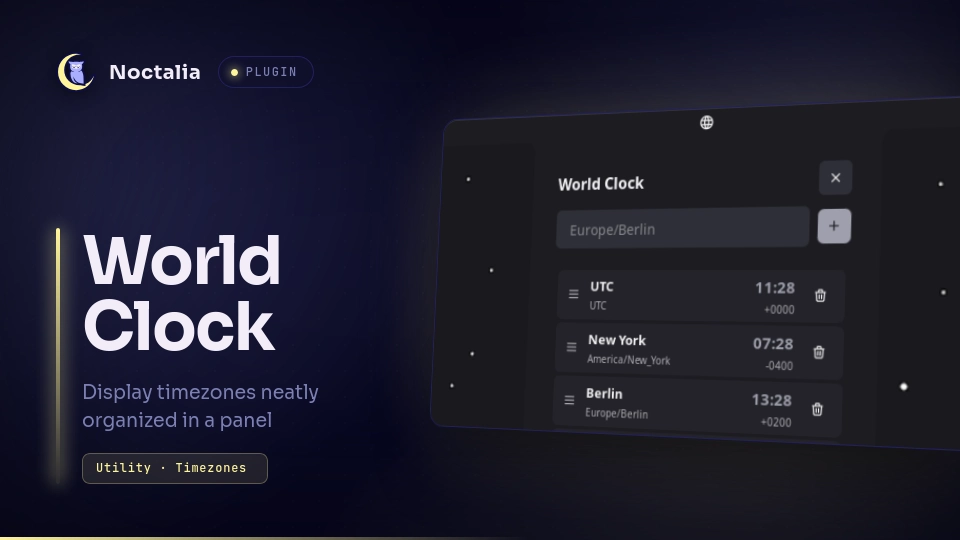
About
World Clock
World Clock tracks multiple IANA timezones in a panel opened from the bar. The headless service owns the zone list and publishes live times; the bar widget and panel are thin clients of that shared state.
Plugin
| Field | Value |
|---|---|
| ID | noctalia/world_clock |
| Entries | Service: service; bar widget: bar; panel: panel |
Usage
Bar widget
Add the bar widget to your bar. It shows a world glyph; click it to open the
world-clock panel.
Turn on Show clocks in the bar in the widget settings to list every
timezone you left visible right in the bar instead: each entry shows the
zone's label (your custom label if you set one, otherwise the zone's short
name) and its live time, following the plugin's Time format setting
(System follows [shell].time_format). A vertical bar shows
the times only, one zone per line. Clicking the widget still opens the panel.
Panel
The panel lists every configured timezone with its current time and UTC offset.
Type an IANA zone name (for example Europe/Berlin) and press Enter or the plus
button to add it. Use the trash control to remove a zone (confirm with the check).
Drag the grip on the left of a row to reorder.
Use the eye control to show or hide a zone in the bar, and the pencil control
to give it a custom label (shown in the bar and the panel). An empty label
falls back to the zone's short name, for example America/New_York -> New York.
Panel preferences: Time format overrides the hour cycle everywhere the
plugin shows times - System follows [shell].time_format, or pick 12-hour or
24-hour. Text size scales the panel's text. Show add-timezone box hides
the input row for a read-only panel, zones can still be added and managed over
IPC. The panel's size is fixed by the plugin, so a smaller text size fits more
zones before scrolling.
On first run the list is seeded with:
UTCAmerica/New_YorkEurope/BerlinAsia/Tokyo
Zones are stored under the plugin data directory and survive plugin updates.
IPC
# Open the panel
noctalia msg panel-toggle noctalia/world_clock:panel

# Manage zones
noctalia msg plugin noctalia/world_clock:service all add "America/Los_Angeles"
noctalia msg plugin noctalia/world_clock:service all remove "UTC"
noctalia msg plugin noctalia/world_clock:service all list
noctalia msg plugin noctalia/world_clock:service all clear
list shows the configured zones in a notification.
Settings
| Setting | Type | Default | Description |
|---|---|---|---|
show_clocks |
bool |
false |
Show the configured clocks in the bar instead of the icon only. |
time_format |
select |
system |
Time format in the panel and the bar: the shell setting, 12-hour, or 24-hour. |
text_size |
select |
normal |
Text size in the panel: small, normal, or large. |
show_add_zone |
bool |
true |
Show the input that adds timezones from the panel. |
Notes
Requires plugin_api = 26. The panel close button respects
shell.show_close_buttons; if the setting is missing, the button remains visible.
Timezone formatting uses noctalia.timeFormat() / noctalia.isValidTimezone().
Display times follow the time_format setting, falling back to [shell].time_format.
Versions
| Version | Plugin API | Updated |
|---|---|---|
| v1.2.2 latest | 43 | Oct 25, 2026 |
| v1.2.1 | 26 | Oct 10, 2026 |
| v1.2.0 | 19 | Oct 4, 2026 |
Older versions stay installable on a Noctalia release whose plugin API is below the latest version's.