 Noctalia
 Back to plugins 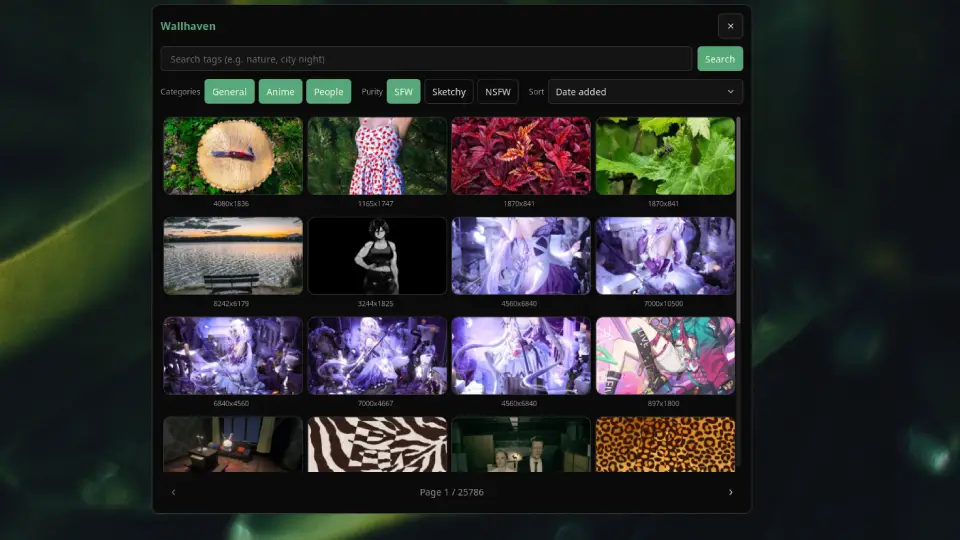
v1.3.2 noctalia
About
Wallhaven
Browse Wallhaven, download a wallpaper into your Noctalia wallpaper directory, and apply it to all monitors.
Plugin
| Field | Value |
|---|---|
| ID | noctalia/wallhaven |
| Entries | Panel: browser; bar widget: wallhaven; shortcut: shortcut |
Usage
Enable the plugin in Settings → Plugins.
Add the
wallhavenbar widget, the control center shortcut, or run:noctalia msg panel-toggle noctalia/wallhaven:browserSearch by tags, adjust category and purity filters, paginate results (or click the page counter, type a page number, and press Enter), then click a wallpaper to download and apply.
Settings
| Setting | Type | Default | Description |
|---|---|---|---|
api_key |
string |
(empty) | Optional Wallhaven API key for higher rate limits and NSFW access. |
download_dir |
folder |
(empty) | Optional download override; defaults to your configured wallpaper directory. |
Thumbnail previews are cached under $XDG_STATE_HOME/noctalia/wallhaven/thumbs (~/.local/state/noctalia/wallhaven/thumbs by default).
Notes
- Requires plugin API 26.
- The panel close button respects
shell.show_close_buttons; if the setting is missing, the button remains visible. - Requires network access (
[shell].offline_modemust be off). - NSFW results require a Wallhaven API key.
- Applied wallpapers use
noctalia.setWallpaper(path)so they persist like any other wallpaper.
Versions
| Version | Plugin API | Updated |
|---|---|---|
| v1.3.2 latest | 43 | Oct 25, 2026 |
| v1.3.1 | 26 | Oct 10, 2026 |
| v1.3.0 | 9 | Sep 13, 2026 |
| v1.0.8 | 3 | Jul 17, 2026 |
Older versions stay installable on a Noctalia release whose plugin API is below the latest version's.