
About
Umbriel Companion
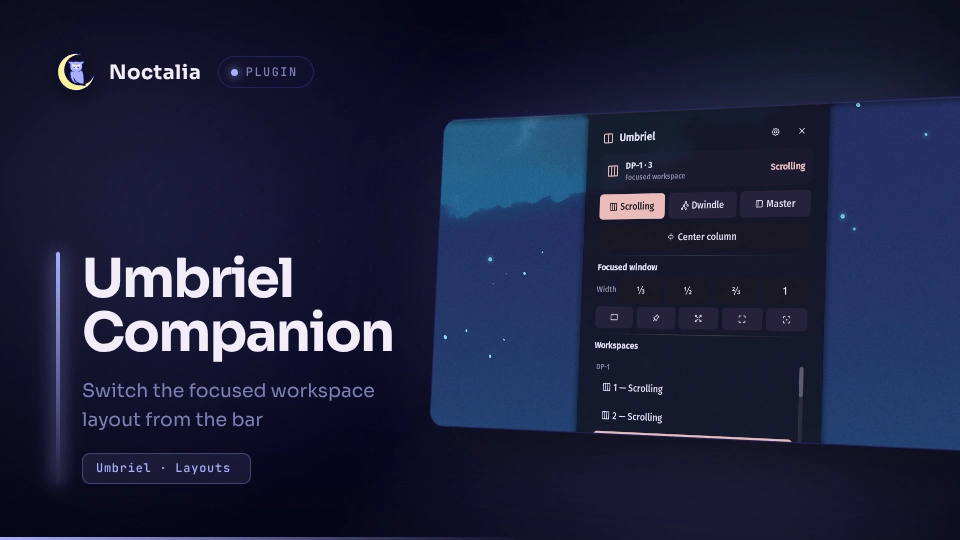
Umbriel chooses a layout per workspace and tracks the active keybind submap. This plugin puts both in the bar: the widget can show either the focused workspace layout or the active submap, and its panel switches the layout, runs the actions that only exist in the active layout, resizes or floats the focused window, and jumps between workspaces.
Plugin
Manifest id noctalia/umbriel-companion.
bar- bar widget. Shows the focused workspace layout by default, or the active submap when selected in its settings. Click opens the panel; a scroll flick cycles scrolling → dwindle → master. The widget hides itself outside an Umbriel session.panel- the layout panel, attached to the widget. Open it without a widget withnoctalia msg panel-toggle noctalia/umbriel-companion:panel.service- the only entry that talks to the compositor. It holdsumbriel subscribe workspaces,submapopen, republishes every pushed line as the snapshot each UI entry reads, and runs every requestedumbriel msgaction.
Requirements
- Noctalia plugin API 28 or newer.
umbrielonPATH, inside a running Umbriel session, with theworkspacesandsubmapsubscription families. Every other compositor gets a hidden widget and an inert panel.
Usage
Add the Umbriel Companion widget to a bar from Settings → Bar, or open the panel through IPC.
The panel targets the workspace Umbriel considers focused - the active workspace of the focused output - and names it
at the top, because that is the workspace workspace-set-layout acts on, not the one the panel is drawn over.
The panel close button respects shell.show_close_buttons; if the setting is missing, the button stays visible.
- Layout - Scrolling, Dwindle, Master. The current layout is highlighted. The override lasts until a config reload reasserts the configured mode.
- Layout actions - master layout gets the master-count steppers; scrolling gets Center column. Dwindle has no layout-scoped action, so the row disappears.
- Focused window - the title, app id, and size of the focused workspace's focused window, then width presets (⅓, ½, ⅔, full), floating, pinned, fullscreen, maximize, and centering for a floating window.
- Workspaces - every workspace of every output with its layout. Click switches to it; right-click moves the focused window or its whole column there.
Nothing here polls. Umbriel's IPC event stream carries the workspace list with each workspace's layout mode and the active submap. The service reads it line by line, so the bar and panel change on the same event as the keybind, and an idle session costs nothing at all.
Settings
- Bar display (widget) - choose the focused workspace layout or the active keybind submap from a dropdown. Submap mode shows a keyboard glyph and the submap name, using Default when no submap is active.
- Show layout name (widget) - print the layout next to the glyph on a horizontal bar.
- Show workspace name (widget) - print the focused workspace name next to the glyph on a horizontal bar.
- Scroll cycles the layout (widget) - turn the scroll gesture off if you would rather not change layouts by accident.
Versions
| Version | Plugin API | Updated |
|---|---|---|
| v1.1.3 latest | 28 | Oct 10, 2026 |
Older versions stay installable on a Noctalia release whose plugin API is below the latest version's.