 Noctalia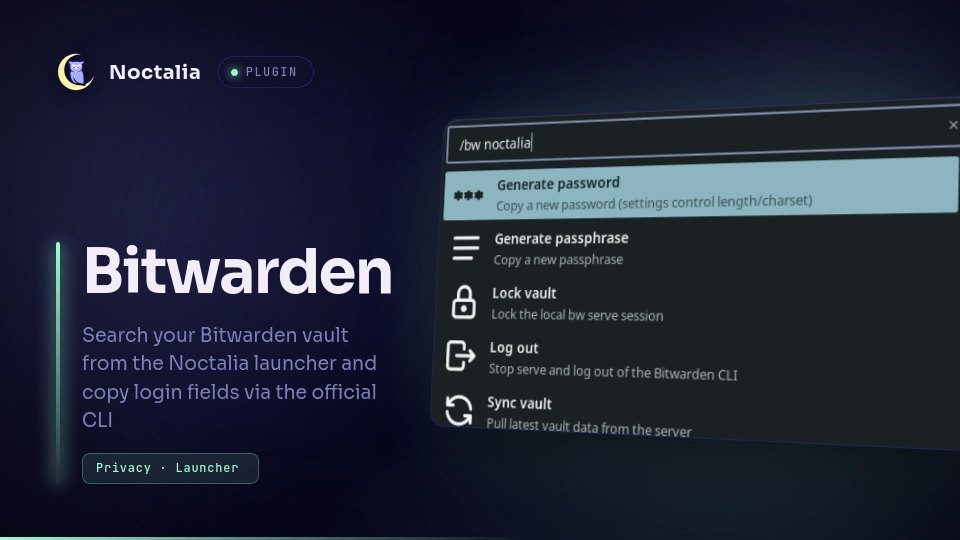
About
Bitwarden
Search your Bitwarden vault from the Noctalia launcher and copy login fields
via the official CLI’s local REST API (bw serve).
This plugin does not talk to the Bitwarden cloud Public API. Vault data is
zero-knowledge: decryption stays in the bw client. Self-hosted / Vaultwarden
servers work if you already pointed the CLI at them with bw config server
(or set Server URL in plugin settings before logging in).
Plugin
| Field | Value |
|---|---|
| ID | noctalia/bitwarden |
| Entries | Service service, launcher finder, panels unlock / login / fields |
| Launcher prefix | /bw |
| Dependency | bitwarden-cli (bw on PATH); optional: wtype for the Autotype button |
Requirements
Install bitwarden-cli so the bw binary
is on PATH. Distro package names vary (bitwarden-cli, bw, …).
Setup
- Install the Bitwarden CLI (see Requirements).
- Log in once, either:
- In Noctalia:
/bw→ Log in → personal API key (web vault: Settings → Security → Keys → View API key), then unlock with your master password; or - In a terminal:
bw login/bw login --apikey(same end state, the plugin reuses the CLI session).
- In Noctalia:
- Optional for self-hosted / EU: set Server URL in plugin settings, or
bw config server https://your.server. - Enable this plugin in Noctalia.
With Auto-start serve enabled (default), the service starts
bw serve --hostname 127.0.0.1 --port <serve_port> when the API is unreachable.
Disabling or uninstalling the plugin stops the bw serve bound to Serve Port
(or to the port it started on, if that changed); other processes on the port and
bw serve on other ports are left alone. Restarting Noctalia leaves it running,
locked per Vault timeout.
Testing login again
bw logout alone is not enough: a running bw serve keeps the unlocked
vault in memory. Prefer the launcher Log out action (stops serve + CLI
logout), or:
# manual cleanup by port (kills whatever holds it, nix-wrapped `node …/bw.js serve` included);
# the plugin's own teardown is narrower - it reaps only a `bw serve` carrying `--port 8087`
fuser -k 8087/tcp || true
bw logout
# confirm nothing is still serving secrets:
ss -ltnp | grep 8087 || echo "port free (good)"
curl -sS http://127.0.0.1:8087/status || echo "serve down (good)"
bw status
Then close and reopen the launcher (or re-type /bw). Reload/re-enable the
plugin if status still looks wrong.
Usage
Open the launcher and type /bw:
| Result | Action |
|---|---|
| Generate password | Copies a new password (GET /generate; works locked) |
| Generate passphrase | Copies a new passphrase |
| Log in | Opens the API-key panel (when not logged in) |
| Log out | Stops bw serve and runs bw logout |
| Unlock vault | Opens a small password panel |
| Lock vault | Locks the local serve session |
| Sync vault | Pulls latest vault data |
| Start bw serve | Shown when serve is offline |
| Vault items | Listed when unlocked. Enter opens the entry when it has custom fields (a picker panel lists every copyable field; digits 1–9/0 then letters a–z copy the numbered one), or copies the configured field (password by default) when it does not. The picker also has an Autotype button: types the username, then Tab, then the password into the previously focused window after a short delay (requires wtype) |
When unlocked, /bw lists vault items (capped). Typing fuzzy-matches the actions and the vault items
(name, username, or URI) and ranks them together, best match first, so /bw unl selects Unlock vault
and /bw ghb finds a GitHub login. The item list is fetched once per /bw and matched locally as you type.
Only each item's id, name, type, username and first URI are kept in memory between keystrokes, never
passwords, TOTP seeds, notes or card data; Enter fetches the secret by id. That metadata stays cached until
the vault locks, a sync completes, or /bw is reopened.
Settings
| Setting | Type | Default | Description |
|---|---|---|---|
serve_port |
int | 8087 |
Local bw serve port (127.0.0.1 only) |
auto_serve |
bool | true |
Start bw serve when unreachable |
vault_timeout |
select | on_restart |
Auto-lock after inactivity (30/60/240 min), on_restart, never (until serve stops), or custom |
vault_timeout_custom_minutes |
int | 15 |
Minutes when vault_timeout is custom (1–10080) |
hide_actions_when_searching |
bool | false |
Hide pinned actions (generate, lock, sync, etc.) once you start typing, so only vault items are matched (actions stay searchable while locked or logged out) |
server_url |
string | (empty) | Passed to bw config server before API-key login |
copy_field |
select | password |
Field to copy: password, username, totp, uri |
notify_on_copy |
bool | true |
Notify after a successful copy |
clear_clipboard_seconds |
int | 0 |
Clear clipboard after N seconds if unchanged (0 = off) |
gen_length |
int | 20 |
Generated password length |
gen_uppercase / gen_lowercase / gen_number / gen_special |
bool | true/true/true/false |
Password charset |
gen_passphrase_words |
int | 4 |
Passphrase word count |
gen_passphrase_separator |
string | - |
Word separator |
gen_passphrase_capitalize |
bool | false |
Capitalize passphrase words |
gen_passphrase_include_number |
bool | false |
Append a number to the passphrase |
IPC
noctalia msg plugin noctalia/bitwarden:service all ensure_serve
noctalia msg plugin noctalia/bitwarden:service all status
noctalia msg plugin noctalia/bitwarden:service all lock
noctalia msg plugin noctalia/bitwarden:service all logout
noctalia msg plugin noctalia/bitwarden:service all sync
noctalia msg plugin noctalia/bitwarden:service all generate
noctalia msg plugin noctalia/bitwarden:service all generate passphrase
noctalia msg panel-toggle noctalia/bitwarden:login
noctalia msg panel-toggle noctalia/bitwarden:unlock
noctalia msg panel-toggle noctalia/bitwarden:fields
Do not pass API secrets or the master password on the CLI. Use the panels.
Security
- Serve is bound to 127.0.0.1 only. While the vault is unlocked, any local process that can reach that port can read vault secrets. Prefer a vault timeout and lock when idle.
- Master passwords and API keys are never stored in plugin settings or on disk.
- Shell
offline_modeblocks launcher HTTP tobw serveuntil it is off. - Generate uses warm
bw serve(GET /generate), CLI fallback if unreachable. - Autotype runs
wtypedirectly (no shell), twice: the username, then a real Tab key press and the password. Each credential is literal text after--, so a leading-is never parsed as an option. They are briefly visible in the process list while it types, the same tradeoff as every wtype-based autotyper. - The field picker receives field keys, labels, and the plain text of URIs, notes, and text custom fields (secure notes included). Passwords and hidden custom fields never reach the panel; the service resolves them by key on copy. The panel consumes that state once on open and drops it on every close and whenever the vault locks or logs out, so a reopened picker starts empty. Nothing is written to disk.
Versions
| Version | Plugin API | Updated |
|---|---|---|
| v1.4.0 latest | 17 | Oct 20, 2026 |
| v1.0.2 | 10 | Sep 13, 2026 |
| v1.0.1 | 8 | Jul 28, 2026 |
Older versions stay installable on a Noctalia release whose plugin API is below the latest version's.