
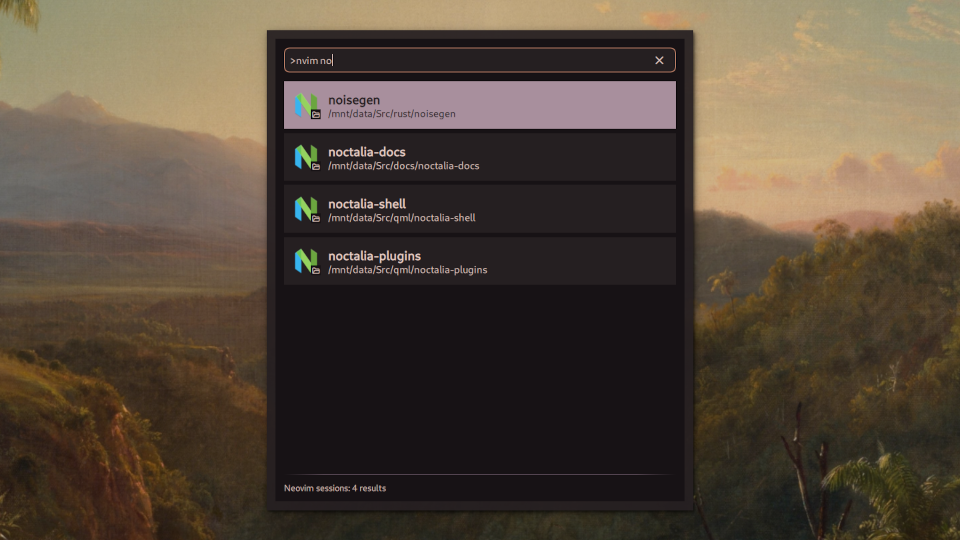
Neovim Session Provider
Open Neovim Sessions
About
Neovim Session Provider
A launcher provider plugin that lets you open one of your saved Neovim sessions
Usage
- Open the Noctalia launcher
- Type
>nvimto enter Neovim mode - Add a search term after the command (e.g.,
>nvim noct), or browse the most recently saved sessions - Select your session and press Enter
Alternatively, you can trigger the provider by IPC with the command qs -c noctalia-shell ipc call plugin:nvim-session-provider toggle.
Supported session manager plugins
This provider should work with any session manager plugin that stores session files in a single directory. For session managers that include the git branch name, the branch is included in parentheses after the session name.
It should work out of the box for the following plugins:
auto-sessionneovim-session-managernvim-possession
For the following plugins, you will need to change the Sessions directory setting (see below for details):
persistence.nvim(LazyVim)persisted.nvim
Settings
Neovim command
The base command used to launch Neovim, including any command line arguments
that you need. Defaults to nvim. When using a GUI frontend like nvim-qt or
neovide, you will need to add a separator so that the Neovim args are parsed
correctly, e.g. nvim-qt -- or neovide --.
Run in Terminal
Whether to run Neovim in a terminal when opening sessions. Disable this if you are using a GUI frontend like Neovim-Qt or Neovide. Defaults to true.
Sessions directory
Directory where Neovim session files are saved. Defaults to
~/.local/share/nvim/sessions, which is the default path used by the following
session management plugins:
auto-sessionneovim-session-managernvim-possession
Other session management plugins use ~/.local/state/nvim/sessions instead, such as:
persistence.nvim(LazyVim)persisted.nvim
Consult the documentation of your session manager plugin if you are using a different one.
Requirements
- Noctalia 4.5.0 or later
- Neovim (it may work with classic Vim, but I haven't tested it)
- A session management plugin that saves session files in a central location