
Back to plugins 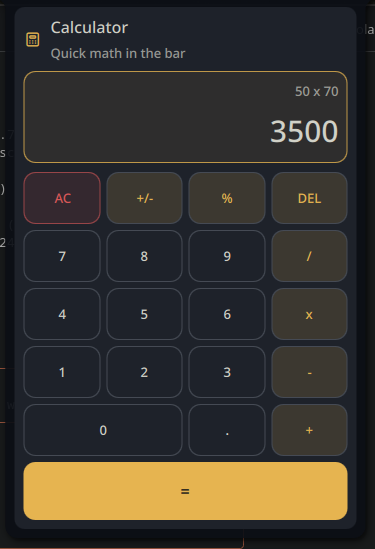
Calculator
Theme-aware calculator plugin for Noctalia on Niri with bar widget, floating panel and keyboard support
v1.1.0 pir0c0pter0 MIT Apr 30, 2026
About
noctalia-calculator
A theme-aware calculator plugin for Noctalia on Niri, with a bar widget, floating panel, keyboard support, and a clean UI that follows the active shell colors.
Preview
Features
- Full expression evaluation with operator precedence via bundled
AdvancedMath.js - Bar widget with optional live result badge
- Floating panel with 21-button grid
- Mouse and keyboard input
- Theme-aware colors and spacing
- 10-language i18n (en, pt, es, fr, de, it, ru, zh, ja, ko)
- Configurable decimal precision (0-10)
Usage
- Left click the bar widget to open the calculator
- Right click the bar widget for the context menu
- Keyboard:
0-9for digits+ - * /for operators.or,for decimal inputEnterfor equalsBackspacefor deleteEscorDeletefor clearF9for sign toggle%for percent
Files
AdvancedMath.js: math evaluation library (from noctalia-shell Helpers)Main.qml: calculator logicBarWidget.qml: bar widget entry pointPanel.qml: floating calculator panelSettings.qml: plugin settings UIi18n/: translations (en, pt, es, fr, de, it, ru, zh, ja, ko)
Copying the result
When the panel is open and a value is showing, a small copy icon appears to the right of the result. Click it to copy the value to the system clipboard. A toast confirms the copy.
Requires wl-copy (from wl-clipboard) on PATH. The icon is hidden in the resting 0 state and while an error is displayed.
Author
Pir0c0pter0
pir0c0pter0000@gmail.com