
Niri Workspaces
Filter, jump to, rename or reset Niri workspaces from the launcher.
About
Niri Workspaces
Browse, jump to, rename or reset Niri workspaces from the Noctalia launcher — modelled after the built-in >win window switcher.
Usage
Open the launcher and type the >ws prefix.
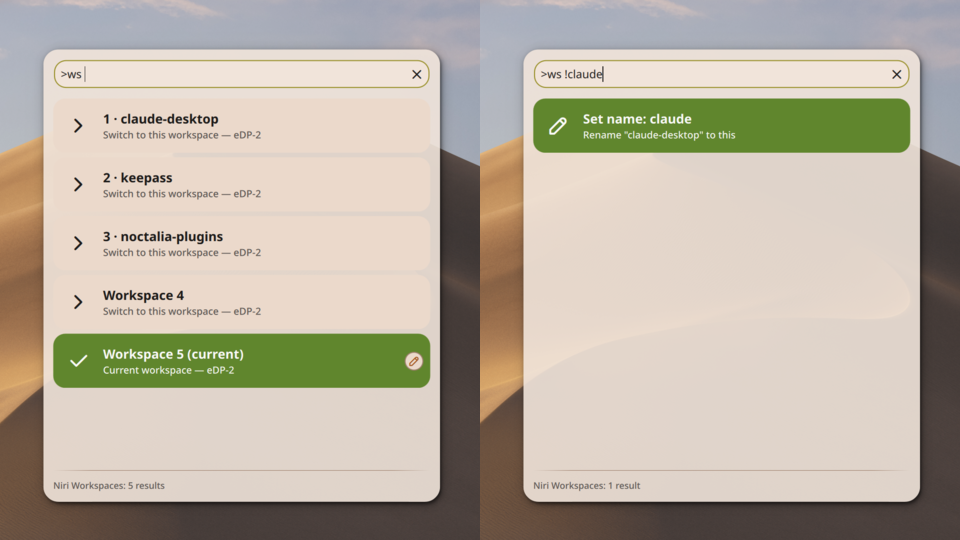
>ws— lists every workspace (current workspace highlighted). Arrow up/down to pick a row, Enter jumps to it.>ws foo— filters workspaces whose name, index, or output containsfoo.
The focused workspace is highlighted by default when the list opens unfiltered, so keyboard rename/reset shortcuts target it right away without any extra navigation.
Keyboard rename / reset
With >ws (unfiltered) open and a workspace highlighted, type:
!new name→>ws !new name— renames the highlighted workspace.!!→>ws !!— clears the highlighted workspace's custom name.
After applying, the launcher returns to the workspace list so you can keep editing or jump somewhere else on your own — Enter on a row switches to that workspace.
Entering rename mode with ! pre-fills the current name (if any), so you can edit it rather than retype. Because rename mode only engages when ! is the first character after the prefix, clear any filter text before typing !.
Pencil / eraser buttons
Each workspace row shows action buttons on the right when selected:
- Pencil — opens rename mode pre-filled with the workspace's current name. Enter applies.
- Eraser — clears the name immediately (shown only when the workspace is named).
Keyboard shortcuts (without opening the launcher)
Bind these to Niri keybindings for direct access:
# Open/close the launcher in workspace mode (mirrors the shell's `launcher emoji` toggle).
qs ipc call plugin:niri-workspaces toggle

# Rename / reset the focused workspace without opening the launcher.
qs ipc call plugin:niri-workspaces renameCurrent "my name"
qs ipc call plugin:niri-workspaces unsetCurrent
renameCurrent / unsetCurrent always target the focused workspace. toggle respects your configured launcher prefix.
Requirements
- Niri with the
niri msgCLI (event-stream support). - On other compositors the plugin loads but stays dormant.
Why Niri-only?
Niri has first-class set-workspace-name / unset-workspace-name actions, and the concept of "reset the name to fall back to the index" maps cleanly to unset-workspace-name. Hyprland's renameworkspace has different semantics, so a Hyprland variant would need to be a separate plugin.