
Back to plugins 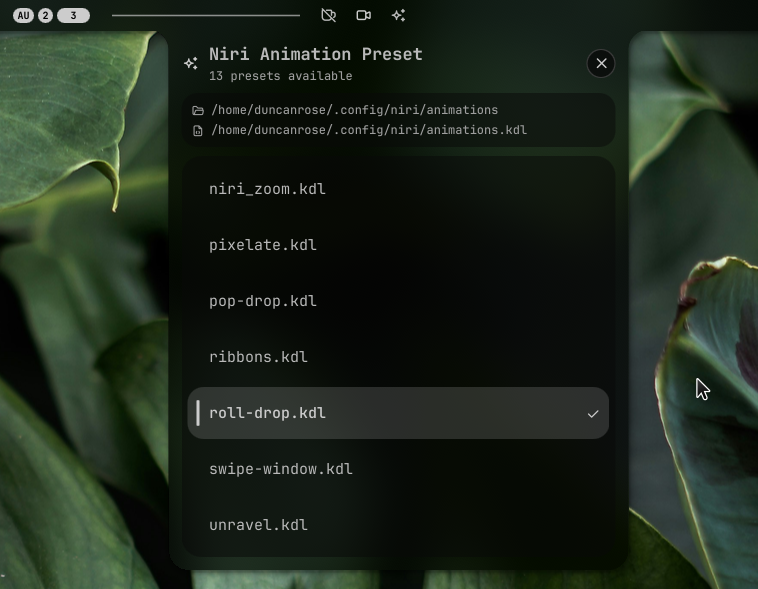
Niri Animation Picker
Pick a KDL animation preset and write it as an include into your niri config
v1.1.3 Duncan-Rose MIT Apr 8, 2026
About
Animation Picker Plugin for Noctalia with Niri
A simple plugin that allows you to Pick a KDL animation preset and write it as an include into your niri config files
Only the include line referencing your animations subfolder is replaced — all other content in the target file is left untouched.
Features
- Pick a KDL animation and write it into your config automatically
- Lists how many presets are available
- Chose the animations folder
- Chose the config file your animations will be writen to
- Configurable Settings
Installation
This plugin is part of the noctalia-plugins repository.
the animation preset files MUST be in a subfolder, do not place them directly in your ~/.config/niri folder
Configuration
Open the plugin settings (right-click the bar widget → Settings) to configure:
| Setting | Default | Description |
|---|---|---|
| Animations folder | ~/.config/niri/animations |
Folder containing your .kdl preset files |
| Target KDL file | ~/.config/niri/config.kdl |
File where the include line will be written |
| Icon color | None (uses Noctalia theme) | Color of the bar widget icon |
Usage
- Left click the bar widget to open the preset picker
- Click a preset to apply it — the
includeline in your target file is updated instantly - Right click the bar widget to access settings
Animations
You can find Animation Presets for niri alredy made here : https://github.com/XansiVA/nirimation
Requirements
- Noctalia Shell 3.6.0+
- Niri-WM