
Back to plugins 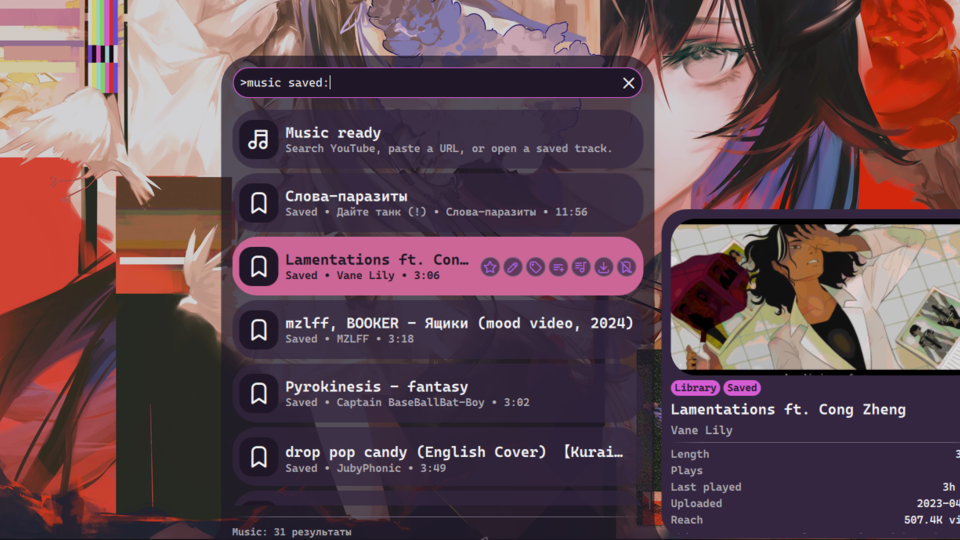
Music Search
Search YouTube, play audio in the background with mpv, and save favorites into a persistent library.
v1.2.2 kevichi7 MIT Apr 18, 2026
About
music-search Plugin
Search YouTube, SoundCloud, or local files, play audio in the background with mpv, and manage a saved library with playlists, tags, ratings, preview metadata, and a built-in queue.
Bar and panel usage
- Add the Music Search bar widget to open a dedicated panel in one click
- The panel exposes search, playback controls, saved tracks, and queue management without going through the launcher
- The launcher provider still exposes the full command surface when you want advanced flows like
playlist:,tag:, oredit:
Requirements
mpvfor playbackyt-dlpfor YouTube and SoundCloud search/details/downloadsjqfor local persistence helpersffprobeis optional but improves local metadata detection
Launcher usage
>music-searchopens the home view with status, library shortcuts, recent plays, top tracks, tags, artists, and playlists>music-search <query>searches the active provider>music-search yt:<query>,sc:<query>,local:<query>force a provider>music-search <url>plays a direct URL immediately>music-search saved:browses the saved library>music-search queueopens the built-in queue browser and controls>music-search playlist:<name>browses, creates, renames, and launches playlists>music-search artist:<name>browses saved tracks by uploader>music-search #tagor>music-search tag:filters or edits tags>music-search edit:updates title, artist, or album metadata for saved entries>music-search speed:1.05adjusts playback speed>music-search stopstops background playback
Search results and saved tracks expose inline actions for queueing, saving, downloading, metadata edits, tags, and playlists. Queue controls are now part of the music-search plugin, so the old standalone queue plugin should be treated as legacy.
The internal plugin ID remains music for IPC compatibility.
IPC usage
qs -c noctalia-shell ipc call plugin:music launcher
qs -c noctalia-shell ipc call plugin:music panel
qs -c noctalia-shell ipc call plugin:music play "https://www.youtube.com/watch?v=dQw4w9WgXcQ"
qs -c noctalia-shell ipc call plugin:music save "https://www.youtube.com/watch?v=dQw4w9WgXcQ"
qs -c noctalia-shell ipc call plugin:music seek 90
qs -c noctalia-shell ipc call plugin:music stop
Data files
- By default, runtime data lives under
~/.cache/noctalia/plugins/music-search/ ~/.cache/noctalia/plugins/music-search/library.jsonstores saved tracks and playback stats~/.cache/noctalia/plugins/music-search/playlists.jsonstores playlists~/.cache/noctalia/plugins/music-search/queue.jsonstores the built-in persistent queue~/.cache/noctalia/plugins/music-search/state.jsonstores current playback state~/.cache/noctalia/plugins/music-search/settings.jsonstores local user state- Set
MUSIC_CACHE_DIRto override the default cache directory