
Back to plugins 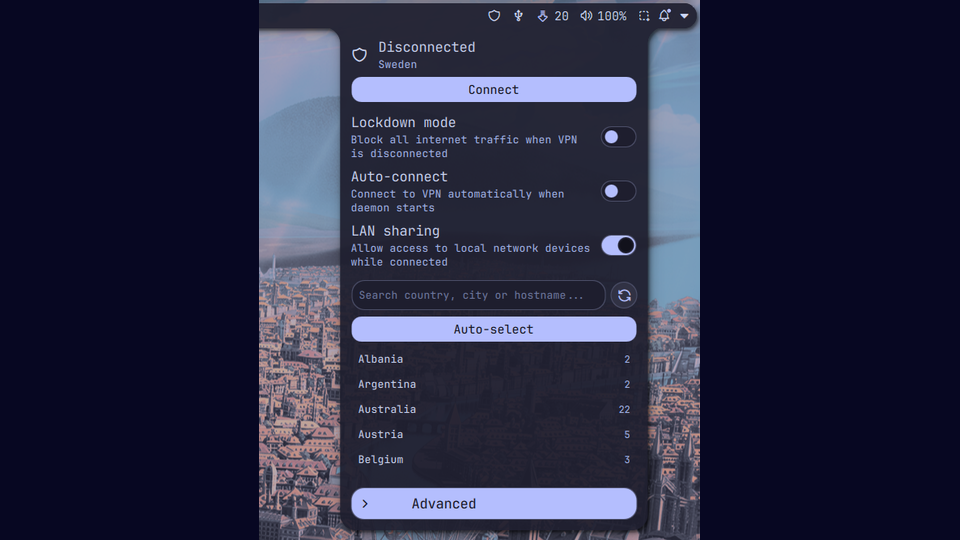
Mullvad VPN
Control Mullvad VPN from the bar: connect/disconnect, pick relays, toggle lockdown mode, multihop and more.
v0.1.0 OCSPG MIT May 11, 2026
About
Mullvad VPN
Noctalia plugin for controlling Mullvad VPN through the mullvad CLI. Provides a bar widget, a panel with relay picker and quick toggles, and a settings page.
Features
- Connect / disconnect / reconnect with one click
- Status icon in the bar (color-coded: green = connected, yellow = connecting, red = lockdown blocking traffic, grey = disconnected)
- Country flag, city or IP next to the icon (configurable)
- Search-first relay picker (country, city, or hostname) with favorites
- Quick toggles: lockdown mode, auto-connect, LAN sharing
- Advanced: multihop with entry country, IP protocol
- Account expiry warning when fewer than N days remain
- IPC handler at
plugin:mullvadfor scripting (toggle,connect,disconnect,status,setLocation, ...)
Requirements
- Noctalia Shell >= 4.0.0
mullvadCLI (mullvad-cli2026.x or newer) andmullvad-daemonrunning- An active Mullvad account (the plugin does not handle login; use
mullvad account login <number>)
Recommended: daemon-only install
This plugin replaces the official Mullvad GUI, so you only need the daemon
package (which ships the mullvad CLI):
- Arch / AUR:
paru -S mullvad-vpn-daemon(instead ofmullvad-vpn) - Debian / Ubuntu: install only the
mullvad-daemonpackage - Fedora: install
mullvad-daemonfrom the Mullvad repo
Then enable and start the service:
sudo systemctl enable --now mullvad-daemon
mullvad account login <YOUR_ACCOUNT_NUMBER>
The full mullvad-vpn (GUI) package will also work, but you'll have a redundant
tray icon and autostart entry.
Settings
| Setting | Default | Description |
|---|---|---|
refreshInterval |
3000 | Status poll interval (ms) |
showCountryFlag |
true | Show flag emoji in the bar widget |
showCityName |
false | Show city next to the icon |
showIp |
false | Show current IP next to the icon |
compactMode |
false | Icon only, no adornments |
clickAction |
toggle | Left-click: toggle or open panel |
relayClickConnects |
true | Clicking a relay row connects immediately |
confirmDisconnectInLockdown |
true | Modal before disconnecting with lockdown on |
favoriteCountries |
[] | Country codes pinned to the top of the picker |
expiryWarningDays |
7 | Threshold for the expiry banner |
IPC
qs -c noctalia-shell ipc call plugin:mullvad status
qs -c noctalia-shell ipc call plugin:mullvad toggle
qs -c noctalia-shell ipc call plugin:mullvad setLocation se sto
qs -c noctalia-shell ipc call plugin:mullvad setLockdown true
License
MIT