
MPD
MPD plugin for Noctalia
About
MPD Plugin for Noctalia
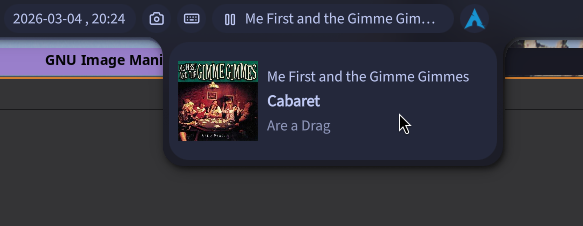
This is a plugin for the Noctalia shell for controlling Music Player Daemon (MPD). It provides a bar widget displaying the current MPD playback state and song name, with a hover panel showing full track details and album art. Mouse buttons can be used to control playback (e.g. play/pause/next/prev) or even toggle ashuffle.
Features
- Shows playback status icon (playing / paused / stopped) and current song name in the bar
- Hover panel with artist, title, album, and embedded cover art (via
mpc readpicture) - Configurable left, right, and middle click actions
- Supports ashuffle
I wrote the plugin for my own purposes (I want to simply click a button to start shuffling my entire library and then just do basic controls like next/prev/pause). Anything more than that (such as selecting specific songs to play) is not provided, I use a separate client for that (specifically myMPD).
Requirements
- Noctalia shell
- MPD running locally
mpcavailable in$PATH- Optionally: ashuffle managed as a systemd user service (
ashuffle.service)
Installation
Copy this directory into your Noctalia plugins folder and enable the plugin from Noctalia's settings.
Configuration
| Setting | Default | Description |
|---|---|---|
| Left click | Next track | Action triggered by left-clicking the widget |
| Right click | Play / Pause | Action triggered by right-clicking the widget |
| Middle click | Toggle ashuffle | Action triggered by middle-clicking the widget |
| Stop playback when disabling shuffle | Yes | When toggling ashuffle off, also send mpc stop |
Available actions: Next track, Previous track, Play / Pause, Stop, Toggle ashuffle, Do nothing.
License
MIT — see LICENSE for details.