
Back to plugins 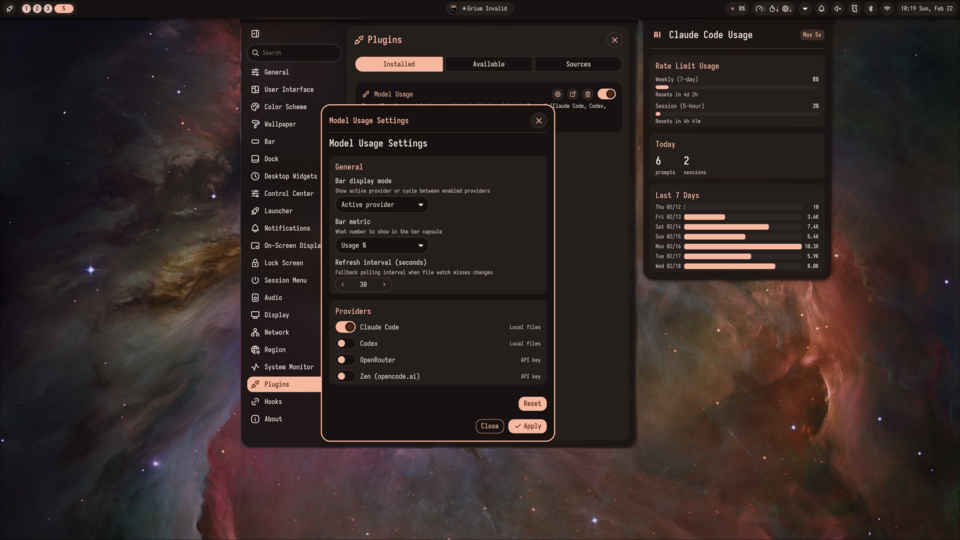
Model Usage
Shows AI coding assistant usage stats in the bar with detail panel (Claude Code, Codex, Copilot, Gemini, OpenRouter, Zen)
v0.3.1 cmptr MIT May 27, 2026
About
Model Usage Bar Widget
This plugin adds a compact usage capsule to the Noctalia bar and a detail panel for provider stats.
How it works
Main.qmlwires provider modules and decides which provider is active.BarWidget.qmlshows one metric (prompts,tokens, orusage) for the active provider.Panel.qmlshows provider details like rate-limit usage, today stats, and recent activity.Settings.qmlcontrols enabled providers, API keys, and refresh behavior.
Current providers:
Claudereads local Claude auth/session files, refreshes OAuth tokens when needed.Codexreads local~/.codexhistory/session/auth files.OpenRouteruses the OpenRouter key/activity APIs.Zenuses the OpenCode Zen API for key validation and model discovery. Zen usage percent is not currently exposed by a documented endpoint, so it reports a neutral usage value.
Usage
- Open the plugin settings.
- Enable the providers you want.
- Add API keys for API-based providers (
OpenRouter,Zen) or use environment variables. - Choose the bar metric and refresh interval.
- Apply settings and open the panel to verify provider status.
API key options
- OpenRouter:
OPENROUTER_API_KEYor settings field. - Zen:
OPENCODE_ZEN_API_KEY,OPENCODE_API_KEY,ZEN_API_KEY, or settings field.