
Back to plugins 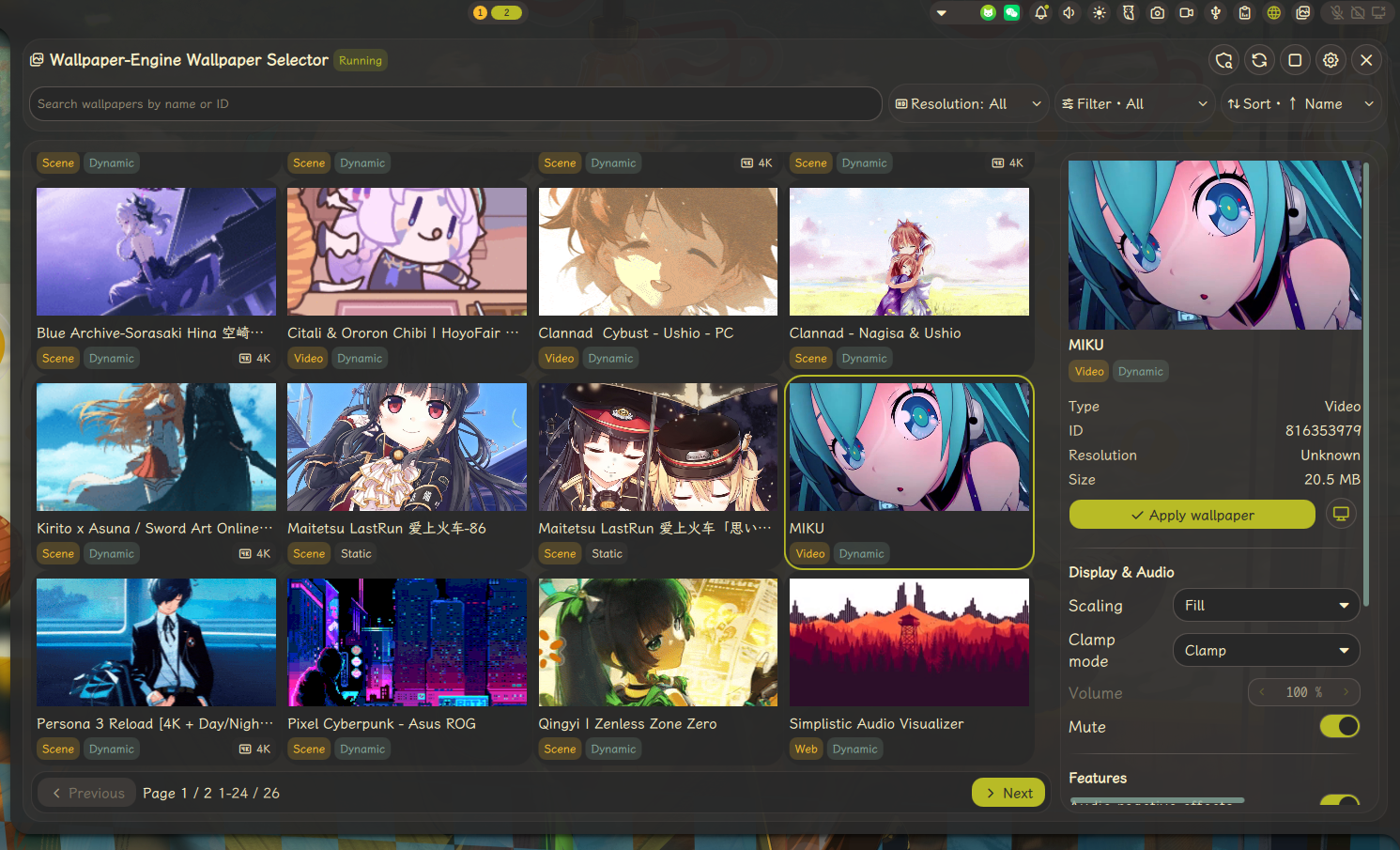
Linux WallpaperEngine Controller
Control linux-wallpaperengine from Noctalia with per-screen wallpaper selection.
v1.3.1 PaloMiku MIT May 20, 2026
About
Linux WallpaperEngine Controller
A Noctalia plugin that provides a Wallpaper-Engine wallpaper selector powered by your locally installed linux-wallpaperengine, with multi-display targeting, runtime controls, extra property editing, and compatibility checks.
Features
- Bar widget with quick access to the wallpaper selector panel
- Panel with wallpaper search by name or ID, type filter, resolution filter, sorting, and pagination
- Apply wallpapers to all displays or select a specific display target
- Sidebar preview with wallpaper badges for resolution, type, dynamic/static state, and possible compatibility issues
- Runtime controls for scaling, clamp mode, volume, mute, audio reactive effects, mouse input, and parallax
- Optional
Sync wallpaper colorsflow that generates per-display color screenshots and applies Noctalia wallpaper colors for the configured source monitor - Settings resource tools to view and clear color image cache (while preserving cache entries for currently online displays)
- 5 translations: en, ja, ru, zh-CN, zh-TW
Requirements
- linux-wallpaperengine installed and available in
PATH - Wallpaper Engine workshop projects available in your Steam Workshop folder
IPC Commands
General usage:
qs ipc call plugin:linux-wallpaperengine-controller <command> [args...]
# Toggle panel on current screen
qs ipc call plugin:linux-wallpaperengine-controller toggle

# Apply wallpaper path to a specific screen
qs ipc call plugin:linux-wallpaperengine-controller apply eDP-1 ~/.local/share/Steam/steamapps/workshop/content/431960/1234567890

# Stop wallpaper on all screens (or pass a screen name)
qs ipc call plugin:linux-wallpaperengine-controller stop all

# Reload engine with current settings
qs ipc call plugin:linux-wallpaperengine-controller reload
Troubleshooting
- Check that
linux-wallpaperengineis available:command -v linux-wallpaperengine - If the panel shows a source-folder error, verify that
Wallpapers source folderexists and contains Wallpaper Engine project directories - If no wallpapers appear after applying filters, clear the search text and resolution/type filters
- If a wallpaper is marked as
may fail, run the compatibility quick check again and verify thatlinux-wallpaperengine --list-properties <wallpaper-path>succeeds - If the extra properties section is empty, that wallpaper may not expose supported editable properties
- If the engine fails to start, recheck your GPU / OpenGL environment.
- If wallpaper colors are enabled and a display was recently changed, apply once on that display to refresh its cached color screenshot
- For runtime logs, start the shell with debug enabled:
NOCTALIA_DEBUG=1 qs -c noctalia-shell
Notes
- This plugin does not bundle the wallpaper engine or any wallpapers. It works by calling your locally installed
linux-wallpaperengineand using Wallpaper Engine workshop wallpapers you have already downloaded. - If no wallpaper matches the current search or filters, the panel will show a filtered empty state instead of the generic source-folder message.
- Color screenshot cache files are stored under
~/.cache/noctalia/plugins/linux-wallpaperengine-controller/and are reused per display/wallpaper when possible.