
Back to plugins 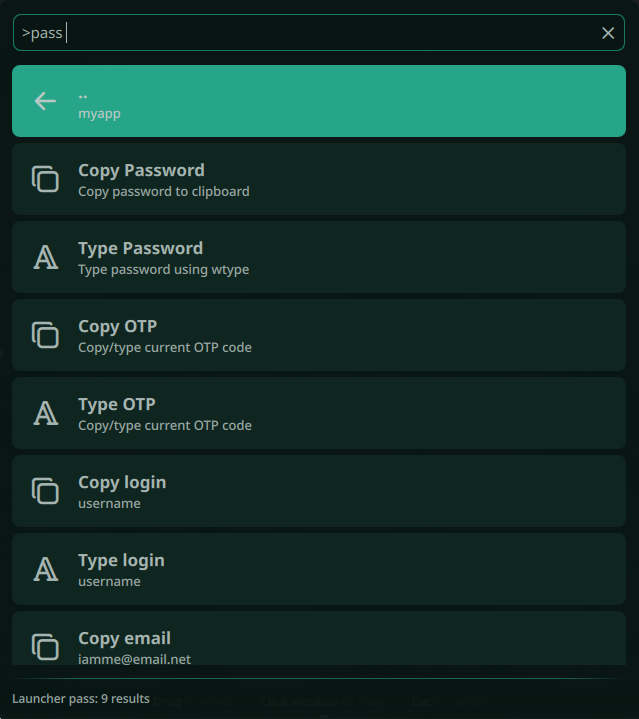
Launcher pass
Noctalia Launcher gnu pass provider
v1.0.0 Marco Melletti MIT May 22, 2026
About
launcher-pass
A Noctalia launcher provider plugin for GNU Pass password store.
Features
- Browse password store directories
- Fuzzy search across all passwords (spaces treated as wildcards)
- Navigate subdirectories
- Copy/type password or any field from password entries
- OTP code support (via
pass otp) - Quick access via
>passcommand - Configurable password store path
Usage
- Open the launcher with your configured keybind
- Type
>passto access the plugin - Press space and start typing to fuzzy search passwords
- Select a password entry to see options:
- Copy Password: Copy password to clipboard
- Type Password: Type password using wtype
- Copy OTP: Copy current OTP code to clipboard
- Type OTP: Type current OTP code using wtype
- Copy
: Copy any field (username, URL, etc.) - Type
: Type any field using wtype
IPC
qs -c noctalia-shell ipc call plugin:launcher-pass toggle
Requirements
- GNU Pass password store
wl-copyfor clipboard operationswtypefor keyboard input (optional)pass-otpextension for OTP codes (optional)
Configuration
By default, the plugin uses the password store rooted in ~/.password-store. You can configure a custom path in the plugin settings.
Other configurable values are:
Launcher Close Delay: a time in seconds that will be awaited after launcher is closed before starting auto typing, this might be required to let the focus return to the proper input field.Wtype Keystroke Delay: delay between keystrokes in milliseconds, increase this value if the input fields do not keep pace with auto typing.Clipboard Timeout: number of seconds before the clipboard is cleared when copy to clipboard action is selected for password or OTP fields, if this configuration is left empty the defaultpassenvironment variablePASSWORD_STORE_CLIP_TIMEis used, otherwise the local configuration will take precedence.
Keybinds
| Action | Description |
|---|---|
>pass |
Open pass browser |
>pass <query> |
Search passwords |
Fuzzy Search
Spaces are treated as wildcards. For example, searching hom comp will match:
/home/computer//web/home/page/computing.gpg/homcomppass.gpg
License
MIT