
Back to plugins 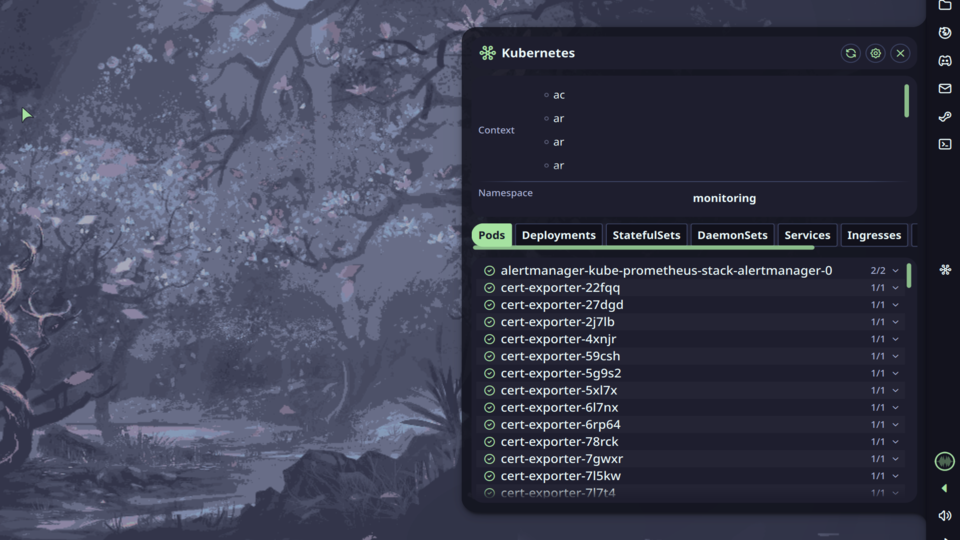
Kubectl Context
Kubernetes context and namespace switcher with resource browser powered by kubectl.
v1.0.4 ultherego MIT Apr 23, 2026
About
Kubectl Context
Kubernetes context and namespace switcher with resource browser powered by kubectl.
Features
- Bar Widget: Shows active context and namespace. Icon turns red when any pod is in Error or CrashLoopBackOff state
- Control Center Widget: Quick access button to toggle the panel
- Panel: Switch contexts and namespaces, browse cluster resources across 8 resource types
- Resource Browser: View Pods, Deployments, StatefulSets, DaemonSets, Services, Ingresses, ConfigMaps and Secrets
- Resource Actions: Copy name, describe, view logs, restart (Deployments/StatefulSets), delete with confirmation
- OIDC Support: Automatically prepends
~/.krew/binto PATH for OIDC and other krew plugins
How It Works
The plugin runs kubectl commands in the background to fetch contexts, namespaces and resources. All data is refreshed at a configurable interval and automatically after context or namespace switches. The active context and namespace are read from kubeconfig.
Logs and describe output are opened in a terminal emulator. The terminal is kept open after the command exits so you can read the output.
Usage
- Bar widget: Left click to open panel, right click for settings menu
- Context switcher: Click a context to switch to it
- Namespace switcher: Click the dropdown button to open the namespace list, type to filter, use arrow keys and Enter to select
- Resource tabs: Click a tab to browse that resource type
- Resource row: Click a row to expand action buttons (Copy name, Describe, View logs, Restart, Delete)
Settings
| Setting | Default | Description |
|---|---|---|
| Kubeconfig path | ~/.kube/config |
Path to kubeconfig file. Leave empty to use default |
| Terminal emulator | $TERMINAL |
Terminal used for describe/logs commands. Leave empty to use $TERMINAL |
| Poll interval | 60 s | How often to refresh data from the cluster |
| Show error badge | true | Show a red badge on the bar widget when a pod is in Error or CrashLoopBackOff state |
| Icon color | None | Color of the bar widget icon |
| Panel width | 620 px | Width of the panel window |
| Panel height | 680 px | Height of the panel window |
IPC Commands
# Toggle panel
qs -c noctalia-shell ipc call plugin:kubectl-ctx toggle

# Refresh contexts and resources
qs -c noctalia-shell ipc call plugin:kubectl-ctx refresh
Requirements
kubectlinstalled and available inPATH- Valid kubeconfig at
~/.kube/configor configured via settings - A terminal emulator for describe/logs functionality (kitty, ghostty, alacritty, foot, etc.)
- For OIDC clusters:
kubectl-oidc_logininstalled via krew (~/.krew/bin)