
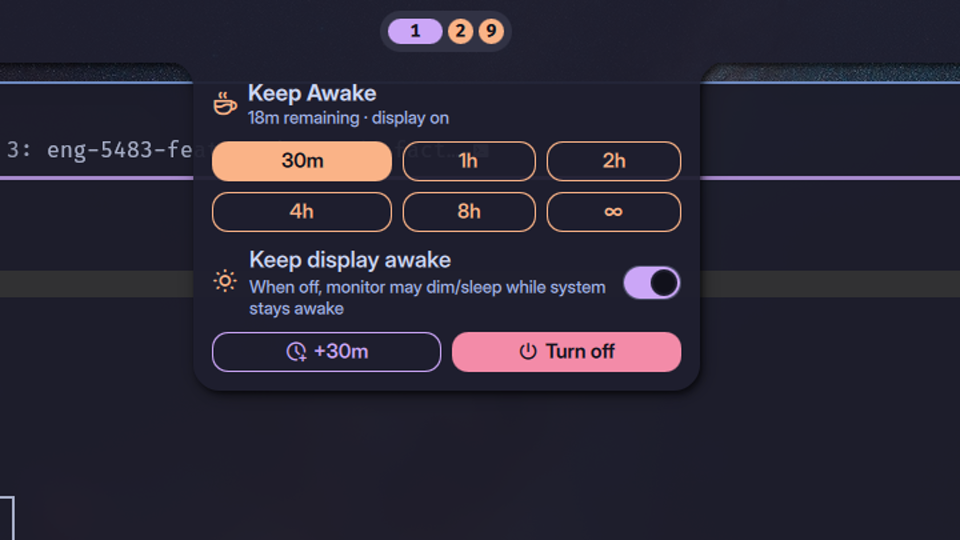
Keep Awake+
Duration+scope Keep Awake with persistent last-choice and partial/full inhibit modes.
About
Keep Awake+
A richer replacement for Noctalia's built-in KeepAwake widget. Pick a
duration, pick a scope, extend on the fly.
Features
- Two scopes
partial— system stays awake; monitor may dim/sleepfull— everything blocked, including the display (uses Noctalia'sIdleInhibitorService)
- Duration grid — configurable presets (default
30m / 1h / 2h / 4h / 8h), plus an optional∞unlimited tile - Bar pill — icon, scope-tinted color, optional countdown text
- Quick extend — one-click
+30m(configurable) while a session is running, without losing remaining time - Persistent last-choice — middle-click the bar widget to re-activate the most recent duration + scope combo
- Tooltip with thermal-guard state
Requirements
This plugin shells out to a host-side system-awake script that wraps
systemd-inhibit, manages session state, and re-evaluates lid state on
natural timer expiry to trigger suspend (since neither logind nor
hyprdynamicmonitors / hypridle re-fire after our inhibit lock releases).
The script ships with the plugin at
scripts/system-awake and is invoked from the
plugin's install directory — no $PATH setup required.
Required runtime tools: bash, coreutils, procps, util-linux,
systemd, jq. Optional: glib (for UPower lid checks) and libnotify
(for toasts).
For a NixOS / Home Manager wiring — including an optional thermal-guard
systemd user service that force-suspends if the laptop overheats while a
session is active — see nix/.
Settings
| Setting | Default | Notes |
|---|---|---|
defaultScope |
partial |
partial or full |
durations |
[30, 60, 120, 240, 480] |
minutes |
includeUnlimited |
true |
show the ∞ tile |
showRemainingText |
true |
render the countdown next to the bar icon |
activateOnLeftClick |
false |
left-click re-activates last combo instead of opening the panel |
quickExtendMinutes |
30 |
the +Xm extend button |
Click map (bar widget)
| Click | Action |
|---|---|
| Left | open panel (or re-activate last, if activateOnLeftClick) |
| Middle | re-activate last duration + scope |
| Right | turn off |
License
MIT — see LICENSE at the repo root.