
Habitica for Noctalia
Habitica dashboard and task scorer for Noctalia Shell with official avatar sprite rendering.
About
Habitica for Noctalia
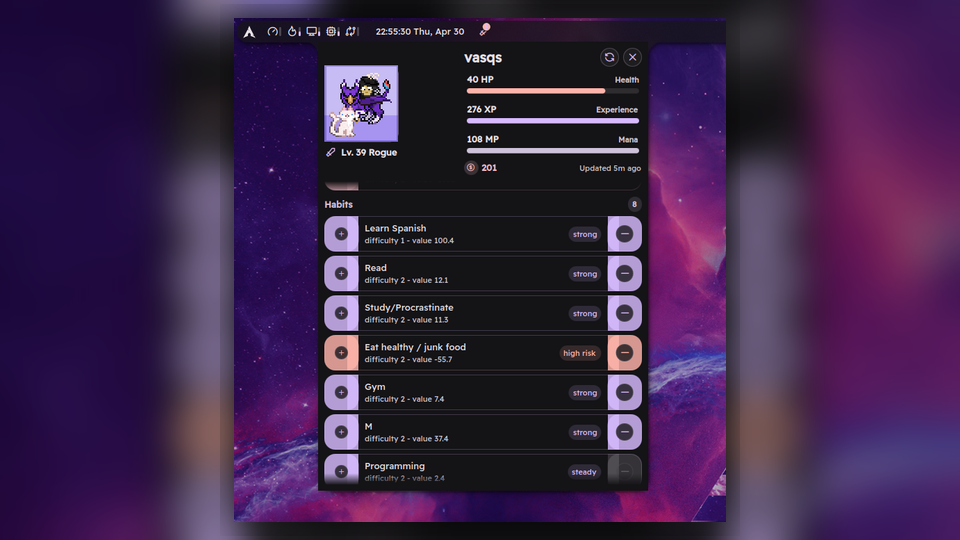
Habitica for Noctalia is a compact productivity plugin that brings your Habitica account into Noctalia Shell. It shows due work in the bar, exposes a richer panel with stats and tasks, and lets you score tasks without leaving the desktop shell.
The current UI stays intentionally focused: due dailies and open todos are first-class, while habits, checklist items, tag filtering, and colorization remain opt-in so the default experience stays light.
Features
- Bar widget with pending task count for due dailies and open todos
- Panel with player name, level, health, mana, experience, and gold
- Manual refresh plus throttled background refresh
- Task scoring for dailies, todos, habits, and checklist items
- Optional habit section
- Optional checklist item display
- Optional tag-based filtering
- Avatar rendering from official Habitica sprite assets
Repository
This standalone repository is intended for direct installation and review:
The community registry submission is prepared separately for:
Local Installation
- Copy or symlink this repository directory into the plugin location used by your Noctalia installation as
habitica. - Enable the
habiticaplugin in Noctalia. - Open the plugin settings and fill in your Habitica credentials.
If you are preparing a community submission, package from Git-tracked files only. Local state files such as settings.json and cache/ are intentionally ignored so you can keep your local credentials and cached Habitica data without publishing them.
Community Submission Packaging
Include these files in the publishable plugin package:
manifest.jsonMain.qmlBarWidget.qmlPanel.qmlSettings.qmlHabiticaAvatar.qmlREADME.mdLICENSEi18n/en.jsonpreview.png.gitignore
Keep these local-only files out of community packages and screenshots:
settings.jsoncache/- any temporary screenshots, local archives, or credential-bearing notes you created during testing
Getting Your Habitica User ID And API Token
- Sign in to Habitica.
- Open
Settings. - Open the
APIsection. - Copy the
User ID. - Copy the
API Token. - Paste both values into the Noctalia Habitica plugin settings.
The plugin sends the following headers to Habitica:
x-api-userx-api-keyx-client
The x-client header is generated as <user-id>-noctalia-habitica, which matches Habitica's third-party client header expectations.
Using It In Noctalia
After configuration:
- the bar widget shows how many due dailies and open todos are currently pending;
- the panel shows account stats, due dailies, open todos, and optional habits;
- clicking scoring controls sends the matching Habitica score request and then refreshes the visible data;
- checklist toggles and tag filtering are available through plugin settings.
The plugin keeps the current refresh optimization: it avoids unnecessary full refreshes while cached data is still fresh, and it fetches avatar-heavy data less often than basic task data.
Privacy And Security
- Your Habitica API token is required to access your account data.
- The plugin does not intentionally log the token.
- Local plugin state can contain sensitive data if you configure credentials or let cached API responses accumulate.
- For publishable copies of the plugin, keep
settings.jsonandcache/out of version control and out of release archives. You do not need to wipe your localsettings.jsonif it is ignored; just do not include ignored files in the package. - This plugin is intentionally limited to reading account/task data and scoring supported tasks. It does not create, edit, or delete Habitica tasks in this version.
Troubleshooting
- If the plugin shows a configuration error, re-open settings and confirm both
User IDandAPI Tokenare filled. - If requests fail, verify your network connection and confirm the token is still valid in Habitica.
- If the panel opens but no avatar appears, refresh once after login so the plugin can fetch avatar-related user fields.
- If tag filtering hides everything, clear the selected tag ID or paste a valid Habitica tag UUID.
- If you are packaging the plugin for others, build the package from Git-tracked files only so ignored local state such as
settings.jsonandcache/habitica.jsonstays on your machine.
API Reference
The plugin uses the public Habitica API documented here:
Endpoints currently used:
GET /api/v3/user?userFields=stats,profile,preferences,notificationsGET /api/v3/user?userFields=stats,profile,preferences,items,notificationsGET /api/v3/tasks/user?type=dailysGET /api/v3/tasks/user?type=todosGET /api/v3/tasks/user?type=habitsGET /api/v3/tagsPOST /api/v3/tasks/:taskId/score/:directionPOST /api/v3/tasks/:taskId/checklist/:itemId/score
Avatar Assets
The avatar is rendered locally from official Habitica sprite images hosted by Habitica. The plugin assembles the visible layers from the user's avatar preferences and equipment data instead of shipping copied sprite assets inside the package.
Submission Notes
- Intended community package name:
Habitica for Noctalia - Minimum Noctalia version:
3.7.1 - Current release version:
1.0.0 - Standalone repository field points at
https://github.com/Vasqs/noctalia-habitica - For pull requests to
noctalia-dev/noctalia-plugins, set the manifest repository field tohttps://github.com/noctalia-dev/noctalia-plugins