
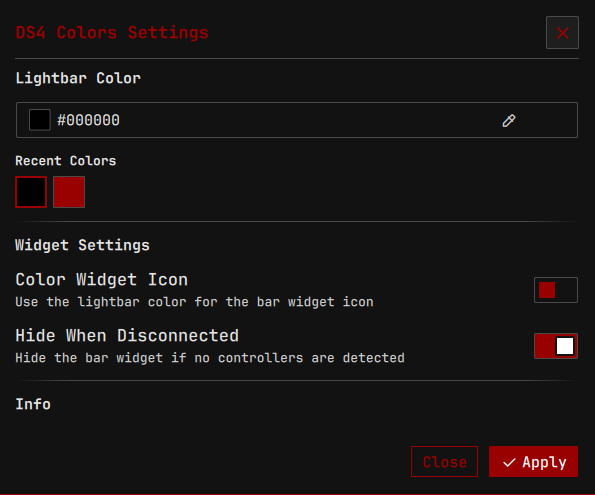
DS4 Colors
Change the lightbar color of your DualShock 4 or DualSense controller with a color picker and recent color history.
About
DS4 Colors
A Noctalia plugin to change the lightbar color of DualShock 4 and DualSense controllers.
Features
- Color Picker: Select any color for your controller's lightbar via the settings page.
- Battery Monitoring: See your controller's battery level in the bar widget.
- Automatic Detection: Finds connected PlayStation controllers (USB or Bluetooth).
- Persistent Settings: Saves your preferred color across reboots.
IPC Commands
Control the plugin from the command line using qs ipc call:
# Set color by RGB components (0–255)
qs ipc call plugin:ds4-colors setColor 255 0 0

# Set color by hex string
qs ipc call plugin:ds4-colors setColorHex "#ff0000"

# Turn the lightbar off
qs ipc call plugin:ds4-colors off

# Force a rescan for connected controllers
qs ipc call plugin:ds4-colors scan
Setup (Required)
This plugin requires write access to the controller's LED sysfs files. The included scripts/setup_rules.sh script configures an udev rule that grants write permission to members of the ds4_colors group:
cd ds4-colors
sudo ./scripts/setup_rules.sh
This script will:
- Create a
ds4_colorsgroup. - Add your user to the
ds4_colorsgroup. - Install the udev rule to
/etc/udev/rules.d/. - Reload udev rules.
Note: You may need to log out and log back in (or reboot) for the group changes to take effect.
NixOS Instructions
If you are on NixOS, manual udev rule installation via scripts/setup_rules.sh will not work.
The plugin will automatically try to use pkexec to prompt for your password when you change colors. However, for a seamless experience without password prompts, add the following to your configuration.nix:
services.udev.extraRules = ''
  SUBSYSTEM=="leds", KERNEL=="*:*:*:*", KERNELS=="*054C:*", \
    RUN+="/bin/sh -c 'chgrp ds4_colors /sys%p/brightness && chmod g+w /sys%p/brightness'"
'';

users.groups.ds4_colors = {};
users.users.YOUR_USERNAME.extraGroups = [ "ds4_colors" ];
Replace YOUR_USERNAME with your actual username. After applying this config (sudo nixos-rebuild switch), the plugin will work without password prompts.
Requirements
- DualShock 4 or DualSense controller.
- Linux kernel with
hid-sonyorhid-playstationdriver (standard in most distributions). - Noctalia 4.6.6 or later.