
Back to plugins 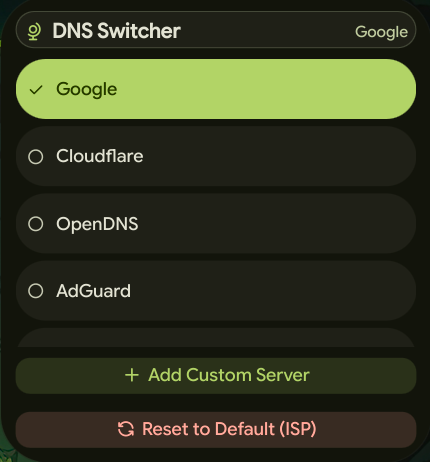
DNS Switcher
DNS Manager with custom server support for Noctalia.
v1.2.1 Ronin-CK MIT Mar 29, 2026
About
DNS Switcher
A plugin that allows you to quickly switch between different DNS servers directly from Noctalia, with support for custom DNS providers.
Features
- Quick DNS Switching: Switch between popular DNS providers with a single click
- Pre-configured Providers: Includes Google, Cloudflare, OpenDNS, AdGuard, and Quad9
- Custom DNS Servers: Add and manage your own custom DNS servers
- Real-time Status: Displays the current active DNS server in the bar and control center
- Auto-detection: Automatically detects which DNS provider is currently active
- NetworkManager Integration: Uses NetworkManager (nmcli) to manage DNS settings
Usage
- Click on the DNS widget in the top bar or control center
- Select a DNS provider from the list
- The DNS will be changed immediately (requires password for privilege escalation)
- The current DNS status is displayed in the widget
Pre-configured DNS Providers
- Google:
8.8.8.8and8.8.4.4 - Cloudflare:
1.1.1.1and1.0.0.1 - OpenDNS:
208.67.222.222and208.67.220.220 - AdGuard:
94.140.14.14and94.140.15.15 - Quad9:
9.9.9.9and149.112.112.112
Adding Custom DNS Servers
- Open the DNS Switcher panel
- Click "Add Custom Server"
- Enter a name for your DNS server
- Enter the IP address(es) (space-separated for multiple IPs)
- Click "Save"
- Your custom server will appear in the list and can be selected like any other provider
Resetting to Default
Click the "Reset to Default (ISP)" button to restore your system's default DNS settings (usually provided by your ISP).
Widgets
- Bar Widget: Displays the current DNS provider name with an icon in the top bar
- Control Center Widget: Shows the DNS status as an icon button in the control center
- Panel: Full panel interface for managing DNS providers and custom servers
Requirements
- Noctalia 4.0.0 or later
- NetworkManager: The plugin uses
nmclito manage DNS settings - pkexec: Required for privilege escalation to change system DNS settings
- Active Network Connection: Must have an active NetworkManager connection
Technical Details
The plugin:
- Checks the current DNS every 3 seconds
- Uses NetworkManager's connection modification to change DNS settings
- Requires root privileges (via
pkexec) to modify network settings - Automatically restarts the network connection after DNS changes
- Supports both IPv4 DNS configuration
Notes
- DNS changes require administrator privileges, so you'll be prompted for your password
- The plugin only modifies the currently active NetworkManager connection
- Custom DNS servers are saved in the plugin settings and persist across restarts
- If no active connection is found, the DNS change will fail