
Back to plugins 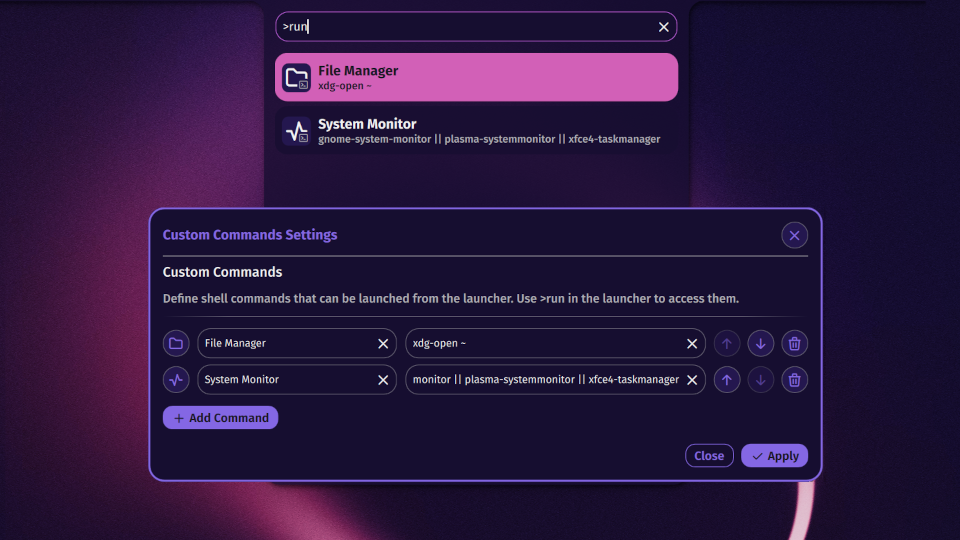
Custom Commands
Define and run custom shell commands from the launcher
v1.0.5 Noctalia Team MIT Mar 27, 2026
About
Custom Commands Plugin
Define and run custom shell commands directly from the Noctalia launcher.
Features
- Launcher Integration: Access commands via the
>runprefix or by searching normally. - Fuzzy Search: Quickly find commands by name or command string.
- Settings UI: Add, remove, reorder, and customize commands with icons.
- Custom Icons: Choose a Tabler icon for each command.
Usage
Type >run in the launcher to see all your commands, or >run <query> to filter them. Commands also appear in normal search results when they match.
Activating a command runs it via sh -lc, so shell features like pipes, || fallbacks, and environment variables all work.
Default Commands
The plugin ships with two example commands:
| Name | Command |
|---|---|
| File Manager | xdg-open ~ |
| System Monitor | gnome-system-monitor || plasma-systemmonitor || xfce4-taskmanager |
These can be edited or removed in the plugin settings.
Settings
Open Settings > Plugins > Custom Commands to manage your command list:
- Add new commands with a name, shell command, and icon.
- Reorder commands with the up/down arrows.
- Remove commands with the trash button.
- Change icons by clicking the icon button to open the icon picker.
Changes are saved automatically to the plugin's settings.json.
IPC Integration
You can quickly browse your commands with the following IPC call:
qs -c noctalia-shell ipc call plugin:custom-commands toggle