
Back to plugins 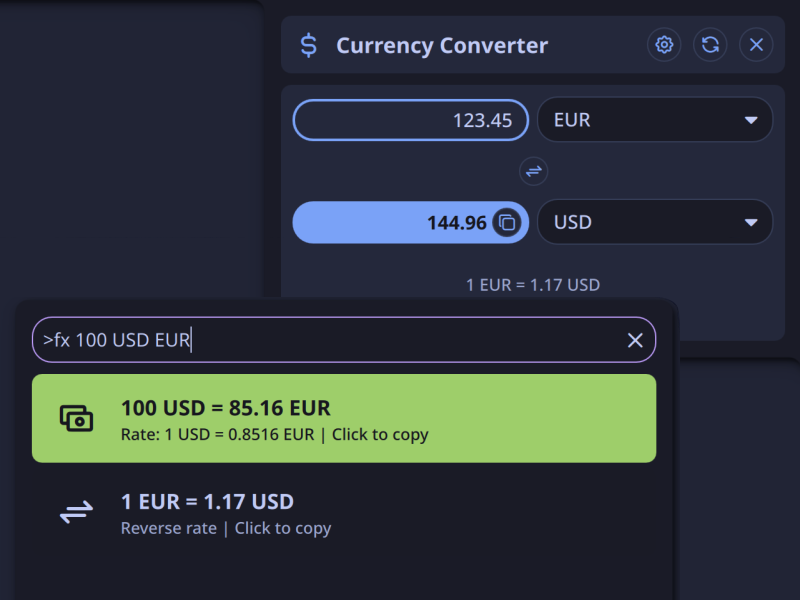
Currency Exchange
Currency conversion utility via launcher and bar widget
v1.0.4 balor MIT May 4, 2026
About
Currency Exchange
Convert currencies from Noctalia launcher or bar widget.
Features
- Launcher integration — Quick currency conversion via
>fxcommand - Bar widget — Click to open the converter panel
- Exchange rate on bar — Displays current rate for your configured currency pair directly on bar (optional)
Launcher Usage
- Open the Noctalia launcher
- Type
>fxto enter currency mode - Enter your conversion query
Examples
| Command | Result |
|---|---|
>fx 100 USD EUR |
Convert 100 USD to EUR |
>fx 50 BRL |
Convert 50 BRL to USD |
>fx EUR GBP |
Show rate for 1 EUR to GBP |
>fx |
Show usage help |
Widget Configuration
To display the exchange rate on the bar widget:
- Open plugin settings
- Set your preferred Source Currency and Target Currency
- Change Display Mode to
fullorcompact
Note: Rate display is only available on horizontal bars.
Supported Currencies
30 currencies supported via frankfurter.app:
AUD, BRL, CAD, CHF, CNY, CZK, DKK, EUR, GBP, HKD, HUF, IDR, ILS, INR, ISK, JPY, KRW, MXN, MYR, NOK, NZD, PHP, PLN, RON, SEK, SGD, THB, TRY, USD, ZAR
IPC Commands
Toggle currency converter panel:
qs -c noctalia-shell ipc call plugin:currency-exchange togglePanel
TODO / IDEAS
- Improve UX of settings page
- Adapt UX of settings page to longer versions of translations
- Make togglePanel ipc function optionally accept AMOUNT, FROM_CURR and TO_CURR
Requirements
- Noctalia 4.0.0 or later
curl(for API requests)wl-copy(for clipboard support)
Data Source
Exchange rates provided by frankfurter.app (free, no API key required).