
About
YouTube Music
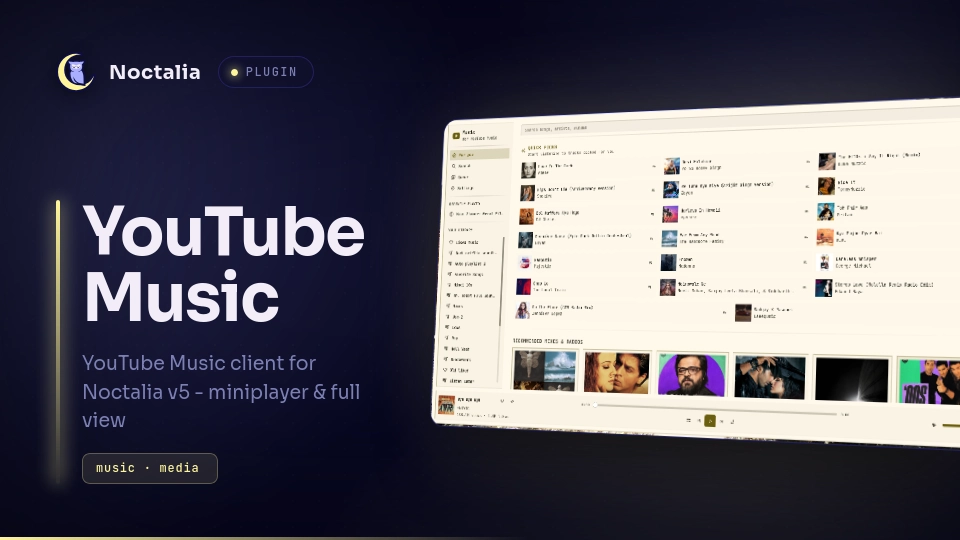
A YouTube Music client for Noctalia v5 with a bar miniplayer and a full shell panel — browse your library, playlists, and recommendations, and control playback with full transport controls, offline caching, and session restore.
Plugin
| Field | Value |
|---|---|
| ID | aabidk20/yt-music |
| Entries | Bar widget: widget; panels: mini, panel; service: service |
Requirements
Install these tools on your PATH:
yt-dlp— stream resolution, audio downloads, and view/like countsmpv— playback enginempv-mpris— MPRIS control of mpv (optional)jq— JSON parsing in YouTube API requestscurl— YouTube API and thumbnail requestsnc— mpv socket IPC (OpenBSD netcat or ncat; traditional/busybox nc lack unix-socket support and won't work)
The plugin's login page shows a health-check card for all of the above if anything is missing, stale, or unsupported.
Usage
Add the bar widget to a bar and bind the widget actions (left click opens the miniplayer, right click opens the full panel, middle click opens the plugin settings). You can also toggle any entry with its IPC command:
noctalia msg panel-toggle aabidk20/yt-music:mini
noctalia msg panel-toggle aabidk20/yt-music:panel
The full panel groups everything: a home feed with Quick Picks, recommended mixes and radios, and your library; playlist and queue views; and a search with Top, Songs, and Playlists tabs. The miniplayer shows the current track with play/pause, previous/next, shuffle, repeat, a seek scrubber, volume and mute, like/unlike, and a hover tooltip with codec and bitrate info.
On first launch, sign in from the sidebar to extract your YouTube Music cookies from an installed browser (Chrome, Chromium, Firefox, Edge, Brave, Opera, Vivaldi, Whale, or Zen).
Playback
Play any track, playlist, or search result; queue controls work across track,
playlist, and search indexes. Playback resumes after a restart via a saved
session. Audio is decoded via yt-dlp's best-audio format; with a YouTube
Premium account you get the higher-quality 256 kbps Opus streams where
available.
Offline
Download individual tracks or entire playlists for offline playback. Audio, stream, thumbnail, and playlist caches are sized and clearable in Settings.
Settings
| Setting | Type | Default | Description |
|---|---|---|---|
debug_logging |
bool |
false |
Write verbose logs to the plugin log file to help troubleshoot issues. |
IPC
The service exposes actions via noctalia msg using the plugin state channel:
noctalia msg plugin aabidk20/yt-music:<entry-id> all <action> [payload]
The bar widget also opens entries directly (panel-toggle aabidk20/yt-music:mini and aabidk20/yt-music:panel).
Notes
- Network — talks only to YouTube Music (
music.youtube.com) and its thumbnail host (i.ytimg.com) viacurl,yt-dlp, and the native HTTP API. No third-party servers. - Files — cookies, playlists, sessions, quick picks, stats, and all audio /
stream / thumbnail caches live under
$XDG_CACHE_HOME/yt-music/; transient scratch files and the mpv socket use/tmp. - Cookie extraction — on sign-in the plugin reads your browser's YouTube
cookies locally via
yt-dlp --cookies-from-browserand stores them only in the cache directory above. Nothing is ever sent anywhere except directly to YouTube for playback and preference requests. See Privacy below. - Processes — spawns the tools listed in Requirements plus a browser on the sign-in page to authenticate.
- MPRIS transport — with
mpv-mprisinstalled, a three-entry mpv playlist keeps the media widget andplayerctltransport controls aligned with the plugin queue. Failed pre-playback streams stop with a notification; builds without lavfi leave those external controls unavailable.
Debug log
With the debug_logging setting enabled, the plugin writes a debug.log to
the cache directory. It records actions and the IDs/names involved (track and
playlist titles, search queries, video and playlist IDs, download activity) to
help troubleshoot. Cookie values are never written to it. If you share the
debug.log when filing an issue, be aware it may contain the names of
playlists and tracks and other identifying activity; scrub anything private
before posting.
Privacy
This plugin reads browser cookies locally on your machine to authenticate with YouTube Music, and stores them only on disk in your user's cache directory. Nothing is shared: no analytics, no telemetry, no external servers — cookies, tokens, and stream URLs never leave your machine.
License
MIT
Versions
| Version | Plugin API | Updated |
|---|---|---|
| v0.4.0 latest | 28 | Oct 8, 2026 |
| v0.3.3 | 26 | Oct 7, 2026 |
| v0.2.8 | 23 | Sep 25, 2026 |
Older versions stay installable on a Noctalia release whose plugin API is below the latest version's.