
About
Vial Keymap
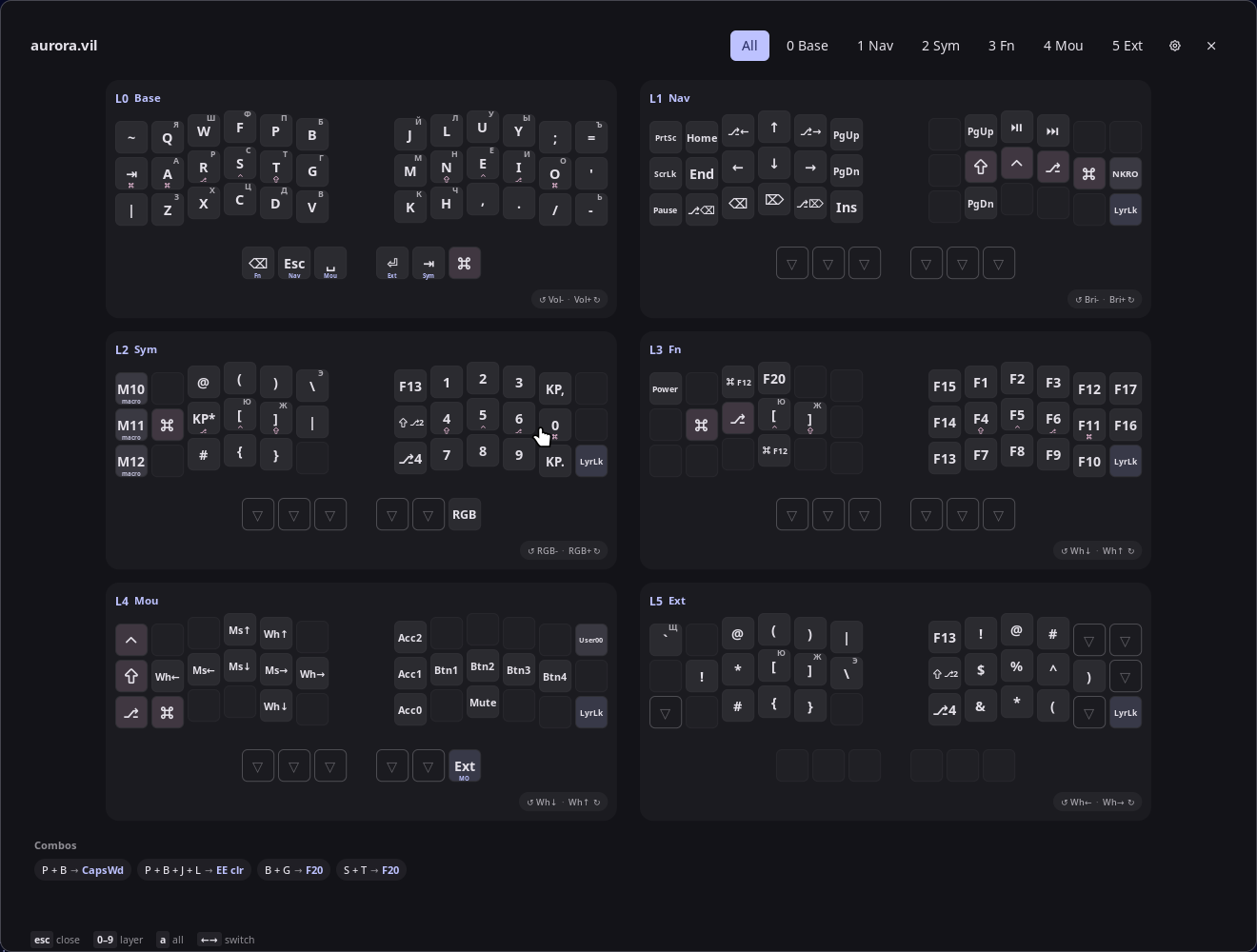
Shows the keymap of a Vial-configured split keyboard (splitkb Aurora Corne by default) as an
overlay, read from a Vial .vil export. All non-empty layers at once, with mod-taps, layer-taps,
combos, encoder bindings and the letters of your second OS layout (for example Russian). It is
the Linux port of egno/vial_helper.
Plugin
| Field | Value |
|---|---|
| ID | egno/vial_keymap |
| Entries | Bar widget: icon; panel: keymap |
Requirements
- A
.vilexport of your keymap from Vial (File → Save current layout). Default path:~/aurora.vil. python3andlibxkbcommon(both standard on most systems) for the second-layout letters.hyprctlto detect the configured OS layouts automatically. Without it, set the layout in Settings or the plugin falls back to a built-in Russian ЙЦУКЕН table.
Usage
Toggle the overlay from your compositor keybind:
noctalia msg panel-toggle egno/vial_keymap:keymap
For example in Hyprland's Lua config:
hl.bind(mainMod .. " + K", hl.dsp.exec_cmd("noctalia msg panel-toggle egno/vial_keymap:keymap"))
Optionally add the bar widget egno/vial_keymap:icon (Settings → Bar, or in your config), a
keyboard glyph that toggles the overlay on click and opens the plugin settings on right or
middle click:
[widget.keymap]
type = "egno/vial_keymap:icon"
While the overlay is open: 0–9 zooms into a layer, a or ` shows all layers,
←/→ cycle, Esc or a click outside closes. Clicking a layer card zooms into it. Layers
that contain only transparent or unassigned keys are hidden. The .vil is re-read on every
open and every 2 seconds while open, so a Vial re-export shows up immediately.
The overlay recognises the Aurora Corne / crkbd matrix (3×6+3 per half) and draws it with column stagger and thumb clusters; other split boards get a mirrored grid, and non-split boards a plain grid.
Settings
Settings → Plugins → Vial Keymap:
| Setting | Type | Default | Description |
|---|---|---|---|
vil_path |
file |
~/aurora.vil |
The Vial .vil export to display. |
layer_names |
string |
(empty) | Comma-separated names in layer order, e.g. Base, Nav, Sym, Fn. Replaces L1-style legends on layer keys and in the layer chips. |
encoders |
select |
both |
Which half's encoder bindings to draw (both, left, right, none). Vial exports a slot per half even if unused. |
alt_layout_enabled |
bool |
true |
Draw the letter each key produces in your second OS layout in the top-right corner of the cap, where it differs from the first layout. |
alt_layout |
string |
(empty) | XKB layout for those letters, e.g. ru, rumac, de(neo). Empty means the second layout from Hyprland's input:kb_layout. |
IPC
noctalia msg plugin egno/vial_keymap:keymap all layer 2   # zoom into layer 2
noctalia msg plugin egno/vial_keymap:keymap all all       # back to all layers
noctalia msg plugin egno/vial_keymap:keymap all reload    # re-read the .vil now
noctalia msg plugin egno/vial_keymap:keymap all layouts   # re-detect the OS layouts
noctalia msg plugin egno/vial_keymap:icon focused toggle  # same as clicking the bar icon
Notes
- Reads only the configured
.vilfile. Writes nothing. - Spawns
hyprctl -j getoption input:kb_layout/input:kb_variantandpython3 xkb_legends.py <layouts> <variants>(bundled) once per open, at most once a minute, to compute the second-layout letters. No network access. - Macro keys are shown as
M0,M1, … without their contents. - Modifiers are drawn as Tabler icons (Ctrl
^, Alt ⎇, Shift ⇧, Super ⌘). Change them inM.MODSat the top ofkeycode.luau. - Tested on Hyprland with Noctalia 5.1.0. Layout detection is Hyprland-specific; on other
compositors set
alt_layoutexplicitly. - Source and issues: github.com/egno/noctalia-vial-keymap.
Versions
| Version | Plugin API | Updated |
|---|---|---|
| v0.2.0 latest | 24 | Sep 24, 2026 |
Older versions stay installable on a Noctalia release whose plugin API is below the latest version's.