 Noctalia
About
USB Manager
USB drives, SD cards and optical media in the bar: see what is plugged in and mounted, open it, unlock encrypted volumes, and remove a drive safely with one click — the plugin powers off a USB drive and ejects a card or a disc, so the button always does what that hardware supports.
Drive state is read straight from the kernel and the udev database; no helper process runs in the background.
Plugin
| Field | Value |
|---|---|
| ID | rylos/usb-manager |
| Entries | Bar widget: bar; panel: panel; service: service |
Requirements
| Dependency | Needed for |
|---|---|
udisks2 |
Mount, unmount, unlock, lock and power off, through its udisksctl command. The udisks daemon also decides, through polkit, what your user may do without a password. |
gdbus |
Ejecting a card or a disc (Drive.Eject over the system bus, which udisksctl has no command for). It ships with glib2. |
xdg-open |
Opening a mounted folder when file_manager is empty (xdg-utils). |
Nothing else is needed to show the drives: they come from sysfs, procfs and
/run/udev/data.
Usage
Add the USB Manager widget (bar) to a bar in Settings. It shows a USB
glyph with the number of drives and hides itself while nothing is plugged in
(see hide_when_empty). The glyph is:
- lit (primary color) while a volume is mounted;
- tertiary while a drive is being written or prepared for removal;
- plain while drives are plugged in but nothing is mounted.
The tooltip lists each drive with its volumes and where they are mounted.
- Left click opens the panel.
- Right click safely removes every drive: all volumes are unmounted, encrypted ones are locked, then each drive is powered off or ejected. A notification says when they can be unplugged, or which one is still in use.
noctalia msg panel-toggle rylos/usb-manager:panel
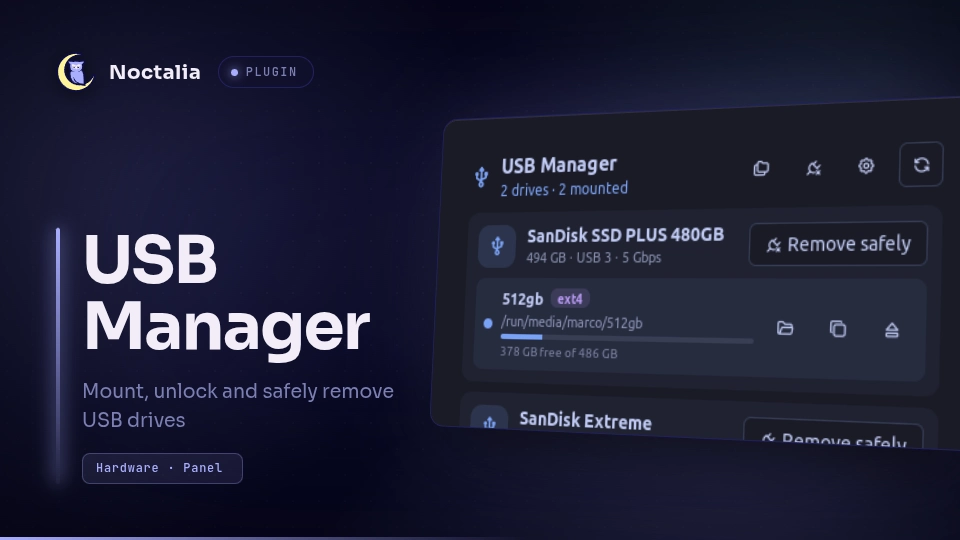
The panel shows one card per drive: name, capacity, USB link speed (for
example USB 3 · 5 Gbps, read from the USB device in sysfs) and a Remove
safely button. Its tooltip says what it will do:
| Drive | Remove safely |
|---|---|
| USB drive, USB card reader | Unmounts everything, locks encrypted volumes, powers the drive off. |
| Optical drive, other drives with removable media | Unmounts everything, then ejects the medium. |
| SD card in a built-in reader, anything else | Unmounts everything; the card can then be pulled. |
Under each drive, one row per volume shows its label, filesystem, mount point and a usage bar, with these actions:
- Open the folder in the file manager, copy the mount path;
- Mount / Unmount;
- for LUKS volumes, Unlock, which asks for the passphrase inline and mounts the volume, and Lock, which unmounts it and closes the container.
The header holds Mount all, Remove all safely, the plugin settings and Refresh.
Settings
| Setting | Type | Default | Description |
|---|---|---|---|
notifications |
bool |
true |
Notify when a drive can be removed safely. Errors, and a drive unplugged while a volume was still mounted, are always shown. |
auto_mount |
bool |
false |
Mount the filesystems of a drive as soon as it is plugged in. Encrypted volumes still wait for their passphrase. |
open_after_mount |
bool |
false |
Open the folder in the file manager after mounting a volume. |
file_manager |
string |
"" |
Command that opens a folder, which is passed as the last argument (e.g. nautilus). Empty uses xdg-open. Advanced. |
scan_interval |
int |
2 |
Seconds between two reads of the kernel's device list (1–30). Advanced. |
hide_when_empty |
bool |
true |
Widget setting: hide the widget while no removable drive is plugged in. |
show_count |
bool |
true |
Widget setting: show the number of drives next to the glyph. |
IPC
noctalia msg plugin rylos/usb-manager:service all <event> [device]
| Event | Device | Effect |
|---|---|---|
refresh |
— | Rescan now. |
mount_all |
— | Mount every unmounted, unencrypted volume. |
remove_all |
— | Safely remove every drive (the widget's right click). |
mount |
volume, e.g. sdc1 |
Mount the volume. |
unmount |
volume | Unmount the volume. |
lock |
LUKS volume | Unmount and lock it. |
open |
volume | Open its mount point in the file manager. |
remove |
drive, e.g. sdc |
Safely remove the drive. |
The device can be given as sdc1 or /dev/sdc1. Unlocking has no IPC event,
so that a passphrase never ends up in a command line or in shell history.
Notes
- What counts as removable: disks on the USB bus, SD cards (
mmcblkwith device typeSD; eMMC storage is left out), optical drives, and anything the kernel flags as removable. A drive that holds/,/boot,/efi,/home,/usr,/varor an active swap partition is never listed, and udev'sUDISKS_IGNOREis honored. - What is read:
/sys/block,/run/udev/data/b<major>:<minor>,/proc/self/mountinfoand/proc/swaps, everyscan_intervalseconds. Mounts are matched by device number, so encrypted volumes are followed to their cleartext device. The snapshot is only republished when something changed. - Processes spawned:
udisksctl(mount,unmount,unlock,lock,power-off,info),gdbusfor ejecting, and the file manager orxdg-open. All of them get their arguments as an argument array, never through a shell, except a customfile_managercommand, which runs through/bin/shwith the folder shell-quoted. - Passphrases: the passphrase typed in the panel is written to an
owner-only file in
$XDG_RUNTIME_DIR(a tmpfs), passed toudisksctl unlock --key-file, and deleted as soon asudisksctlreturns, so it never shows up in a process list. It is not stored anywhere else. - Permissions: whether mounting or powering off asks for a password is up to udisks and polkit; on a normal desktop session removable drives need none.
- Notifications: plugging and unplugging a drive is not notified: the
widget appears and disappears, and most desktops already announce USB
devices. The plugin notifies when a drive can be removed safely (setting
notifications), when an action fails, and when a drive is pulled while a volume is still mounted. - Busy drives: when a volume is in use, unmounting fails and the notification says so; close the files and terminals that use the drive and try again.
Versions
| Version | Plugin API | Updated |
|---|---|---|
| v1.0.0 latest | 43 | Nov 2, 2026 |
Older versions stay installable on a Noctalia release whose plugin API is below the latest version's.