
About
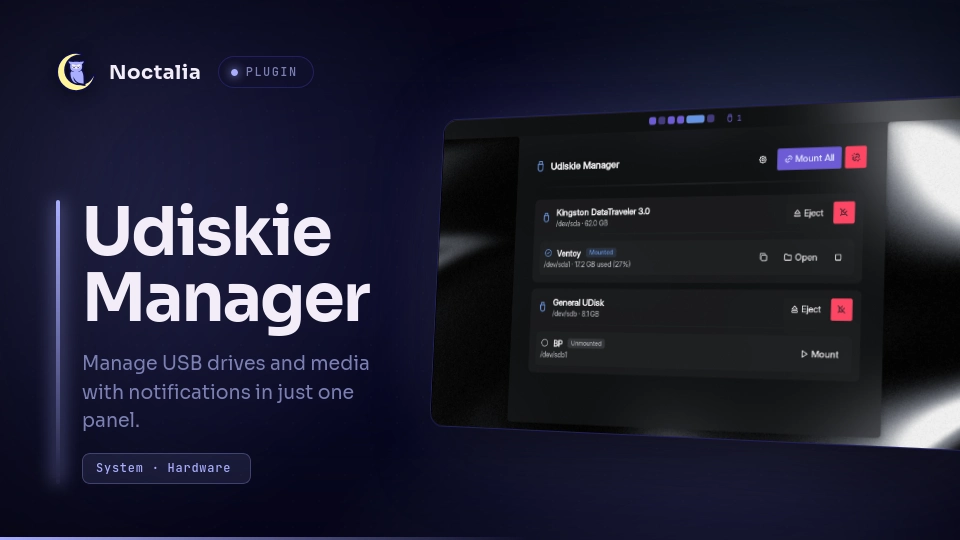
Udiskie Manager
Manage USB drives and media with notifications in just one panel.
Features
- Real-time device discovery and status monitoring via UDisks2 event streaming.
- Storage capacity and partition usage indicators with formatted bytes and percentage.
- Automatic detection and dedicated unlock action for LUKS encrypted volumes (
crypto_LUKS). - Interactive management panel with drive hierarchy, open, mount, unmount, eject, and power off actions.
- Copy mount path to clipboard action.
- Configurable bar widget with mounted device counter and auto-hide when empty option.
- Native desktop notifications for drive connections, disconnections, mounts, unmounts, and errors.
- Quick refresh and native settings integration.
Plugin
| Field | Value |
|---|---|
| ID | aristides/udiskie |
| Entries | Bar widget: status; panel: manager; service: service |
Requirements
Install udiskie, udisks2, and xdg-open on PATH:
udiskie: Device mount operations and device info queries.udisks2: Providesudisksctlfor real-time DBus event streaming.xdg-open: Launcher binary for opening mounted folders in the file manager.
udiskie-info -ofields: the service queriesudiskie-info -owith the device attributes listed underVALID_PARAMETERS(e.g.is_drive,is_partition,is_luks,mount_path,is_detachable). If yourudiskieis old enough to lack any of them, the device list will come back empty — upgradeudiskiein that case. A recent release (2.x) is recommended.
Usage
- Bar Widget (
status): Addstatusto the bar configuration in Noctalia settings. Left-click to open the Udiskie Manager Panel. Right-click to trigger an immediate plugin refresh. - Panel (
manager): Open via the bar widget or run:
noctalia msg panel-toggle aristides/udiskie:manager
Settings
| Setting | Type | Default | Description |
|---|---|---|---|
enable_notifications |
bool |
true |
Show desktop notifications on drive events and errors. |
auto_open_filemanager |
bool |
false |
Automatically open mounted drives in the file manager upon connection. |
file_manager_cmd |
string |
xdg-open |
File manager launcher command. |
glyph |
glyph |
device-usb |
Icon glyph shown for the widget on the bar. |
show_count |
bool |
true |
Display the count of mounted devices on the bar widget. |
hide_when_empty |
bool |
false |
Hide the bar widget when no USB drives are connected. |
IPC
# Toggle panel
noctalia msg panel-toggle aristides/udiskie:manager

# Service actions
noctalia msg plugin aristides/udiskie:service all mount /dev/sdX
noctalia msg plugin aristides/udiskie:service all unmount /dev/sdX
noctalia msg plugin aristides/udiskie:service all eject /dev/sdX
noctalia msg plugin aristides/udiskie:service all detach /dev/sdX
noctalia msg plugin aristides/udiskie:service all mount_all
noctalia msg plugin aristides/udiskie:service all unmount_all
noctalia msg plugin aristides/udiskie:service all refresh
Performance
The plugin eliminates the standalone Python udiskie daemon by using an event-driven udisksctl monitor subprocess managed by Noctalia. Both approaches activate udisksd via D-Bus on first use.
| Component | RSS | VSZ | CPU |
|---|---|---|---|
udisksctl monitor (this plugin) |
~12 MB | ~170 MB | 0.0% |
udiskie Python daemon (standalone) |
~84–110 MB | ~1183 MB | 0.2% |
udisksd (shared, D-Bus activated) |
~22 MB | ~688 MB | 0.2% |
Total footprint: plugin ~34 MB vs standalone ~106–132 MB. Saves ~72–98 MB RAM and avoids a persistent Python process.
Measurements are local to a given system/kernel and udiskie version; actual RSS/VSZ/CPU values vary by hardware and environment.
Development
Run plugin validation and tests using the workspace Makefile:
make test
Notes
- Requires plugin API level 9 or newer.
Versions
| Version | Plugin API | Updated |
|---|---|---|
| v0.1.0 latest | 9 | Aug 5, 2026 |
Older versions stay installable on a Noctalia release whose plugin API is below the latest version's.