 Noctalia
About
Typing Stats
A small capsule for the Noctalia bar: a progress bar that fills as you type, and after it the number of completed blocks. Every 100 typed characters advances the number by one. It keeps an all-time total and a separate count for every day, can switch the capsule between today and the total, and opens an interactive calendar heatmap: each day is colored by that day's input, and hovering a day shows its count.
  ┌────────────────────────────────────┐
  │ ☀  ████████████░░░░░░░░  42        │   today's count
  └────────────────────────────────────┘
     mode  progress to next 100  blocks

  ┌────────────────────────────────────┐
  │ ∞  ██████░░░░░░░░░░░░░░░  318       │   all-time count
  └────────────────────────────────────┘
Plugin
| Field | Value |
|---|---|
| ID | goldesquemoon/typing-stats |
| Entries | Service: counter; bar widget: capsule; panel: calendar; shortcuts: reset, heatmap |
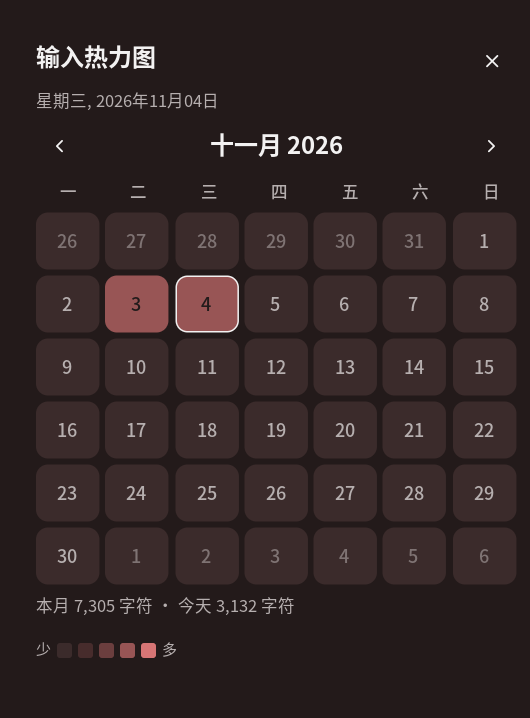
The bar widget lives in the bar's normal widget capsule. It stores a total and a per-day history in the plugin data dir, so both survive restarts and updates. The heatmap panel is a month calendar in the style of the control-center calendar.
Screenshots
| Calendar panel | Settings |
|---|---|
 |
 |
Requirements
| Requirement | Why |
|---|---|
python3 |
Runs the small evdev reader that counts printable keys. |
udevadm |
Applies the one udev rule that grants read access to keyboard event nodes. |
| One-time root setup | sudo ./setup.sh inside this plugin's directory. |
niri (focused-window filter) |
Tracks the focused window for the optional whitelist/blacklist filter. |
Wayland has no protocol for observing global key presses, so the plugin reads the kernel input
devices, which needs read permission on /dev/input/event*. setup.sh installs one udev rule
that tags keyboard event nodes uaccess; systemd-logind then gives the active local session user
an ACL (no group membership, no re-login).
Install
From a checkout of the plugin source:
sudo ./typing-stats/setup.sh    # udev rule (once)
./typing-stats/install.sh       # register source + enable plugin (no root)
Then add the capsule once:
Settings → Bar → Add widget → Typing Stats, or
in
~/.local/state/noctalia/settings.toml:[bar.default] start = [ ..., "typing" ] [widget.typing] type = "goldesquemoon/typing-stats:capsule" capsule = true
Add the two optional control-center tiles under Settings → Control Center → Shortcuts:
- Reset typing stats (
reset) - Typing heatmap (
heatmap, opens the calendar panel)
Usage
Just type. The capsule shows:
- a mode glyph — ☀ for today, ∞ for all time
- the progress bar — characters since the last completed block
- the number — completed blocks (
floor(characters / block_size))
Left click the capsule to switch between today and all time. The mode is persisted. Right click opens the heatmap calendar attached below the bar, under this capsule; the middle click opens the plugin settings. The tooltip shows today's characters, the all-time total and the progress within the current block.
Heatmap calendar
Right-click the bar capsule to open the panel attached to the bar and anchored under the capsule. The Typing heatmap tile opens the same panel attached at the bar's default position (it has no capsule anchor). It mirrors the control-center calendar:
- 7 columns, Monday-first; current month with
</>month navigation - each day filled with the theme primary at one of four fixed levels (see
thresholdsbelow), not relative to the month's maximum - the current day outlined; previous/next-month days faded
- hover any day to see
YYYY-MM-DD · N characters - the footer shows the month total and today's count
noctalia msg panel-toggle goldesquemoon/typing-stats:calendar
The color levels are fixed thresholds, one layer at a time (defaults):
| Level | Daily characters |
|---|---|
| 0 | 0–499 |
| 1 | 500–999 |
| 2 | 1000–1999 |
| 3 | 2000–4999 |
| 4 | 5000+ |
Change them with the Heatmap thresholds setting, for example 300,800,1500,3000. With
Notify on a new level enabled, reaching
a new level (500, 1000, 2000 or 5000 by default) sends a notification with the count and level.
Reset
The Reset typing stats tile or IPC clears both the all-time total and the whole daily history:
noctalia msg plugin goldesquemoon/typing-stats:counter all reset
Simulate input for testing (does not touch the daily history incorrectly; it counts as today):
noctalia msg plugin goldesquemoon/typing-stats:counter all add 100
noctalia msg plugin goldesquemoon/typing-stats:counter all mode today
noctalia msg plugin goldesquemoon/typing-stats:counter all mode total
What counts
- Letters, digits, punctuation, space and keypad keys.
- Autorepeat does not count: holding a key adds one, never a stream of free characters. This is deliberate, to keep the statistics honest.
- Shortcuts do not count: a key pressed while Ctrl, Alt or Super is held is ignored.
- Navigation/function keys, Backspace, Enter, Tab and modifiers do not count.
Because the source is the keyboard device, this is a printable-key count. When an IME is composing (for example pinyin for Chinese), the composition keys are counted as they are typed; the committed CJK character is not counted a second time. No text, key names or modifier state are stored — only totals.
Window filter
The optional filter counts only some windows, or skips some windows, based on the focused
window's niri app_id. It works with niri's JSON event stream, with a 5-second
focused-window poll as a fallback.
- Off — count every printable key (default).
- Whitelist — count only windows whose app ID is listed. An empty whitelist counts nothing.
- Blacklist — count every window except the listed ones. An empty blacklist counts everything.
App IDs are matched case-insensitively. Find the app ID of the current window with:
niri msg --json focused-window | grep -o '"app_id":"[^"]*"'
# or list every window:
niri msg --json windows | grep -o '"app_id":"[^"]*"' | sort -u
Then enter the IDs in Settings → Plugins → Typing Stats → Filter app IDs, for example
Alacritty, wechat, firefox. The filter applies to the all-time total, the daily counts and
the heatmap; level notifications only fire for counted keys.
The filter needs niri. On another compositor there is no focused-window signal, so a whitelist counts nothing and a blacklist counts everything; use Off there.
Settings
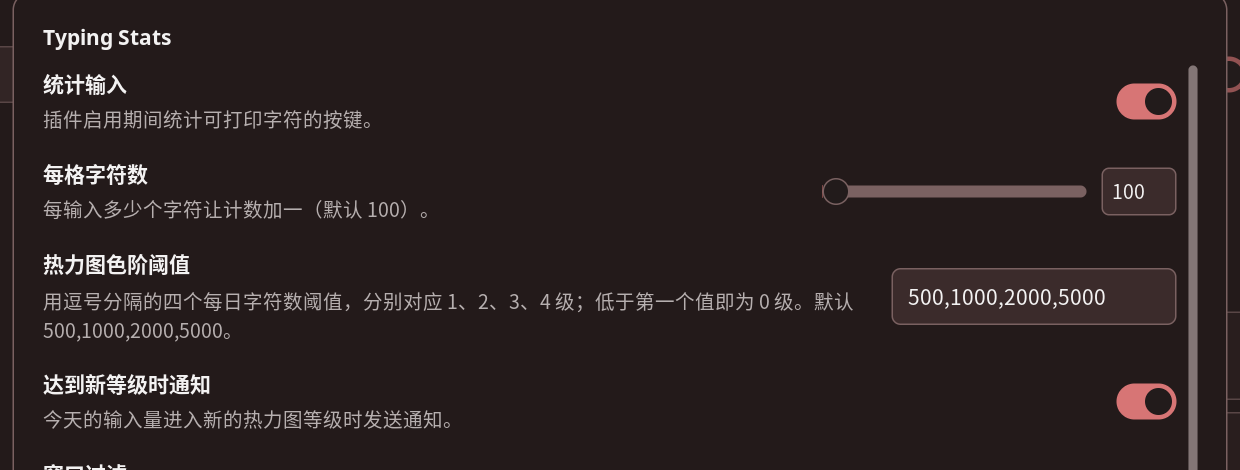
| Setting | Type | Default | Description |
|---|---|---|---|
enabled |
bool |
true |
Count printable keys while the plugin is loaded. Turning it off keeps the stored totals and leaves the capsule in place. |
block_size |
int |
100 |
Characters per block: the number after the bar advances by one every block_size characters. |
thresholds |
string |
500,1000,2000,5000 |
Four comma-separated daily character counts for levels 1–4; below the first value is level 0. |
level_notify |
bool |
true |
Send a notification when today's typing reaches a new heatmap level. |
filter_mode |
select |
off |
off, whitelist (count only listed apps) or blacklist (skip listed apps). |
filter_apps |
string_list |
empty | niri app IDs, case-insensitive. Empty whitelist counts nothing; empty blacklist counts everything. |
The data file (stats.json in the plugin data dir) contains:
{
  "version": 2,
  "chars": 12345,
  "today": "2026-11-03",
  "days": { "2026-11-02": 640, "2026-11-03": 690 },
  "display_mode": "today"
}
It is written at most once every 5 seconds (and on reset), so a crash loses at most a few
seconds of counting. A v1 file that only had chars is migrated by assigning the old total to
today.
How it works
typelisten.py ── "C" ──► service.luau ── state "stats" ──► widget.luau
  (evdev)                  (total + days)                  (progress + number)
                                │
                                └── state "display_mode" ──► widget.luau
- The listener opens the keyboard event nodes, tracks Ctrl/Alt/Super, and prints one
Cline per printable key press. It printsPINGevery 15 s; the service restarts it if it goes silent. - The service adds each
Cto the all-time total and todays[today], detects the local date change (resetting today's bucket at midnight even without typing), and publishes the summary on the plugin state store. The widget renders from that summary. display_modelives on the shared state: the widget's click writes it, the service persists it and republishes the summary.- The optional window filter reads the focused window from
niri msg --json event-stream(WindowsChanged,WindowOpenedOrChanged,WindowClosed,WindowFocusChanged) and falls back to afocused-windowpoll every 5 seconds. EachCline is counted only if the current app passes the whitelist/blacklist check. - The heatmap panel is a declarative month calendar: it reads the persisted history plus the
live
statssummary, lays out a Monday-first 6×7 grid, colors every day by the fixedthresholdslevels, and puts the date + count in each cell's hover tooltip. Month navigation is local to the panel.
Troubleshooting
| Symptom | Fix |
|---|---|
| The capsule stays at 0 while typing | python3 typing-stats/scripts/typelisten.py --test-devices — every node must say READABLE; otherwise run sudo typing-stats/setup.sh. |
| The capsule is missing | Add it once under Settings → Bar → Add widget → Typing Stats. |
| The number does not change until 100 | It is the completed-block count; the progress bar is the per-key feedback. |
| Count jumps by more than expected | The IME composition keys are counted as typed keys; shortcuts are excluded. |
| No ACL after setup | Log in through a display manager (logind seat), or sudo usermod -aG input $USER and log back in. |
Privacy
- The listener only tells the service that a printable key was pressed. It never reports key names, codes, modifiers or text, and the service only stores counts per day.
- Everything stays on the machine: the counts, the data file and the panel. Nothing is sent anywhere.
- Access is an ACL for the active local session user. Disabling the plugin in Noctalia unloads
the listener;
./uninstall.shremoves the udev rule. - Turning the Count typing setting off stops counting immediately, but the reader process keeps running until the plugin is unloaded (the runtime gives a service no way to stop a stream), so unload or disable the plugin if you want the device handles closed.
中文说明
状态栏胶囊里是"进度条 + 数字":每输入 100 个字符数字加一,进度条显示距离下一格还有多远。 插件同时保存:
- 历史总计数
- 每天的单独计数(按本地日期分桶,跨天自动切换)
胶囊左侧的小图标表示当前显示模式:☀ 今天,∞ 历史总计。左键点击胶囊在两者之间切换, 模式会记住。右键胶囊打开热力图日历;中键打开插件设置。悬停提示里同时显示今天、历史总计 和当前格的进度。
热力图日历
右键点击状态栏胶囊 打开面板:面板贴在任务栏下方,并从胶囊下方展开。控制中心的 输入热力图 磁贴也能打开同一个面板,但它没有胶囊锚点,会按任务栏默认位置展开。 面板照搬系统控制中心日历的样式:
- 周一起始,7 列 × 6 行;顶部
</>切换月份 - 每天按当天的输入量填充主题主色的不同深浅
- 今天有描边;相邻月份的日子数字变淡
- 鼠标悬停任意一天显示
YYYY-MM-DD · N 字符 - 底部显示本月总计、今天计数,以及 保存图片 按钮
颜色不是按当月最大值算的,而是固定阈值、逐层加深(默认):
| 等级 | 每日字符数 |
|---|---|
| 0 | 0–499 |
| 1 | 500–999 |
| 2 | 1000–1999 |
| 3 | 2000–4999 |
| 4 | 5000+ |
可以在插件设置 热力图色阶阈值 里改成 300,800,1500,3000 这样的四个数字。开启
达到新等级时通知 后,今天达到 500 / 1000 / 2000 / 5000(默认)时会弹出通知,显示字符数
和等级。
重置
重置输入统计 磁贴会清空历史总计和全部每日记录:
noctalia msg plugin goldesquemoon/typing-stats:counter all reset
窗口过滤
可按当前焦点窗口过滤:
- 关闭:统计所有可打印按键(默认)
- 白名单:只统计列表里的窗口;空白名单不统计任何窗口
- 黑名单:统计除列表外的所有窗口;空黑名单统计所有窗口
匹配使用 niri 的 app_id,不区分大小写。查看当前窗口的 app_id:
niri msg --json focused-window | grep -o '"app_id":"[^"]*"'
然后在 设置 → 插件 → Typing Stats → 过滤应用 ID 里每行填一个,例如 Alacritty、
wechat、firefox。过滤对总计数、每日计数和热力图都生效;等级通知只对计入的按键触发。
过滤依赖 niri:它会读取 niri 的窗口焦点事件流,并每 5 秒用 focused-window 兜底。其他
合成器上没有焦点窗口信息,白名单会什么都不统计,黑名单会统计全部,此时请用「关闭」。
统计规则:字母、数字、标点、空格、小键盘都算;长按重复不算(每次按下只计一次,防止 按住按键刷数);按住 Ctrl/Alt/Super 的快捷键不算;退格、回车、Tab、方向键、功能键不算。 中文输入法拼音阶段的按键按实际按键计数,最终上屏的汉字不会重复计数。
界面文案(胶囊提示、日历面板、控制中心磁贴、通知、设置项)都跟随系统语言,提供中文和英文。
所有数据只保存在本机的 stats.json 里,不外发;把 统计输入 设置关掉会立刻停止计数,
但读取进程要等插件卸载才会退出。
安装:
sudo ./typing-stats/setup.sh    # 只安装 uaccess udev 规则,让当前会话可读键盘事件
./typing-stats/install.sh       # 注册插件源并启用插件
然后到 设置 → 状态栏 → 添加挂件 → Typing Stats 添加一次胶囊。可选磁贴:Reset typing stats(重置)、Typing heatmap(打开日历面板)。
License
MIT, see LICENSE.
Versions
| Version | Plugin API | Updated |
|---|---|---|
| v1.2.0 latest | 43 | Nov 3, 2026 |
Older versions stay installable on a Noctalia release whose plugin API is below the latest version's.