 Noctalia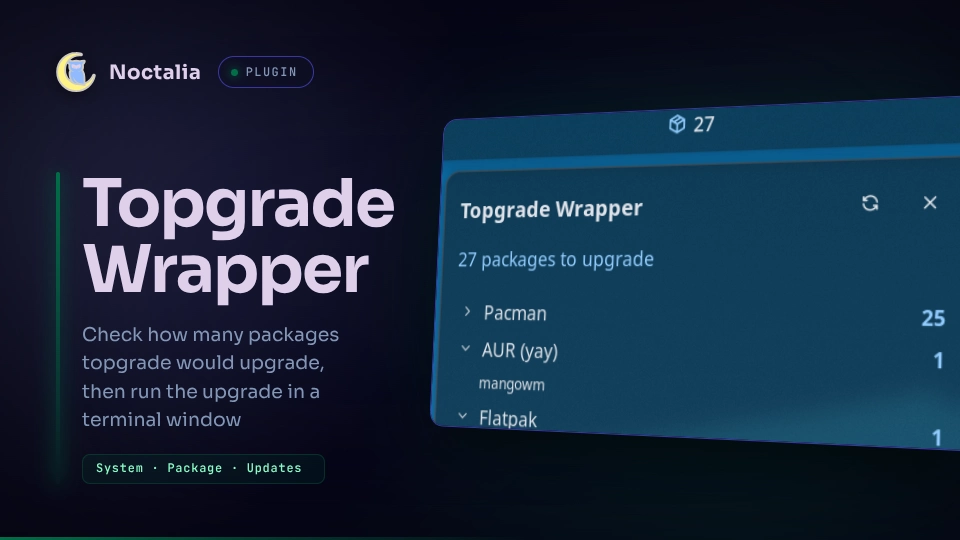
About
Topgrade Wrapper
A noctalia v5 bar plugin for topgrade. The bar glyph shows how many packages are waiting; the panel checks for updates and starts the run in a terminal window.
Plugin
| Field | Value |
|---|---|
| ID | nightwatch75/topgrade-wrapper |
| Entries | Bar widget: topgrade-wrapper; panel: panel; service: service |
Requirements
Noctalia v5.0.0-beta.9 or newer (plugin_api = 24, for direct argv process
execution — the dry-run check execs topgrade itself, so no shell parses the
Topgrade config path).
Also topgrade on PATH, and env (coreutils) — the check runs under
LC_ALL=C, the only way to fix the locale with no shell involved, matching
topgrade's own English step headings.
A terminal emulator is needed for the update run: Noctalia's own detection
($TERMINAL, then ghostty, kitty, alacritty, wezterm, foot,
konsole, gnome-terminal, ptyxis, xterm), or the one set in
Terminal.
Everything else below is optional and affects only the count, never the upgrade.
Count coverage
A manager is counted when the tool that answers "how many updates?" is installed. A missing tool costs you a number, not a feature.
| Counted | Needs |
|---|---|
| Arch repositories | checkupdates (from pacman-contrib) |
| AUR | yay or paru |
| Debian/Ubuntu | apt-get |
| Fedora/RHEL | dnf |
| openSUSE | zypper |
| Flatpak, Snap, Homebrew | flatpak, snap, brew |
| Cargo, npm, RubyGems, pip | cargo-install-update (from cargo-update), npm, gem, pip |
Anything topgrade runs but this list doesn't cover — Void's xbps, Gentoo's
emerge, Alpine's apk, Nix, VS Code extensions, containers, and so on — is
named under Not counted in the panel and left out of the total. A partly
covered step (an AUR helper with no pacman-contrib, say) names the manager
that couldn't answer, so the total is never mistaken for the whole system.
Usage
Add the topgrade-wrapper widget from Noctalia's widget picker, then click it
to open the panel. You can also toggle it directly, or bind it in your
compositor:
noctalia msg panel-toggle nightwatch75/topgrade-wrapper:panel
| Action | Effect |
|---|---|
| Left click (bar glyph) | Open/close the panel |
| Right click (bar glyph) | Check for updates now |
| Middle click (bar glyph) | Open this widget's settings |
| Check Updates (panel) | Count what topgrade would upgrade |
| Click a manager row (panel) | Expand or collapse its packages |
| Hover a package (panel) | Show its full installed → available versions below the list |
| Update (panel) | Run topgrade in a terminal window |
| Dismiss (panel) | Keep the numbers, return the glyph to its resting colour |
| ↻ refresh (panel header) | Same as Check Updates |
| ▶ run now (panel header) | Same as Update — run topgrade straight away, skipping the check |
| ⚙ settings (panel header) | Open this plugin's page in Settings → Plugins |
Left and right click are declared as separate, remappable actions, so you can rebind them from the bar's own gesture settings.
The plugin's settings page also opens from the command line:
noctalia msg settings-open-plugin nightwatch75/topgrade-wrapper
The glyph turns to the accent colour with the pending count once a check
finds something, stays neutral while up to date or after Dismiss, and
turns red when topgrade is missing or a check failed. Its tooltip shows the
status, the per-manager breakdown, and the time of the last check.
Checking
topgrade has no "how many packages?" mode, so the check runs in two steps:
topgrade --dry-run --no-self-updatereports the steps topgrade would run, honoring your own topgrade configuration and the Excluded steps setting.- Every package manager named in that output is asked once, read-only, to
list what it has pending (
checkupdates,flatpak remote-ls --updates, and so on).
The panel shows one row per manager with updates, the total in the headline, Up to date for managers that answered zero, and Not counted for steps with no query behind them. A query that times out or errors is also moved to Not counted, never shown as zero.
Click a manager row to expand it into its packages; the number is the exact
length of that list. Each package shows its name and, where reported,
installed → available, elided to fit the row — hover it to see the full
text in the line under the list. Flatpak shows short commits (187a4c5 → 7a8c453) when its version string doesn't move. Homebrew and npm report names
only. Turn off Show package versions for name-only rows; hovering still
shows the full detail either way. Very long lists are trimmed with a +N more line.
Checks only run on request, unless Auto-check interval is set. A check that finds updates can send a desktop notification (Notify when updates are found) and play a sound (Sound when updates are found).
Updating
Update opens a terminal running topgrade. Nothing runs in the
background: package managers keep their prompts, and sudo asks for your
password on the terminal's tty. The window closes when the run ends unless
Keep the terminal open is on.
While the run is in flight the panel says so, and the plugin watches for the
topgrade process; once it's gone, the counts refresh automatically.
Settings
| Setting | Type | Default | Description |
|---|---|---|---|
topgrade_config |
file |
(empty) | Alternative topgrade configuration, passed as --config. Empty lets topgrade resolve its own file. |
exclude_mode |
select |
config |
Where skipped steps come from: topgrade configuration (its own disable list) or Override with the list below. |
exclude_steps |
string_list |
(empty) | topgrade step ids to skip, passed as --disable <id> (e.g. flatpak, cargo, containers). Shown and applied only in override mode. Run topgrade --help for the full list. |
auto_check_hours |
int |
0 |
Check automatically every N hours. 0 never checks on its own. |
notify_on_updates |
bool |
true |
Send a desktop notification when a check finds packages to upgrade. |
sound_on_updates |
bool |
false |
Play a short sound when a check finds packages to upgrade. |
show_versions |
bool |
true |
Show installed → available beside each package. Off lists names only; hovering still shows the full pair either way. |
terminal |
string |
(empty) | Terminal command for the update run, e.g. kitty. Empty uses Noctalia's detection. |
assume_yes |
bool |
false |
Pass --yes so package managers do not ask for confirmation. |
sudo_loop |
bool |
false |
Pass --sudoloop, so the password is asked once and the sudo timestamp refreshes for the whole run. |
keep_terminal_open |
bool |
false |
Pass --keep so the window waits for a key press instead of closing. |
glyph |
glyph |
package |
The glyph shown for the widget on the bar. |
show_count |
bool |
true |
Show the pending-update count next to the glyph. |
Excluding steps
By default the plugin adds nothing: what topgrade skips is whatever the
disable list in your topgrade.toml says. Switch Excluded steps source
to Override with the list below to also pass those ids as --disable <id>
on every command, check and run alike — your config file is never rewritten,
and --disable can only add exclusions, never re-enable one your
topgrade.toml already sets.
Changing the mode or the list invalidates the last count, since it described
a different command. Only [a-z0-9_] ids are accepted; anything else is
dropped with a log line. An id topgrade doesn't know fails the check with
topgrade's own error message.
IPC
The service accepts the same three actions as the panel buttons, so a check or a run can be bound to a key or driven from a script:
noctalia msg plugin nightwatch75/topgrade-wrapper:service all check
noctalia msg plugin nightwatch75/topgrade-wrapper:service all update
noctalia msg plugin nightwatch75/topgrade-wrapper:service all dismiss
Notes
- Commands spawned.
topgrade --dry-run --no-self-updatefor the step list; one read-only listing query per detected manager (checkupdates,yay -Qua,paru -Qua,apt-get -s upgrade,dnf check-update,zypper list-updates,flatpak list+flatpak remote-ls --updates,snap refresh --list,brew outdated,cargo install-update --list,npm -g outdated,gem outdated,pip list --outdated); and, for the run, your terminal withtopgradeinside it. No upgrade command ever runs outside that terminal window. - Network. Several count queries contact package mirrors, the AUR RPC, or a Flatpak remote — read-only, and only when a check runs.
- Privileges. The plugin never elevates anything itself. topgrade
escalates per step with its own
sudo_command, prompting on the terminal's tty. Settingsudo_command = "pkexec"in yourtopgrade.tomlroutes that through Noctalia's polkit agent as a graphical dialog instead. - Files. The plugin writes nothing: no cache, no state file, and your
topgrade.tomlis never modified. - Counts are per manager, not per step. A count is only as good as the query behind it; managers without one are named, not estimated.
- Settings that change the command line (the config file, excluded steps) invalidate the last result; cosmetic edits like the glyph leave it alone.
Install
Install Topgrade Wrapper from Noctalia's plugin store (Settings → Plugins), then add the widget to a bar from Settings → Bar. Plugin options live in Settings → Plugins.
For local development, add your working copy as a path source instead
(.luau edits hot-reload):
noctalia msg plugins source add dev path /path/to/plugins
noctalia msg plugins enable nightwatch75/topgrade-wrapper
License
MIT.
Versions
| Version | Plugin API | Updated |
|---|---|---|
| v0.1.0 latest | 24 | Sep 4, 2026 |
| v0.0.6 | 15 | Aug 2, 2026 |
| v0.0.2 | 9 | Jul 26, 2026 |
Older versions stay installable on a Noctalia release whose plugin API is below the latest version's.