 Noctalia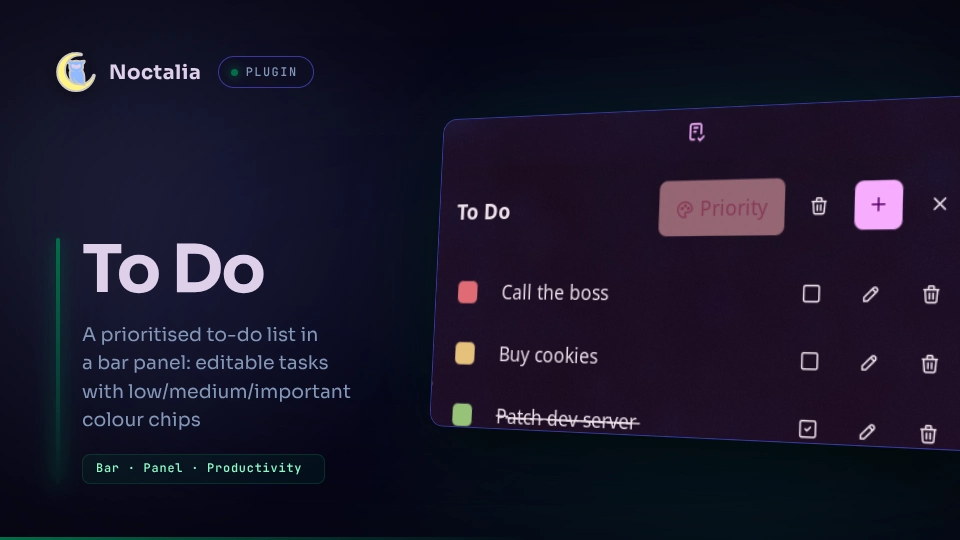
About
To Do
A noctalia v5 bar plugin: a prioritised to-do list. Click the bar glyph to toggle a panel of task rows — add tasks with + or N, tick them off (the text is struck through), edit or delete with the row's own buttons, and set each task's priority one at a time or all at once. Right-click a task for the same actions in a context menu. The list is stored as a single JSON file; no external commands are run.
Plugin
| Field | Value |
|---|---|
| ID | nightwatch75/todo |
| Entries | Bar widget: todo; panel: panel |
Usage
Add the todo widget from Noctalia's widget picker and click it to open the
task panel. You can also open the panel directly or bind it in your compositor:
noctalia msg panel-toggle nightwatch75/todo:panel
| Action | Effect |
|---|---|
| Left click (bar glyph) | Open/close the To Do panel |
| + or N (panel) | Add a task at the top of the list, editing it right away |
| Sort toggle (panel header) or S | Switch ordering between Priority and Manual |
| Colour chip (row) | Cycle the task's priority: important → medium → low |
| ☰ grip (row, manual only) | Drag the row to a new position (reorder) |
| Click the task's text | Edit the task's text |
| Right-click the task's text | Open the row menu: edit, done, priority, delete |
| Enter, or ✓ (row) | Commit the edit — the row goes back to a static line |
| ☐ / ☑ button (row) | Toggle done/to-do (done tasks are struck through) |
| ✏️ / 🗑 button (row) | Edit / delete that task |
| Glyph next to a legend entry | Set every task to that priority |
| ✔️✔️ / ☐ button (panel footer) | Mark every task done / undone |
| 🗑 button (panel header) | Delete every done task (asks first) |
| ⚙ button (panel header) | Open this plugin's page in Settings → Plugins |
That settings page also opens from the command line, so it can be bound in your compositor too:
noctalia msg settings-open-plugin nightwatch75/todo
Priorities
Each task carries a priority, shown at the start of the row as a small coloured square — click it to cycle. A legend at the foot of the panel maps each colour to its category, and each entry's glyph button sets every task to that priority in one click:
| Priority | Colour |
|---|---|
| Important | red |
| Medium | amber |
| Low | green |
Ordering
The panel header carries a toggle (or press S) that switches between two ordering modes; the choice is remembered.
- Priority (default) — rows are sorted important → medium → low. Equal-priority rows keep their relative order. No grips are shown.
- Manual — rows keep the order you give them. Each row grows a ☰ grip on the left; changing a priority here only recolours the chip, it never moves the row.
Priority mode is only a view: the stored order is always the manual one, so switching between the two modes never loses your custom ordering.
Reordering in manual mode
Grab a row by its ☰ grip and drag it. Thin insertion zones open up between the rows as you drag; drop the row on one to move it there.
The row menu
Right-click a task's text to open a native context menu:
| Entry | Effect |
|---|---|
| Edit task | Put the row into edit mode |
| Mark as done/to do | Same as the row's ☐ / ☑ button |
| Priority | Set the priority directly (● marks the current one) |
| Delete task | Remove the task |
It offers the same actions as the row's own buttons, plus an explicit priority pick.
Editing
Rows are static lines by default. Click a task's text, its ✏️ button, or pick Edit task from the row menu to edit it; press Enter or the ✓ button to commit back to a static line. A new task (+ or N) lands at the top of the list, already in edit mode — committing it while still empty simply discards it. Edits are also autosaved after a short idle pause and on close.
Tick a task (☐ → ☑) to complete it — its text is struck through until you un-tick it. The bar glyph's tooltip shows how many tasks are still to do.
A task longer than the row wraps onto further lines and the row grows to fit, so the whole text stays readable.
Storage
Tasks live in one file, todo.json, inside the configured To Do folder
(default ~/Documents/Todo). It is a small JSON object,
{ "version": 2, "sort": "priority" | "manual", "tasks": [ … ] }, where tasks
is the array of { id, text, priority, done } objects (in manual order) — easy
to read, hand-edit, sync, or back up. An older plain-array file is still read
automatically.
Settings
| Setting | What it does |
|---|---|
| To Do folder | Where todo.json is stored (default ~/Documents/Todo). |
| Sound on complete | Play a short sound when a task is marked done. |
| Bar glyph | The glyph shown for the widget on the bar. |
| Show label | Show or hide all bar text beside the glyph (on by default). |
| Label | Text shown beside the glyph when Show label is on (To Do by default). |
| Bar count | Which count the bar label shows: Total, Pending only, or Pending/total (Total by default). |
The panel header's count toggle still controls whether the task count follows the label. With Show label off, the bar shows only the glyph; the pending count remains available in its tooltip.
Install
Install To Do from Noctalia's plugin store (Settings → Plugins), then add the widget to a bar from Settings → Bar. Plugin options live in Settings → Plugins.
For local development, add your working copy as a path source instead
(.luau edits hot-reload):
noctalia msg plugins source add dev path /path/to/plugins
noctalia msg plugins enable nightwatch75/todo
Requirements
- noctalia v5.0.0-beta.9 or newer (
plugin_api = 28, for the row's right-click menu) - No external dependencies
License
MIT.
Versions
| Version | Plugin API | Updated |
|---|---|---|
| v1.2.2 latest | 28 | Sep 28, 2026 |
| v0.0.14 | 15 | Jul 28, 2026 |
| v0.0.10 | 9 | Jul 24, 2026 |
| v0.0.9 | 5 | Jul 24, 2026 |
| v0.0.7 | 3 | Jul 15, 2026 |
Older versions stay installable on a Noctalia release whose plugin API is below the latest version's.