
About
Timezone Hub
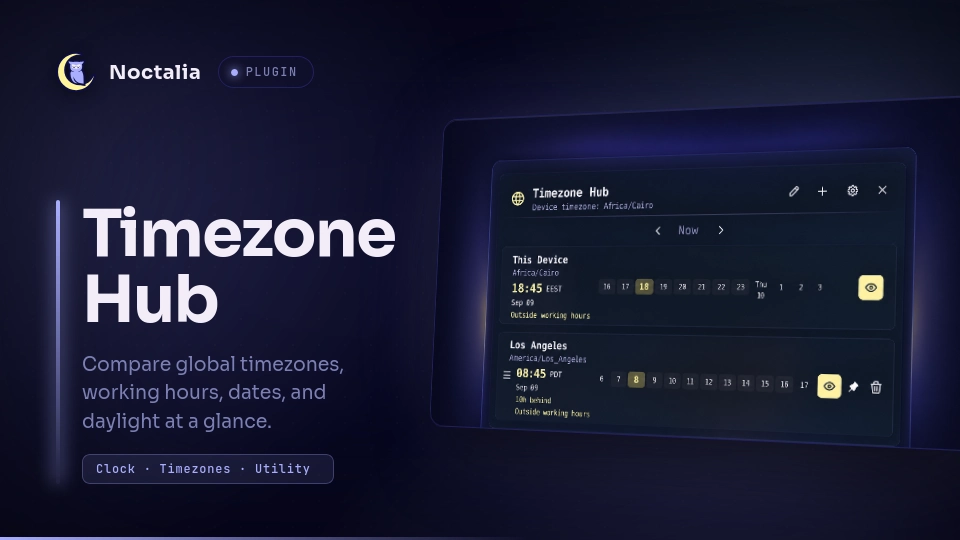
Timezone Hub is a multi-timezone clock for comparing cities, working hours, dates, and daylight at a glance. It can also change the device timezone from the Noctalia panel.
Plugin
| Field | Value |
|---|---|
| ID | ahmedhossamdev/timezone-hub |
| Entries | Bar widget: bar; panel: panel; service: service |
Requirements
- Install
timedatectlonPATHto detect, list, and change timezones. - Install
pkexeconPATHand run a polkit authentication agent to authorize device-wide timezone changes. /usr/share/zoneinfo/zone1970.tabor/usr/share/zoneinfo/zone.tabis optional and supplies representative coordinates for sunrise and sunset.
Usage
Add the Timezone Hub bar widget in Settings → Bar. Click the widget to open the comparison panel, or use:
noctalia msg panel-toggle ahmedhossamdev/timezone-hub:panel
The panel always shows the device timezone first. Use Add a timezone to search the IANA timezone database and add comparison cities. Drag the grip to reorder a city, use its eye button to show or hide it in the bar widget, use the pin button to make it the device timezone, and use the trash button to remove it. Up to three timezones can appear in the bar.
The pencil button changes the device timezone directly. This launches a polkit authentication prompt because the setting applies to the whole system. The settings button opens the plugin's settings page.
Settings
| Setting | Type | Default | Description |
|---|---|---|---|
time_format |
select |
24h |
Uses 24-hour or 12-hour times. |
show_date_in_bar |
bool |
true |
Shows each selected timezone's date in the bar widget. |
show_date_in_panel |
bool |
true |
Shows the local date in every panel row. |
show_relative_time |
bool |
true |
Shows ahead/behind, day, and working-hours descriptions. |
show_sun_times |
bool |
false |
Shows locally calculated sunrise and sunset times when timezone coordinate data is available. |
date_format |
select |
weekday |
Formats dates as weekday, short, or ISO. |
hours_before |
int |
2 |
Number of hours before the selected time shown in each hour strip, from 0 to 6. |
hours_after |
int |
9 |
Number of hours after the selected time shown in each hour strip, from 3 to 16. |
highlight_work_hours |
bool |
true |
Highlights the configured working-hour range. |
work_hour_start |
int |
9 |
Working day start hour, from 0 to 23. |
work_hour_end |
int |
17 |
Working day end hour, from 1 to 24. |
IPC
Open the panel:
noctalia msg panel-toggle ahmedhossamdev/timezone-hub:panel
Manage comparison timezones through the service entry:
noctalia msg plugin ahmedhossamdev/timezone-hub:service all add "America/Los_Angeles"
noctalia msg plugin ahmedhossamdev/timezone-hub:service all remove "America/Los_Angeles"
noctalia msg plugin ahmedhossamdev/timezone-hub:service all list
add and remove accept one exact IANA timezone. list returns the saved
comparison timezones.
Notes
- The plugin writes comparison timezones and bar selections to its Noctalia plugin data directory so they survive shell and plugin restarts.
- It makes no network requests.
- Sunrise and sunset are calculated locally from representative coordinates in the system timezone database. Times can vary within large timezones, and no value is shown for polar dates on which the sun does not rise or set.
- Changing the device timezone spawns
pkexec timedatectl set-timezoneand may show an authentication prompt.
Versions
| Version | Plugin API | Updated |
|---|---|---|
| v2.1.0 latest | 24 | Sep 9, 2026 |
Older versions stay installable on a Noctalia release whose plugin API is below the latest version's.