
About
Thunderbird Companion
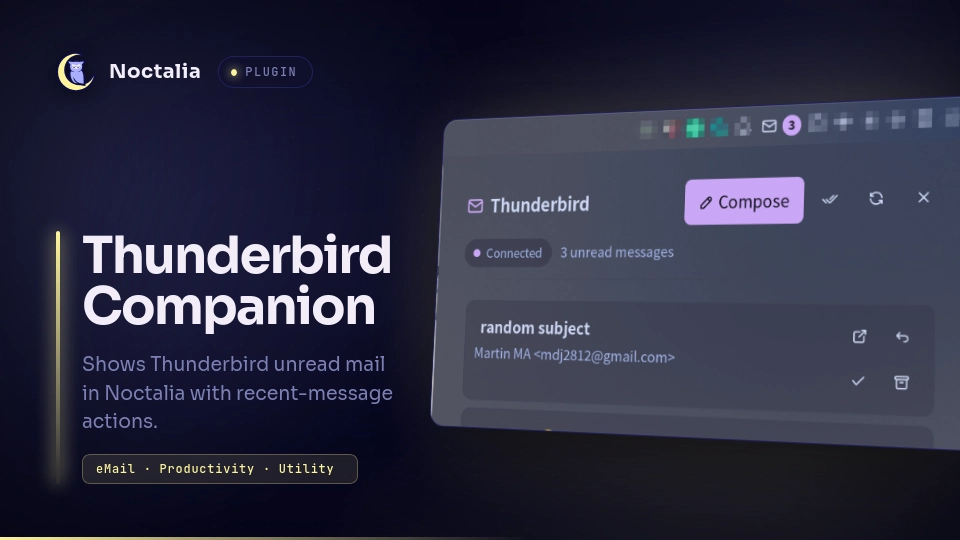
Show Thunderbird unread mail in the Noctalia bar and open a compact recent-mail panel without configuring IMAP or SMTP twice. Thunderbird remains responsible for accounts, credentials, synchronization, composing, and message storage.
Plugin
| Field | Value |
|---|---|
| ID | mdj2812/thunderbird-companion |
| Entries | Bar widget: mail; panel: inbox; service: bridge |
Requirements
thunderbird128 or newer provides the mailbox and companion MailExtension APIs.python3builds the bundled MailExtension, runs the bundled native-messaging host, and installs the bridge when you select Set up bridge.xdg-openopens the generated extension package directory on request.
The bridge currently targets a native Linux Thunderbird installation. Sandboxed Flatpak and Snap builds may not be able to launch host native-messaging applications.
Setup
- Enable the plugin's
bridgeservice entry and open the panel. - Select Set up bridge. No terminal interaction is required: the plugin
validates the bundled bridge against
bridge-version.json, installs the native host, builds the XPI from the readable bundled source, and shows the manual extension-installation actions in the panel. It does not open external windows automatically. Specifically, the setup:- installs the native host, release marker, and XPI under
$XDG_DATA_HOME/noctalia-thunderbird-companion/(under~/.local/share/whenXDG_DATA_HOMEis unset); - registers it in
~/.mozilla/native-messaging-hosts/; and - keeps the generated package as
thunderbird-companion.xpiin that data directory.
- installs the native host, release marker, and XPI under
- Select Open Add-ons and Open package folder in the panel, then drag
thunderbird-companion.xpiinto Thunderbird Add-ons and approve its account/message/native-messaging permissions.
Thunderbird deliberately has no unprivileged command-line API for silently installing an extension. The final drag and permission approval are therefore kept as the one required security confirmation; setup automates everything around it. The bridge connects automatically after installation.
The bridge does not use an independent update channel. Its readable source and compatibility metadata ship with the plugin. When a plugin update requires a different bridge version or protocol, the panel reports Companion update required and rebuilds both local components from that plugin revision.
Thunderbird must be running for live mailbox state and message actions. The panel keeps the last snapshot when Thunderbird is closed.
Usage
Add the Thunderbird Companion mail widget to the bar. It displays the
unread count; click it to open the recent unread-message panel. Right-click the
widget to compose a message.
The panel can also be opened with:
noctalia msg panel-toggle mdj2812/thunderbird-companion:inbox
Select a message to open it in Thunderbird. The row actions mark it as read or archive it according to Thunderbird's account settings, or open a reply compose window. The panel provides compose, mark-all-read, refresh, launch, setup, and close actions as appropriate.
Settings
| Setting | Type | Default | Description |
|---|---|---|---|
notify_new |
bool |
false |
Show Noctalia notifications for newly reported unread messages. |
max_messages |
int |
20 |
Recent unread rows shown in the panel (5–50). |
thunderbird_command |
string |
thunderbird |
Command used for launch and fallback compose actions. |
Widget glyph |
glyph |
mail |
Bar icon. |
IPC
noctalia msg plugin mdj2812/thunderbird-companion:bridge all refresh
noctalia msg plugin mdj2812/thunderbird-companion:bridge all compose
noctalia msg plugin mdj2812/thunderbird-companion:bridge all launch
noctalia msg plugin mdj2812/thunderbird-companion:bridge all setup
noctalia msg plugin mdj2812/thunderbird-companion:bridge all cmd '{"op":"mark_all_read"}'
noctalia msg plugin mdj2812/thunderbird-companion:bridge all cmd '{"op":"mark_read","id":123}'
noctalia msg plugin mdj2812/thunderbird-companion:bridge all cmd '{"op":"reply","id":123}'
cmd accepts open_message, mark_read, archive, and reply operations
with the current numeric Thunderbird message id, plus mark_all_read without
an ID. Message IDs are session-scoped, so scripts should obtain them from the
latest bridge snapshot rather than storing them.
Notes
- The MailExtension requests access to account/folder metadata, message headers, read-state updates, archiving, compose windows, and native messaging. It does not read or export message bodies.
- Snapshot files contain sender, subject, date, account, folder, and unread
state. They are stored with user-only permissions under
$XDG_STATE_HOME/noctalia/thunderbird-companion/(or~/.local/state/noctalia/thunderbird-companion/). - Connected status comes from the native host's short-lived heartbeat, not from the cached snapshot. Removing the extension or closing Thunderbird therefore changes the plugin to offline while retaining cached messages.
- Setup copies the bundled native host, builds the bundled MailExtension, and
writes the per-user native-host registration and XPI paths documented above.
Panel buttons launch
thunderbird about:addonsorxdg-openonly when selected. - No mail-server credentials are exposed to Noctalia or the native host.
- The native host accepts messages only from the bundled extension ID and only exchanges snapshots and a small fixed command set.
Versions
| Version | Plugin API | Updated |
|---|---|---|
| v0.1.1 latest | 9 | Sep 1, 2026 |
Older versions stay installable on a Noctalia release whose plugin API is below the latest version's.