
About
ThinkPad Fan & Thermal Control
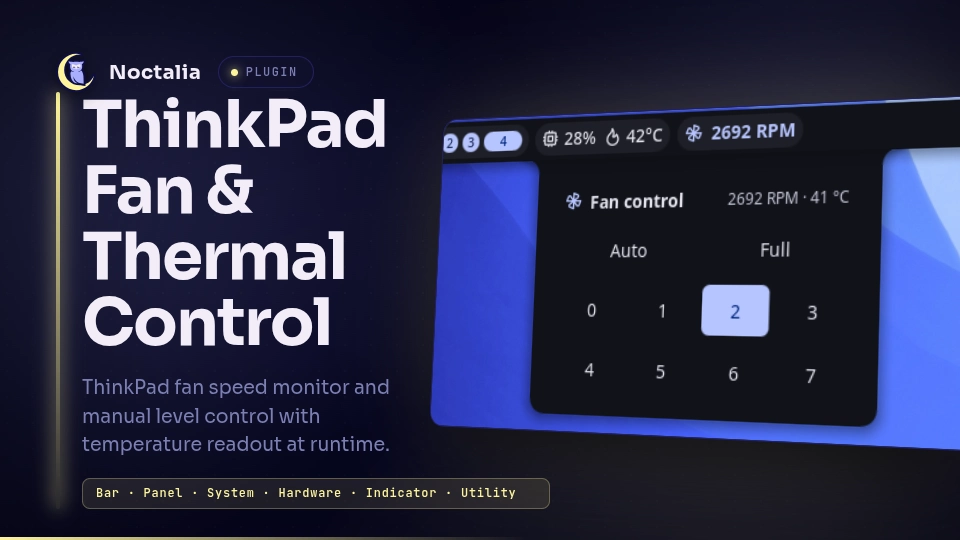
A fan monitor and manual speed control for Noctalia v5, for ThinkPads using
the thinkpad_acpi kernel module. The bar widget shows the current fan RPM and
turns a warning color when the fans are forced off or set to a manual level.
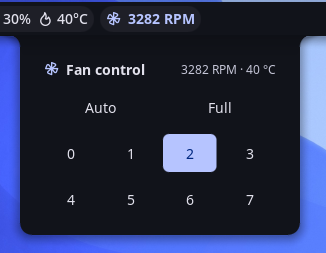
Clicking it opens a panel to pick a fan level — no root needed at runtime.
Ported from the Noctalia v4 (Quickshell/QML) plugin of the same name to the v5 Luau plugin runtime.
Plugin
Manifest id piero-93/thinkpad-fan. Three entries share one state snapshot (no
Lua memory is shared between them):
service— headless: polls/proc/acpi/ibm/fanand the thermal zone, and performs the fan-level writes.widget— the bar widget: fan glyph +NNNN RPM, tinted by status. Click it to open the panel.panel— the control surface: a grid of fan levels (Auto, Full, 0–7). Toggle it from a keybind with:noctalia msg panel-toggle piero-93/thinkpad-fan:panel
Features
- Live RPM in the bar, with a tooltip showing speed, level, and temperature.
- Status coloring — the widget turns red when the fans are forced off (level 0) and uses the accent color for any manual override.
- Manual level control — Auto, Full (disengaged), or fixed levels 0–7.
- Temperature readout from a configurable thermal zone.
Requirements
- A ThinkPad exposing
/proc/acpi/ibm/fanthrough thethinkpad_acpikernel module, loaded withfan_control=1(see Setup). - The service reads and writes those files through a shell, so
shandcatmust be onPATH. Both ship with every distro (coreutils and the system shell); there is nothing to install. - The bundled setup script additionally uses
sudo,bash,dirname,getent,groupadd,usermod,chgrp,chmod,rm, andudevadm— all part of coreutils, shadow-utils, and systemd/udev.
Setup (required for manual control)
Manual fan control needs two things, handled once by the included script:
- the
thinkpad_acpimodule loaded withfan_control=1, and - write access to
/proc/acpi/ibm/fanfor your user.
Run it from the installed plugin directory:
cd ~/.local/share/noctalia/plugins/thinkpad-fan/scripts
sudo ./setup-fan-permissions.sh
The script is idempotent, and it makes these changes to your system:
| Change | Detail |
|---|---|
| Creates a group | fan_ctl, and adds you to it with usermod -aG |
| Installs a udev rule | /etc/udev/rules.d/99-noctalia-thinkpad-fan.rules — chgrp fan_ctl + chmod 0664 on /proc/acpi/ibm/fan at every module bind |
| Installs a modprobe option | /etc/modprobe.d/99-noctalia-thinkpad-fan.conf — options thinkpad_acpi fan_control=1 |
Write access is granted to the fan_ctl group only — the file is not made
world-writable, so other local processes cannot drive your fans.
Then log out and back in so the group membership applies, and reboot (or
reload thinkpad_acpi) if the script had to enable fan_control=1. Without
this setup the RPM/temperature readout still works, but changing the level will
fail (the panel shows a notification).
⚠️ Forcing the fans off (level 0) or to a fixed low level can let the machine overheat. Use manual levels with care; Auto returns control to firmware.
Migrating from the v4 plugin. Its setup script installed
/etc/udev/rules.d/99-thinkpad-fan.rules, which made /proc/acpi/ibm/fan
world-writable on every boot — that would undo the group-scoped access above, so
this script removes it, and only when its contents still match that exact rule.
Nothing else is deleted: a pre-existing /etc/modprobe.d/thinkpad_acpi.conf (or
any other thinkpad_acpi config) is left alone, since setting fan_control=1
twice is harmless.
NixOS
/etc/udev/rules.d is generated from system config on NixOS, so the script exits
instead of writing to it. Add the equivalent declaratively:
users.groups.fan_ctl = { };
users.users.<you>.extraGroups = [ "fan_ctl" ];
boot.extraModprobeConfig = ''
  options thinkpad_acpi fan_control=1
'';
services.udev.extraRules = ''
  ACTION=="add|bind", SUBSYSTEM=="platform", DRIVER=="thinkpad_acpi", RUN+="${pkgs.coreutils}/bin/chgrp fan_ctl /proc/acpi/ibm/fan", RUN+="${pkgs.coreutils}/bin/chmod 0664 /proc/acpi/ibm/fan"
'';
Usage
Install the plugin from Noctalia's plugin manager, then add the ThinkPad Fan & Thermal Control widget from the bar's Add-widget picker.
Contributors only — to run it from a checkout instead, register that checkout as a development source:
noctalia msg plugins source add dev path /path/to/community-plugins
noctalia msg plugins enable piero-93/thinkpad-fan
.luau edits hot-reload; plugin.toml changes apply on the next config reload.
Settings
| Setting | Type | Default | Description |
|---|---|---|---|
| Colorize by status | bool | true |
Tint the widget when forced off / manual |
| Left-click opens the control panel | bool | true |
Open the panel on left-click |
| Thermal zone | string | thermal_zone0 |
sysfs thermal zone for the temperature |
What it does to your system
For review transparency (this plugin is trusted, unsandboxed Luau):
- Reads
/proc/acpi/ibm/fanand/sys/class/thermal/<zone>/tempevery 2.5 s. The read goes throughnoctalia.runAsync, which executes via/bin/sh -c, so each poll spawns a shell and acat. Both paths are shell-quoted, and the configurable thermal zone is reduced to a single path segment before use. - Writes
level <value>to/proc/acpi/ibm/fan— through the same shell — only when you pick a level in the panel. The value is checked against a whitelist (auto,disengaged,0–7) before it reaches the command. - No network access, and no commands beyond the shell,
cat, and the redirect described above. - The setup script is never invoked by the plugin; you run it yourself with
sudo. Its system changes are listed in Setup above.
License
GPL-3.0
Versions
| Version | Plugin API | Updated |
|---|---|---|
| v1.0.0 latest | 3 | Aug 17, 2026 |
Older versions stay installable on a Noctalia release whose plugin API is below the latest version's.