 Noctalia
About
Theme Switcher
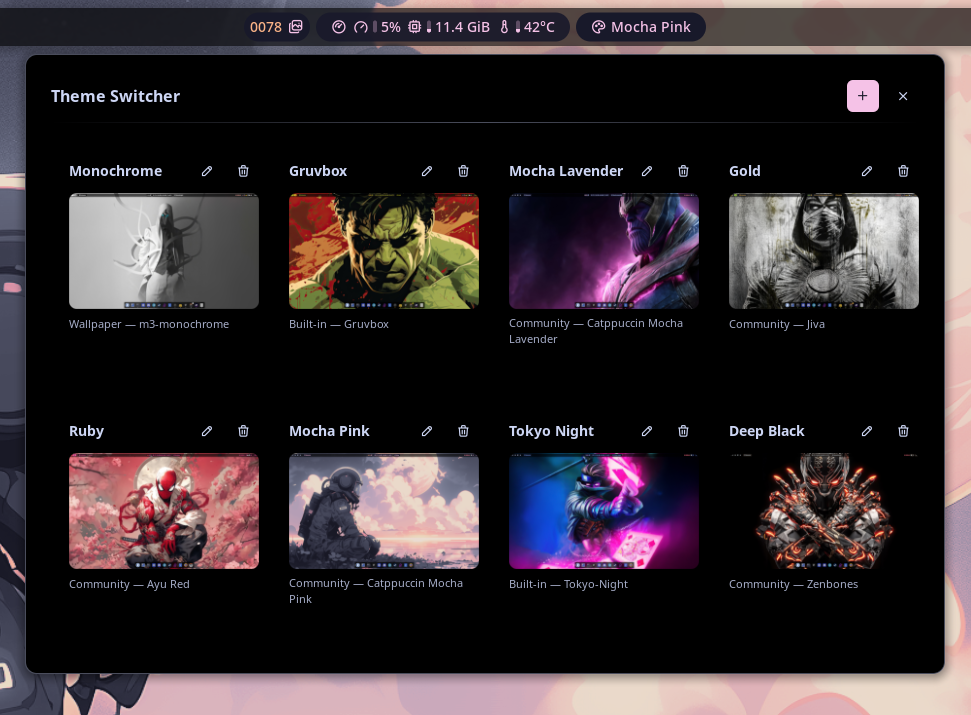
Browse saved themes in a carousel and apply palette, wallpaper, and templates to the shell in one click. Each theme bundles a palette source (built-in, wallpaper, community, or custom), the wallpaper that goes with it, a preview screenshot, and a title.
Plugin
| Field | Value |
|---|---|
| ID | theblackdon/theme-switcher |
| Entries | Shortcut: open; shortcut: wallpaper; shortcut: random; bar widget: theme-switcher; panel: carousel; panel: editor; panel: wallpapers; panel: wallpaper-picker; service: wallpaper-ipc |
Usage
Enable the plugin in Settings → Plugins.
Add a
Theme Switcherbar widget, a control center shortcut, or run:noctalia msg panel-toggle theblackdon/theme-switcher:carouselIn the carousel, click a theme card to apply it immediately (palette source + selection, wallpaper, and templates). Use the pencil button on a card to edit it, the plus button to add a new one.
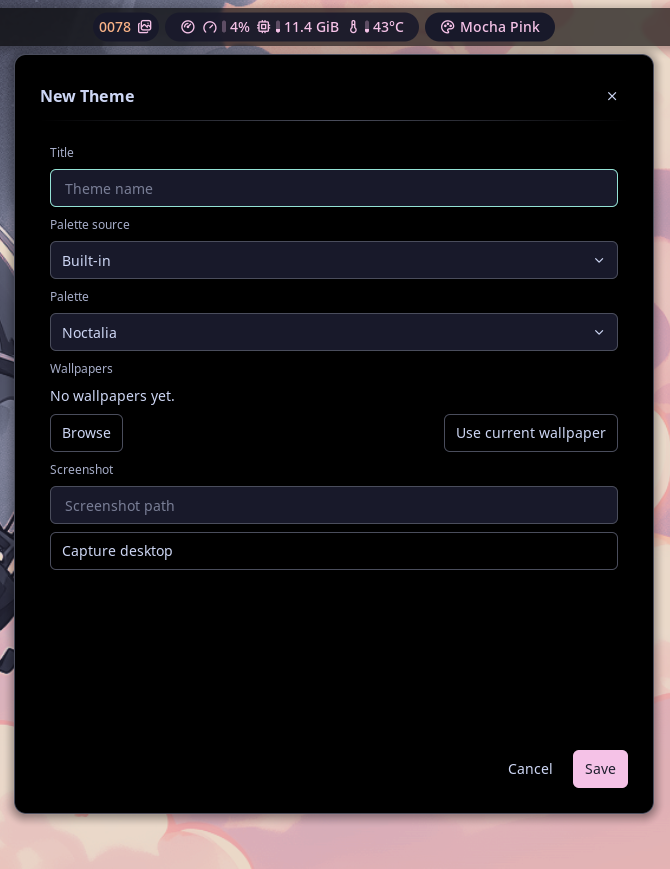
The editor lets you pick a palette source (built-in, wallpaper, community, or custom), the matching palette or generator scheme, one or more wallpapers, a screenshot path (including a "Capture desktop" helper), and a title. Use the
Browsebutton to open the multi-select wallpaper picker and add several images at once. Open the editor directly with:noctalia msg panel-toggle theblackdon/theme-switcher:editorThe
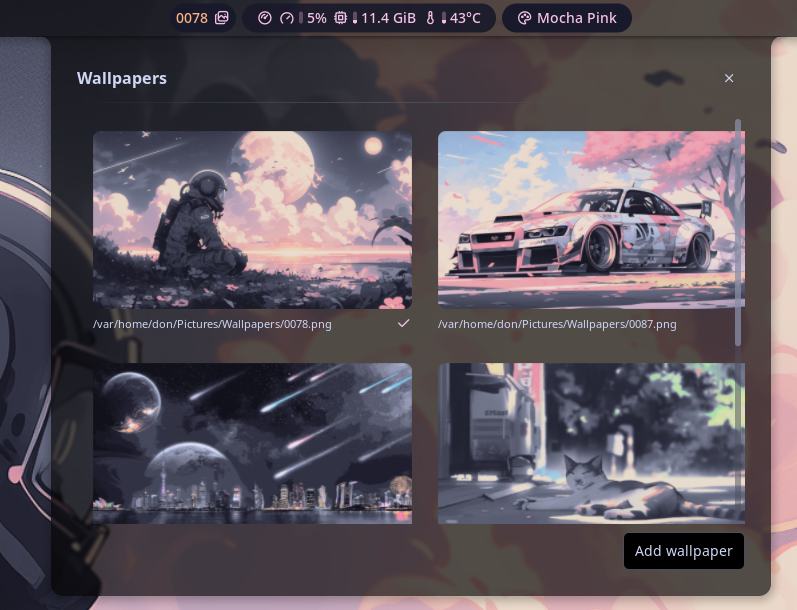
wallpapershortcut opens the wallpapers panel, which lets you browse and switch the wallpapers of the currently applied theme without re-applying the palette. TheAdd wallpaperbutton opens a multi-select thumbnail picker (paged, with a name filter and select all/clear) and appends every checked image at once. It browses the shell's wallpaper folder and generates small thumbnails in the background, so even a folder of hundreds of large wallpapers stays responsive. Open the panel with:noctalia msg panel-toggle theblackdon/theme-switcher:wallpapersThe picker can also be opened directly with
noctalia msg panel-toggle theblackdon/theme-switcher:wallpaper-picker.The
randomshortcut applies a random wallpaper from the currently applied theme with a single click.
Keyboard bindings
Wallpaper switching is reachable over IPC via the always-running wallpaper-ipc
service, so you can bind these to keys as KWin/KineticWE custom shortcuts
(Command/URL action):
noctalia-kwe msg plugin theblackdon/theme-switcher:wallpaper-ipc all random
noctalia-kwe msg plugin theblackdon/theme-switcher:wallpaper-ipc all next
noctalia-kwe msg plugin theblackdon/theme-switcher:wallpaper-ipc all apply "Rose Pine"
noctalia-kwe msg panel-toggle theblackdon/theme-switcher:carousel
noctalia-kwe msg panel-toggle theblackdon/theme-switcher:wallpapers
noctalia-kwe msg panel-toggle theblackdon/theme-switcher:wallpaper-picker
noctalia-kwe msg panel-toggle theblackdon/theme-switcher:editor
Use
:wallpaper-ipcforrandom/next/apply. Dispatching to the:wallpaperspanel only works while that panel is open; a service is always ready.
applytakes a theme id (the slug of its title, e.g.rose-pine) or its title ("Rose Pine"), case-insensitively. Partial matches work when unambiguous.
Use noctalia instead of noctalia-kwe if that is the binary name on your system.
How a theme is applied
Applying a theme sets the active wallpaper first, then runs noctalia msg color-scheme-set <source> <palette> to switch the palette, and finally noctalia msg templates-apply to re-render the configured templates. A theme can hold several wallpapers; the active one is selected in the walls panel.
Screenshots
| Carousel | Editor | Wallpapers |
|---|---|---|
 |
 |
 |
Notes
- Community palettes are listed from the Noctalia palette catalog over HTTP, with an offline fallback to the plugin's cached copy and the shell's community-palette cache.
- Custom palettes are read from
~/.config/noctalia/palettes/*.json. - Themes are stored in the plugin's data directory (
themes.json). - Picker thumbnails are generated in the background with the first available tool (
magick,convert,vipsthumbnail, orffmpeg) and cached under the plugin data dir. If none is installed, the picker falls back to a filename checklist.
Versions
| Version | Plugin API | Updated |
|---|---|---|
| v0.2.1 latest | 43 | Oct 25, 2026 |
| v0.2.0 | 28 | Oct 14, 2026 |
Older versions stay installable on a Noctalia release whose plugin API is below the latest version's.