
About
Task Warrior
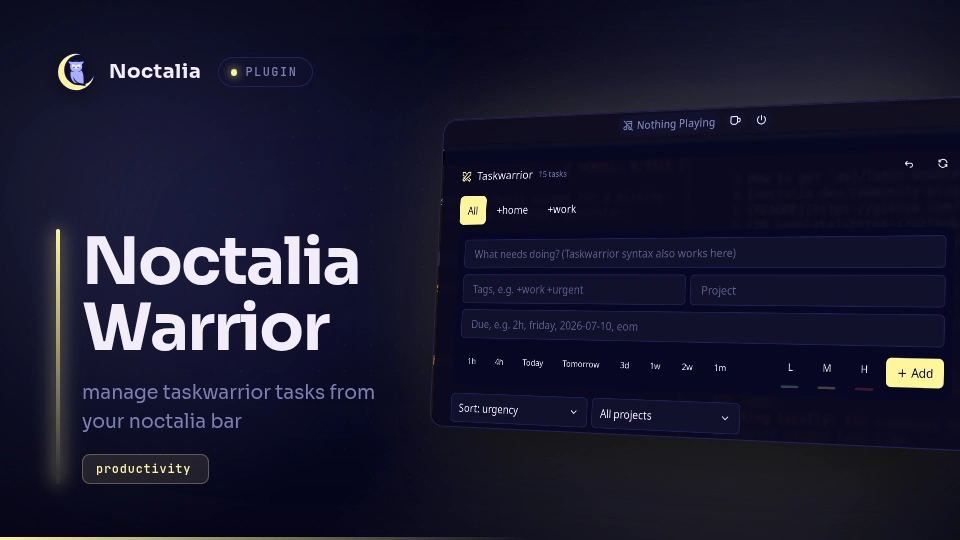
Taskwarrior on your Noctalia bar. A bar widget shows how many tasks are
pending and turns red when something is overdue or due today. Its panel lets you view, add, edit,
complete and delete tasks. Everything goes through the task CLI, so the panel and your terminal
always show the same tasks.
Plugin
| Field | Value |
|---|---|
| ID | asj/task-warrior |
| Entries | Bar widget: bar; panel: panel; service: tasks |
Requirements
Install task (Taskwarrior 3.x or newer) and make sure it is on PATH. The plugin uses your existing
Taskwarrior configuration and data; it needs no extra setup.
Usage
Enable the plugin in Settings → Plugins, then add the Task Warrior widget (asj/task-warrior:bar)
to a bar section. The tasks service starts with the plugin and needs no setup.
- Left click the widget to open or close the panel.
- Right click it to refresh the task list immediately.
- Hover it to see the pending, overdue and due-today counts.
The panel can also be toggled from a keybind or script:
noctalia msg panel-toggle asj/task-warrior:panel
In the panel:
- Tabs are built from the tags on your pending tasks (
+work,+home, …), plus an optional All tab. - Add a task with the form at the top: a description, plus fields for tags, project, due date and
priority. The tags field starts with the current tab's tag. The due field accepts any Taskwarrior
date expression (
2h,friday,eom,2026-07-10), and its preset menu (Tomorrow, 1w, …) fills one in for you. Raw Taskwarrior syntax such asdue:2h +worktyped into the description also works. - Sort by urgency, due date, priority or project, and filter by project on each tab.
- Complete or delete a task with the check and trash buttons on its row.
- Click a task to load it into the form, where you can edit its description, project, due date, priority and tags, or mark it Done or Delete it.
- The header's undo button reverts the last change, just like
task undo; its refresh button reloads the list.
Settings
| Setting | Type | Default | Description |
|---|---|---|---|
show_all_tab |
bool |
true |
Show an All tab listing every pending task. The other tabs come from the tags on your pending tasks. |
refresh_interval |
int |
30 |
How often, in seconds (5–3600), the task list is reloaded in the background so changes made elsewhere appear. |
Notes
- The plugin only runs the
taskcommand, and never touches the network or writes files itself. It runstask exportto read your pending tasks, andtask add,done,delete,modifyandundowhen you act in the panel. Taskwarrior writes these changes to its own data as usual. - Commands run with
rc.confirmation=off, so changes apply without a prompt. Use Undo (ortask undo) to revert a mistake. - Only
status:pendingtasks are shown; waiting, completed and deleted tasks are hidden.
Versions
| Version | Plugin API | Updated |
|---|---|---|
| v2.0.0 latest | 3 | Oct 22, 2026 |
Older versions stay installable on a Noctalia release whose plugin API is below the latest version's.