
Back to plugins 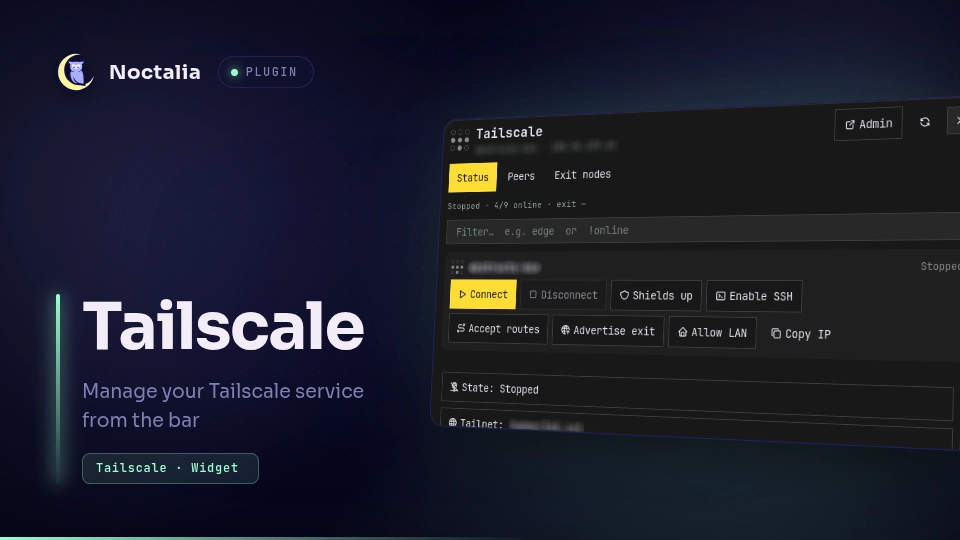
v1.0.6 davemhammer
About
Tailscale
Manage Tailscale connection state, peers, exit nodes, and preference toggles from Noctalia.
Plugin
| Field | Value |
|---|---|
| ID | davemhammer/tailscale |
| Entries | Bar widget: status; panel: manager; service: service; launcher: ts |
| Launcher Prefix | /ts |
Requirements
Install these on PATH (declared in plugin.toml dependencies):
tailscale— status, prefs, up/down, set, ping, ssh (requires a runningtailscaled)jq— slim prefs extract fromtailscale debug prefsxdg-open— open the admin console URL
You need permission to operate the daemon (operator user or equivalent).
Usage
Add the status bar widget (davemhammer/tailscale:status). Click for the panel.
Panel tabs:
- Status — connect/disconnect, shields, SSH, accept routes, advertise exit, allow LAN
- Peers — ping, SSH, copy IP/DNS, use as exit if offered
- Exit nodes — select or clear an exit node
Toggle chips use a fixed label and highlight when the setting is on.
Launcher: /ts, /ts peers, /ts exit, /ts up, /ts down.
noctalia msg panel-toggle davemhammer/tailscale:manager
Settings
| Setting | Type | Default | Description |
|---|---|---|---|
refresh_interval |
int |
10 |
Status poll interval in seconds. |
notify_on_peer_change |
bool |
true |
Notify when a peer goes online/offline. |
tailscale_bin |
string |
tailscale |
CLI path. |
admin_url |
string |
(empty) | Override admin console URL (default login.tailscale.com admin). |
ssh_user |
string |
(empty) | Default user for tailscale ssh. |
show_counts |
bool (widget) |
true |
Show online/total peers on the bar. |
IPC
noctalia msg panel-toggle davemhammer/tailscale:manager
noctalia msg plugin davemhammer/tailscale:service all refresh
noctalia msg plugin davemhammer/tailscale:service all up
noctalia msg plugin davemhammer/tailscale:service all down
noctalia msg plugin davemhammer/tailscale:service all toggle
Notes
- Shells out to
tailscale status --json | jq …(same Mullvad-exit filter as textstatus; those nodes stay on the Exit tab viaexit-node list),tailscale debug prefs | jq …(safe field projection),tailscale exit-node list,tailscale set …,tailscale up/down, optionaltailscale ping/tailscale sshin a terminal, andxdg-openfor the admin URL. A raw--jsondump on a Mullvad-enabled tailnet is large enough to trip Noctalia's plugin CPU budget and auto-disable the service. - Advertise-exit state is read from prefs
AdvertiseRoutes(0.0.0.0/0/::/0), not onlyExitNodeOption. - Network: only through the Tailscale CLI/daemon (no separate HTTP client in the plugin).
- Filesystem: no plugin-written credentials; uses local Tailscale state via the CLI.
- Brand mark assets are bundled under
assets/(Simple Icons style 3×3 dots).
Versions
| Version | Plugin API | Updated |
|---|---|---|
| v1.0.6 latest | 10 | Aug 14, 2026 |
Older versions stay installable on a Noctalia release whose plugin API is below the latest version's.