 Noctalia
About
Tablet Display
Use an Android tablet or an iPad as a second screen, extended or mirrored, streamed by Sunshine to Moonlight. Game-streaming tech gives hardware encoding, up to 120 fps and low delay, without Miracast's 1080p limit.
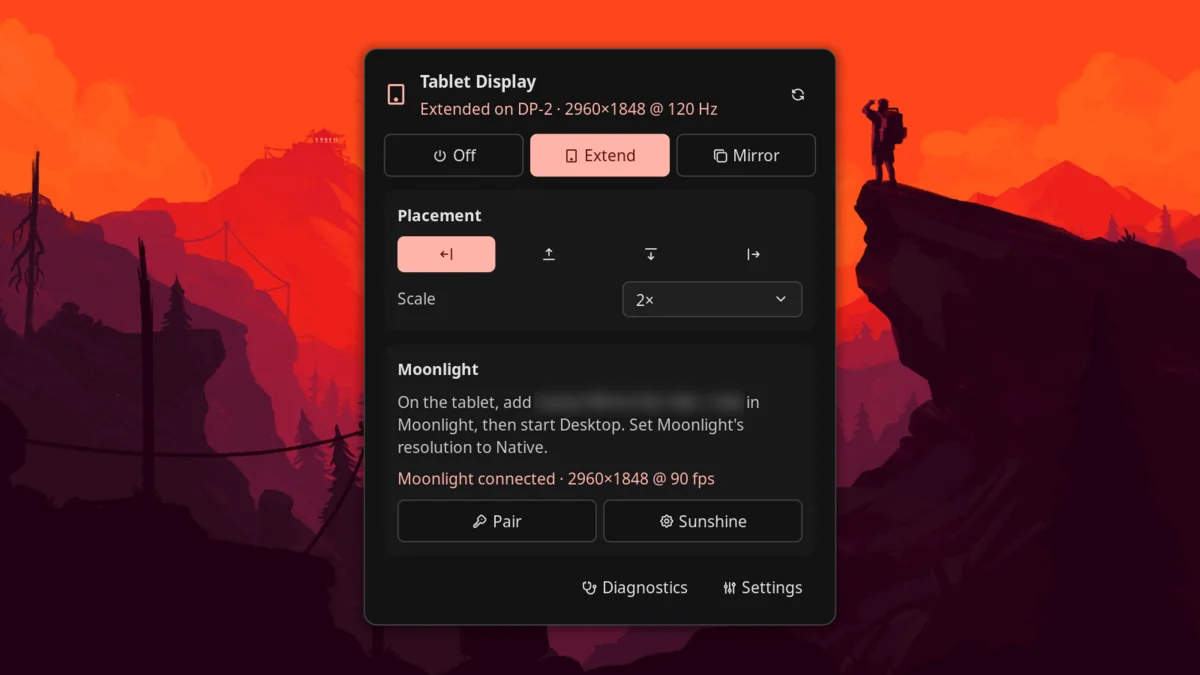
- Extend adds a display for the tablet. Move windows and workspaces onto it like any monitor, and place it left, right, above or below your screen.
- Mirror shows the monitor you're using on the tablet.
- The display matches your tablet's resolution, from a device preset or automatically from what Moonlight asks for.
Tested with a Samsung Galaxy Tab S9 Ultra and a Framework Laptop 16 (Radeon 780M) on niri 26.04, Hyprland 0.57, sway 1.12 and mango 0.18.5, with Sunshine 2026.1109 and Noctalia 5.4.1. iPads, other tablets and other GPUs should work but haven't been tested; reports are welcome.
Plugin
| Field | Value |
|---|---|
| ID | iwasironman/tablet-display |
| Entries | Bar widget: status; panel: panel; shortcut: toggle; service: service |
Requirements
sunshine: from your distribution (sudo pacman -S sunshineon Arch and CachyOS) or LizardByte's releases.jqandpython3onPATH.python3generates the display's EDID.pkexec(polkit), only on compositors that need the port method below.nmcli(NetworkManager), only for USB mode: it keeps your internet off the USB cable (see USB mode).- Moonlight on the tablet, from the Play Store or the App Store.
- The computer and tablet on the same network (5 or 6 GHz Wi-Fi, or wired for the computer), or connected by a USB cable (see USB mode). With a firewall, open Sunshine's ports: TCP 47984, 47989, 47990, 48010 and UDP 47998–48000.
- A supported compositor. How Extend adds a display depends on it:
| Compositor | Method | Setup |
|---|---|---|
| Hyprland | Virtual output (hyprctl output create headless) |
None |
| mango | Virtual output (mmsg dispatch create_virtual_output) |
None |
| sway | Virtual output (swaymsg create_output) |
None |
| niri | Unused display port: niri has no virtual outputs in a release yet | Install the port helper once |
The port method borrows an unused DP or HDMI connector: a small root helper
loads a generated EDID (the display's description) onto it and marks it
connected, so the compositor sees a real monitor. It works on AMD and Intel
graphics, not under Secure Boot kernel lockdown (cat /sys/kernel/security/lockdown
must show [none]), and not with the NVIDIA driver. Nothing is permanent: a
reboot undoes it. Mirror works on every compositor without the helper.
Usage
Set up Sunshine (once)
- Start Sunshine once, so you can reach its settings page:
The unit name depends on how Sunshine was packaged;systemctl --user start app-dev.lizardbyte.app.Sunshinesystemctl --user list-unit-files | grep -i sunshineshows yours. Turning on Extend in the panel also starts it. - Create Sunshine's login. Open https://localhost:47990, or press Sunshine in the panel. Your browser will warn about the certificate: Sunshine uses a self-signed one, so continue to the page. The first visit asks you to choose a username and password; you need them to pair Moonlight.
- Leave capture settings to the plugin. While the tablet display is on, the plugin sets Sunshine's output, capture method, audio and session hooks itself. Other Sunshine settings, such as encoder and bitrate, are yours to change in the web UI.
- Don't enable Sunshine at login. The plugin starts Sunshine when you turn the display on and stops it when you turn it off, so nothing can be streamed while it's off.
- If touch or the keyboard doesn't work later, log out and back in once.
Sunshine's package installs a udev rule that gives your session access to
/dev/uinput, and it applies at the next login.
Add the widget and tile
Add the Tablet Display bar widget (iwasironman/tablet-display:status) in
Settings → Bar → Bar Widgets, and optionally the Tablet shortcut
(iwasironman/tablet-display:toggle) to the control center's Home tab in
Settings → Control Center. You can
also open the panel directly:
noctalia msg panel-toggle iwasironman/tablet-display:panel
Use it
- Pick your tablet under Settings → Plugins → Tablet Display (or leave Auto).
- Open the panel by clicking the bar widget, and choose Extend or
Mirror. On niri the panel first offers Install helper, which runs
sudo helper/install.shin a terminal (see Notes). - Pair, the first time: in Moonlight on the tablet, add this computer by the address the panel shows. Moonlight displays a PIN. Press Pair in the panel, sign in with Sunshine's username and password, and enter the PIN.
- In Moonlight, set the resolution to Native and start Desktop.
- Use the arrows under Placement to put the tablet left, above, below or right of your screen, and Scale to size its contents.
- Choose Off when you're done. Sunshine stops.
Right-clicking the bar widget, or clicking the control-center tile, turns Extend on and off.
USB mode
A USB cable gives a steadier frame rate and lower delay than Wi-Fi. Sunshine and Moonlight work the same way; only the address Moonlight connects to changes.
- Connect the tablet with a USB cable and turn on USB tethering on the tablet (on Samsung: Settings → Connections → Mobile Hotspot and Tethering → USB tethering). Leave its Wi-Fi on; Android may grey out the switch without a connection to share. On an iPad this is Personal Hotspot over USB, which needs a cellular model; this has not been tested.
- The panel's Moonlight card shows Over USB: add
<address>in Moonlight. Add that address in Moonlight; it is recognised as the same, already-paired computer. - With a firewall, allow Sunshine on the cable's network interface.
Diagnostics prints the exact commands, for example with ufw:
The interface name comes from the physical USB port, so the same port keeps the same name.sudo ufw allow in on enp199s0f4u1 proto tcp to any port 47984,47989,47990,48010 sudo ufw allow in on enp199s0f4u1 proto udp to any port 47998:48000
With tethering on, the tablet also offers the computer an internet connection,
and NetworkManager prefers it over Wi-Fi. The plugin takes the default route off
the USB link (see the usb_keep_internet setting), so your internet stays on
Wi-Fi or Ethernet. Diagnostics opens a terminal with a report for bug
reports.
Settings
Under Settings → Plugins → Tablet Display. Advanced settings are behind Show advanced.
| Setting | Type | Default | Description |
|---|---|---|---|
device |
select |
auto |
The tablet, which sets the display's resolution and physical size. Presets: Galaxy Tab S9 Ultra, S9+, S9, iPad Pro 13" and 11" (M4). Auto uses the resolution Moonlight asks for (set Moonlight to Native). Takes effect the next time the display is turned on. |
custom_resolution |
string |
2560x1600 |
For Custom, and for Auto before Moonlight first connects: WIDTHxHEIGHT in landscape. |
custom_diagonal |
double |
0 |
Screen diagonal in inches, used to pick the automatic scale. 0 means unknown. |
audio |
bool |
false |
Play the computer's sound on the tablet while streaming. |
usb_keep_internet |
bool |
true |
In USB mode, keep the computer's internet traffic off the USB cable. Applies nmcli device modify <iface> ipv4.never-default yes ipv6.never-default yes to the current connection only (nothing is saved), and only when another internet connection exists. |
keep_sunshine |
bool |
false |
Advanced. Leave Sunshine running after Off, as it was before. Sunshine then follows your own Sunshine settings, which may stream your main screen. |
refresh_rates |
string |
60,90,120 |
Advanced. Refresh rates the display offers, comma-separated; it uses the fastest. 2960×1848 at 120 Hz needs about 17 Gbit/s, which the GPU's port must carry. |
method |
select |
auto |
Advanced. Virtual output, Unused display port, or Automatic (virtual where the compositor supports it, otherwise the port). |
port |
string |
auto |
Advanced. The connector the port method borrows, such as card2-DP-3. Auto tries free connectors on the GPU that drives the built-in screen first. |
IPC
The service accepts these events:
noctalia msg plugin iwasironman/tablet-display:service all extend
noctalia msg plugin iwasironman/tablet-display:service all mirror
noctalia msg plugin iwasironman/tablet-display:service all off
noctalia msg plugin iwasironman/tablet-display:service all toggle    # extend <-> off
The control script works from a shell too:
CTL=<plugin dir>/bin/tablet-display-ctl
$CTL extend | mirror [monitor] | off
$CTL set position left|right|above|below
$CTL set scale auto|1|1.5|2|...
$CTL state | jq .
$CTL doctor
$CTL uninstall      # turn off, restore sunshine.conf, delete state
Notes
- What it runs. The Luau entries only run
bin/tablet-display-ctl(bash), which callsjq,python3 bin/make-edid.py, the compositor's own tool (niri msg,hyprctl,swaymsg,mmsg,wlr-randr),systemctl --userto start and stop Sunshine,pkexecfor the port helper,nmclifor USB mode,ipto find the USB link, andxdg-openfor Sunshine's web page. The plugin makes no network requests itself; Sunshine does the streaming. - What it writes.
~/.config/sunshine/sunshine.conf: only a marked block while the display is on. Your own lines for the same keys are commented out and restored on Off.~/.local/state/noctalia-tablet-display/: settings, the generated EDID, and the hook Sunshine calls when Moonlight connects.$XDG_RUNTIME_DIR/noctalia-tablet-display/: session state and a log.- USB mode: the active NetworkManager connection of the tablet's USB link,
at runtime only (
never-default); saved profiles are not changed. - Sunshine's systemd user environment (
WAYLAND_DISPLAYand the compositor's socket), so it captures the session that turned the display on.
- The port helper (niri, or the port method elsewhere) is the only part
that runs as root. Install helper runs
sudo helper/install.sh, which installs/usr/local/libexec/noctalia-tablet-display/port-helperand a polkit policy letting the active local session run it without a password. It accepts an EDID only on stdin and only if its checksums pass, touches only external connectors, turns on only a disconnected one, and turns off only one it turned on. It writes the connector's debugfsedid_overrideand sysfsstatus, and sends a hotplug event. Remove it withsudo helper/install.sh --remove. - Sunshine is stopped before the display is removed. If the display it streams disappears, Sunshine falls back to streaming another monitor, such as your laptop screen.
- 120 Hz at full resolution needs a lot of bandwidth. If the frame rate wanders, stream at 90 fps or pick a lower resolution in Moonlight.
- Touch and placement. Sunshine maps touch onto a desktop it assumes
starts at 0,0, and refuses a display at a negative position. So the plugin
always lays the monitors out from 0,0: for Left and Above it moves
your other monitors right or down instead of using negative coordinates, and
Off moves them back (niri, sway, mango). Sunshine works out where touch
goes when Moonlight connects, so after changing Placement during a stream,
reconnect Moonlight for direct touch to follow; the panel reminds you.
Moonlight's trackpad mode isn't affected. On Hyprland, Left and
Above still use
auto-left/auto-up; if touch is off there, use Right or Below. - Touch on niri: niri maps touch to a monitor only from its config. For
Moonlight's direct-touch mode add
input { touch { map-to-output "DP-3" } }(your display's name) toconfig.kdl. Moonlight's trackpad mode works without it. Hyprland maps it automatically. - mango can only remove all virtual outputs at once, and re-arranges monitors when one changes; the plugin pins your other monitors in place.
- Status messages from the control script (errors, hints) are in English.
Sunshine and Moonlight are separate projects under their own licenses; this plugin only configures and drives them. MIT licensed.
Versions
| Version | Plugin API | Updated |
|---|---|---|
| v0.3.0 latest | 43 | Nov 13, 2026 |
Older versions stay installable on a Noctalia release whose plugin API is below the latest version's.