 Noctalia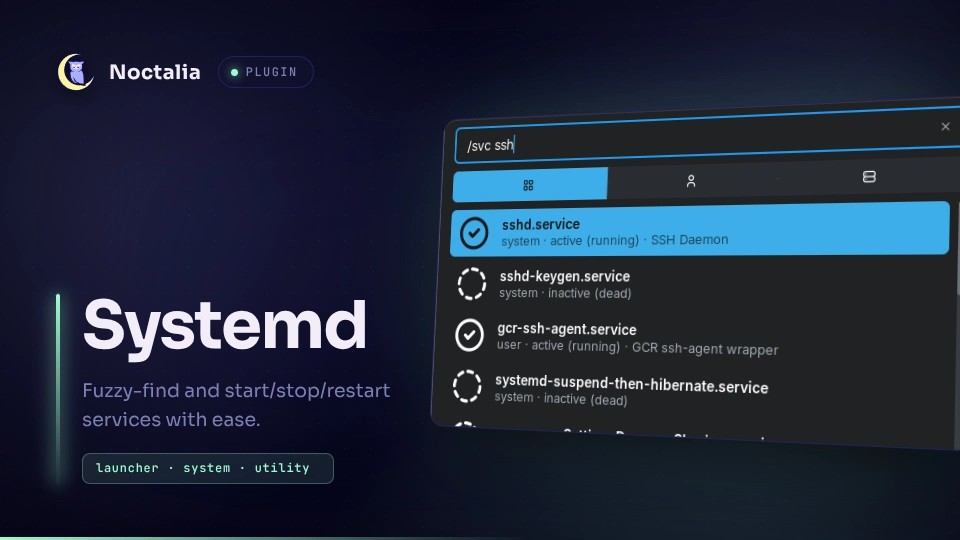
About
Systemd Units
Fuzzy-find systemd units from the launcher and start, stop or restart them. Units from both the user and the system manager are listed together, with their current state shown on every row.
Plugin
| Field | Value |
|---|---|
| ID | srounce/systemd |
| Entry | Launcher provider: units |
| Launcher Prefix | /svc |
Requirements
systemctl must be on PATH, which is the case on any systemd-based system.
Controlling system units goes through polkit, so a polkit authentication agent
must be running unless a wrapper command is configured in the settings.
Usage
Open the launcher and type /svc to list units. Failed units are shown first,
then running ones. Keep typing to filter by unit name or description, for
example /svc sshd. The launcher's category tabs narrow the list to user or
system units.
Select a unit to drill into its actions: the input becomes /svc <unit> and
the results change to Stop and Restart for a running unit, or Start
for one that is not running. Typing after the unit name filters the actions.
Selecting an action runs systemctl <action> <unit> (with --user for user
units) and shows a notification with the unit's new state, or the error output
if the command failed.
Settings
| Setting | Type | Default | Description |
|---|---|---|---|
scopes |
select |
both |
Which managers to list: user and system, user only, or system only. |
unit_types |
string_list |
["service"] |
Unit types to list, such as service, timer or socket. |
system_wrapper |
string |
"" |
Command prepended to systemctl for system units, for example sudo -n. Leave empty to rely on polkit. |
Notes
The plugin only spawns systemctl: list-unit-files and list-units to build
the list, then start, stop, restart and is-active for the chosen
action. Nothing is written to disk and no network access is made. The unit
list is cached for ten seconds between launcher queries.
Versions
| Version | Plugin API | Updated |
|---|---|---|
| v1.0.0 latest | 24 | Sep 20, 2026 |
Older versions stay installable on a Noctalia release whose plugin API is below the latest version's.