
About
Spotify Search
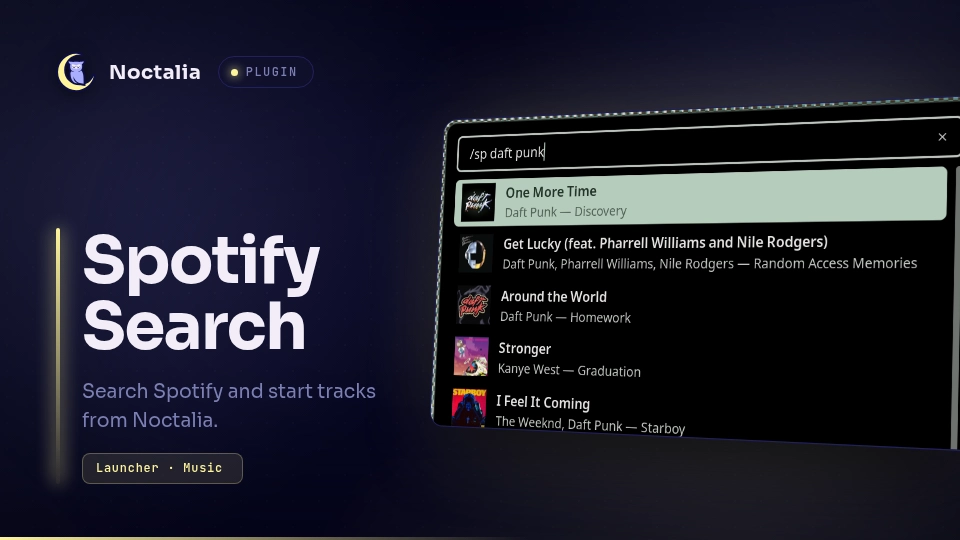
Search Spotify tracks from the Noctalia launcher, view cached album artwork, and start a selected track on an available Spotify playback device.
Plugin
| Field | Value |
|---|---|
| ID | notfinaldev/spotify |
| Entries | Launcher provider: tracks |
| Launcher Prefix | /sp |
Requirements
Install these commands on PATH:
python3(3.11 or newer) — runs the bundled Spotify Web API helper and reads TOML configuration.spotify_player— authenticates Spotify before the plugin can use its token cache. Runspotify_player authenticateonce.notify-send— reports playback failures.pgrep— detects whether the Spotify desktop client is running.gtk-launch— startscom.spotify.Clientwhen no playback device is available.
An authenticated Spotify account and an active Spotify playback device are required. Spotify's playback API normally requires Spotify Premium.
Usage
- Run
spotify_player authenticateonce to authenticate Spotify. - Open the Noctalia launcher and type
/spfollowed by a track, artist, or album, for example/sp daft punk. - Select a track to start playback. The plugin uses the active device first, then a computer device, then another available device. If no device exists, it starts the Spotify desktop client. Device discovery shares a 30-second deadline across authentication, polling, and network waits.
The provider searches immediately when the query changes, without an added typing delay. It shows a hint for an empty query, displays a loading row while searching, and reports unavailable authentication, search, and playback failures in the launcher or a desktop notification. Spotify can still rate-limit a personal application; the helper respects its cooldown rather than automatically retrying.
Search helpers have a 100-second process timeout to accommodate token refresh and uncached artwork downloads; playback helpers have a 75-second process timeout covering device discovery and the final playback request. A timeout is reported explicitly rather than as an empty search or a generic playback failure.
Notes
Authentication and privacy
- The plugin reads
client_idfrom~/.config/spotify-player/app.tomland the token from~/.cache/spotify-player/user_client_token.json(the cache used byspotify_player0.24.1). Setclient_iddirectly;client_id_commandis not executed by the helper. Neither file is stored in this repository. - When the access token is near expiry, the helper posts the refresh token to Spotify's token endpoint and atomically updates that local token file with mode
0600. No token is printed, included in launcher results, or sent anywhere except Spotify's HTTPS endpoints. - Search terms, playback-device queries, and playback requests are sent to Spotify's Web API over HTTPS. Album artwork URLs returned by Spotify are fetched over HTTPS.
Personal application setup
- Create an application in the Spotify Developer Dashboard, enable Web API, and register
http://127.0.0.1:8989/loginas a redirect URI. - Set
client_idto that application's Client ID in~/.config/spotify-player/app.toml. Setlogin_redirect_urito the same redirect URI. No client secret is required. - Run
spotify_player authenticateand approve the browser authorization. Changing the Client ID without reauthenticating does not change the application associated with an existing token. - Search from
/spafter authorization completes.
This avoids sharing ncspot's application quota, but does not remove Spotify's own limits. Development-mode applications require a Premium owner, allowlisted users, and a maximum of 10 results per search request. The plugin makes one search request rather than adding pagination requests.
Rate limits
- A Spotify HTTP 429 response records the
Retry-Afterdelay in seconds. Later helpers report the remaining cooldown without refreshing authentication or calling Spotify again. There is no automatic retry; search or activate a track again after the cooldown. - The cooldown is stored in
${XDG_CACHE_HOME:-~/.cache}/noctalia-spotify/rate-limit.json, with arate-limit.lockfile coordinating simultaneous helper processes. Atomic updates preserve the longest outstanding cooldown, including across shell restarts. - Missing, malformed, or negative
Retry-Aftervalues use a 30-second cooldown; zero values wait at least one second to avoid an immediate request loop. The plugin cannot lift Spotify's application-wide rate limit or control requests made by other clients.
Cache and processes
- Search returns at most 10 tracks from distinct albums. Uncached album artwork is stored in
${XDG_CACHE_HOME:-~/.cache}/noctalia-spotify/covers/as a hashed WebP filename. Individual downloads are limited to 2 MiB; entries older than 30 days are removed and the cache is capped at 100 MiB. - Cover cleanup tolerates entries removed by another search process. A disappearing cached cover is downloaded again rather than recreated as an empty image.
- The launcher asynchronously runs
python3 spotify_backend.py search <query>andpython3 spotify_backend.py play <track-id>. The helper may runnotify-send,pgrep -x spotify, andgtk-launch com.spotify.Clientas described above. - The configured Spotify Client ID identifies the application; it is not an account credential. The helper has no built-in shared application ID. Access and refresh tokens remain only in the local token cache.
Release notes
1.0.4
- Remove the two-second typing debounce; search immediately when the query changes.
- Retain Spotify rate-limit cooldown handling for personal applications.
1.0.3
- Use the application configured in
spotify_playerfor token refresh instead of a hard-coded shared ncspot Client ID. - Use Spotify's development-mode search limit of 10 results and document personal-application authorization.
1.0.2
- Wait for two seconds without a query change before searching Spotify.
1.0.1
- Respect shared Spotify rate-limit cooldowns for search, playback, and token refresh.
- Keep search results when concurrent cache cleanup removes an artwork entry.
- Bound device discovery with one deadline and give search/playback helpers explicit process timeouts.
Run the isolated regression suite with python3 -W error::ResourceWarning -m unittest discover -s tests -v. It uses local HTTP fixtures and temporary cache/token files, not real Spotify credentials or playback.
Versions
| Version | Plugin API | Updated |
|---|---|---|
| v1.0.4 latest | 3 | Oct 5, 2026 |
Older versions stay installable on a Noctalia release whose plugin API is below the latest version's.