
About
Speedtest Meter
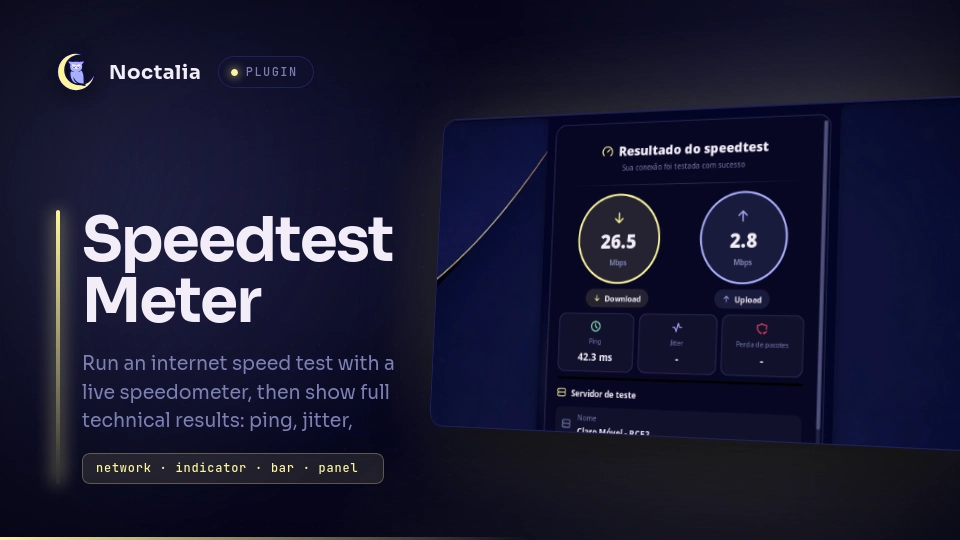
Run an internet speed test with a live speedometer and detailed results.
What it does
Speedtest Meter runs a network speed test using the Ookla Speedtest CLI or
speedtest-cli, displaying real-time results with a live speedometer
gauge. It measures:
- Download speed (Mbps)
- Upload speed (Mbps)
- Ping (ms)
- Jitter (ms)
- Packet loss (%)
- Server details (name, host, location, country, IP)
- Connection details (ISP, external IP, city, region, country, organization)
The panel shows a visual speedometer during the test and displays full
technical results upon completion. The speedometer is a circular dial
(with needle, tick marks and a colored progress arc) rendered live while
the test runs, using the same ring-gauge drawing core as the official
Noctalia "processes" plugin. The needle and arc sweep smoothly (eased,
speedtest.net-style) toward the current speed and the tick marks light up
as it passes. If python3/Pillow are unavailable it gracefully falls
back to the simple circular display.
Plugin
| Field | Value |
|---|---|
| ID | nilsonlinux/speedtest-meter |
| Entries | Bar widget: speedtest-widget; Panel: speedtest |
Entries:
- Widget:
speedtest-widget- Shows an icon in the bar; click to open the panel - Panel:
speedtest- Runs the speed test and displays the results
Settings
| Setting | Type | Default | Description |
|---|---|---|---|
glyph (widget) |
glyph |
brand-speedtest |
Icon shown in the bar for the speedtest-widget widget. |
Requirements
At least one of the following must be installed and on PATH:
speedtest(Ookla CLI) - preferred backend; gives a truly live gauge with per-phase progress.speedtest --versionis checked for the string "Ookla" before it's trusted, since some distros'speedtest-clipackage also installs a same-namedspeedtestbinary.speedtest-cli(Python implementation) - fallback backend. No incremental progress, so the gauge pulses instead of tracking real numbers while it runs — the final result is still complete either way.stdbuf(coreutils) - used, when present, to force line-buffered output from the Ookla CLI so the live gauge updates in real time instead of only at the end. Present on virtually every Linux system.
Optional (only for the circular speedometer dial):
python3+Pillow(pip install Pillow) - render the speedometer dial images live. Without them the plugin keeps working but shows the simpler circle display instead.
Install the Ookla Speedtest CLI (recommended) or the Python fallback:
# Arch Linux (AUR) — package name varies, check `yay -Ss speedtest` first
yay -S speedtest-bin

# Ubuntu/Debian
curl -s https://packagecloud.io/install/repositories/ookla/speedtest-cli/script.deb.sh | sudo bash
sudo apt-get install speedtest

# Fedora
curl -s https://packagecloud.io/install/repositories/ookla/speedtest-cli/script.rpm.sh | sudo bash
sudo dnf install speedtest

# Or the Python fallback (also in most distros' official repos, e.g.
# Arch: pacman -S speedtest-cli, plus Debian/Ubuntu, Fedora, openSUSE, Alpine)
pip install speedtest-cli
stdbuf ships as part of coreutils and is already installed on virtually
every Linux system — no separate install step needed.
If neither speedtest tool is found, the error screen shows the right install command for the detected package manager (pacman/apt/dnf/zypper/apk) automatically.
External dependencies
Third-party services
- ipapi.co - After every successful test, the panel sends one request
to
https://ipapi.co/json/to resolve the client's public IP into geolocation data (city, region, country, organization) shown alongside the test server's own location. No data is stored or transmitted beyond that single request.
Local gauge renderer
python3+Pillowworker (scripts/speed_gauge.py, which usesscripts/draw_graph.py) - when available, redraws the two speedometer dials live while a test runs, using the same ring-gauge drawing core as the official "processes" plugin. The worker reads a tiny JSON snapshot that the panel writes with the current speeds; the needle sweeps toward the target with easing (speedtest.net style), the tick marks light up as it passes, and re-rendering stops once the value settles. If it cannot start (nopython3orPillow), the plugin falls back to the plain circular display and keeps working normally; nothing is sent over the network besides the usual speedtest/ipapi requests.
Legacy speedtest-cli behavior
The human-readable stream is kept on screen in the original order. When Upload: arrives, the plugin stays on the live Upload phase while the final Upload number animates into place.
Only after the bandwidth test has completed does the plugin start the metadata enrichment:
- Query the current Speedtest.net server directory using the sponsor/city shown by the completed test.
- Read the server
hostandcountryfrom that directory. - Resolve the server hostname to an IPv4 address.
- Use
ipapi.co/<server-ip>/json/only when Host or Country is still missing. - Persist every successful ipapi response in
/ipapi-cache.json, keyed by server IP, so the same server IP is never queried again on later tests. - If ipapi returns HTTP 429, keep a global cooldown in the cache to avoid sending more requests until the cooldown expires.
- Show the final result screen only after the Upload animation and metadata phase are complete, with a timeout fallback.
The https://ipapi.co/json/ client-IP request is not used for server metadata.
Notes
While a test is running (or a result is being shown), the panel writes a
few files to the ${XDG_RUNTIME_DIR} directory:
| File | Description |
|---|---|
noctalia_nilsonlinux_speedtest_live.json |
Live snapshot (current download/upload speeds and gauge scale) consumed by the gauge worker. |
noctalia_nilsonlinux_speedtest_download.png |
Download speedometer dial image (160x130). |
noctalia_nilsonlinux_speedtest_upload.png |
Upload speedometer dial image (160x130). |
${XDG_RUNTIME_DIR} is used when set (falling back to ${TMPDIR}, then
/tmp). The files are removed when the panel closes.
Installation
Install via Noctalia Plugin Store.
Usage
- Click the widget in the bar to open the panel
- Click "Start test" to run a speed test
- Watch the circular speedometer dial while it runs (live numbers with the Ookla backend, a pulse with the legacy backend)
- Review the results: download/upload, ping, jitter, packet loss, test server details, your ISP and external IP
Panel IPC Command
To toggle the panel from outside the plugin:
noctalia msg panel-toggle nilsonlinux/speedtest-meter:speedtest
License
MIT
Versions
| Version | Plugin API | Updated |
|---|---|---|
| v1.5.1 latest | 18 | Sep 17, 2026 |
Older versions stay installable on a Noctalia release whose plugin API is below the latest version's.