
About
Soundcore Buds for Noctalia
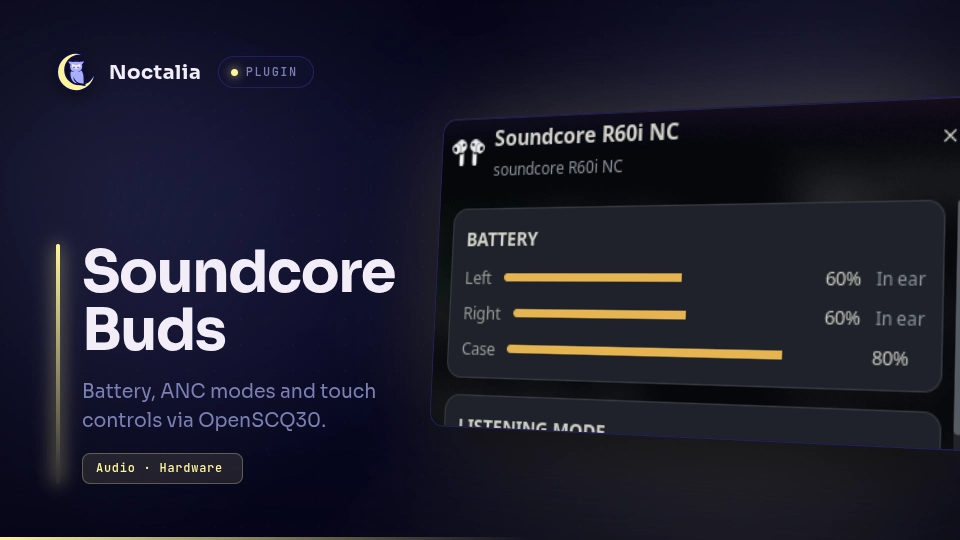
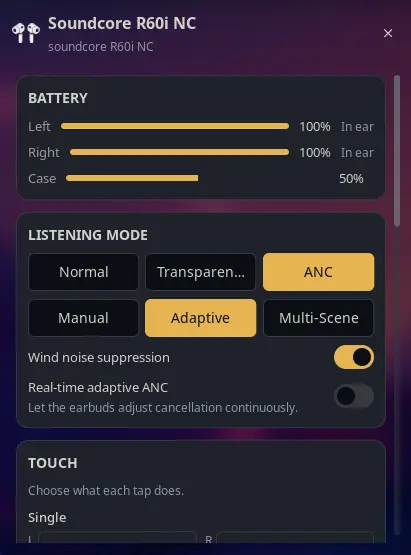
Soundcore battery, listening mode and ANC strength in the Noctalia bar, powered by OpenSCQ30. Tested against Soundcore R60i NC (D1202C); other OpenSCQ30 models work via capability detection.
Ported from the architecture of the AirPods community plugin (harveywuk/airpods, MIT, itself a port of thisisgm/omarchy-pods), with device logic adapted from omarchy-better-omapods (bridge.py / Model.js).
Screenshots
Plugin
| Field | Value |
|---|---|
| ID | sankity/soundcore-buds |
| Entries | Bar widget: soundcore; panel: panel; service: service |
Requirements
- OpenSCQ30 installed with
openscq30onPATH(or setopenscq30_pathin Settings → Plugins). bluetoothctl(bluez),busctl(systemd) andbashonPATH(used for discovery;busctlalso pauses/resumes MPRIS players during Find).- Find helper only:
pactl, pluspaplay(orpw-play) andpython3to synthesize and play the locating tone. - Earbuds paired via the usual Bluetooth flow and registered with OpenSCQ30:
openscq30 paired-devices listmust show your device. If not:openscq30 paired-devices add --mac-address <MAC> --model <MODEL_ID>(find<MODEL_ID>viaopenscq30 list-models).
Usage
Add the Soundcore Buds widget to a bar from Settings → Bar. The icon stays hidden until Soundcore buds are connected (see hide_when_disconnected).
- Left click opens the panel.
- Right click cycles the listening mode without opening anything.
- Sections are grouped cards; tapping an active listening mode collapses it. Noise Cancellation expands Adaptive / Manual / Multi-Scene sub-modes, each with its own extra controls (ANC slider, scenario). Touch controls are grouped per gesture with left/right dropdowns side by side.
The panel is also available directly:
noctalia msg panel-toggle sankity/soundcore-buds:panel
Settings
| Setting | Type | Default | Description |
|---|---|---|---|
openscq30_path |
file | empty | Path to openscq30. Leave empty to find it on PATH. |
poll_interval |
int | 4 |
Service poll interval in seconds (2–15). Bluetooth is slow, keep it at 3 or above. |
hide_when_disconnected |
bool | true |
Hide the bar widget when nothing is connected (widget setting). |
icon |
select | Auto |
Bar icon: Auto follows the device, Earbuds is the in-ear silhouette, Over-ear is the headphone cups (widget setting). |
Touch
The panel shows a TOUCH section when the connected device exposes touch
controls (8 on the R60i NC: single/double/triple/hold per bud). Each row is a
dropdown with the actions the device actually offers, plus a touch-tone toggle
and a reset-to-defaults row where supported. Changes apply immediately and
snap back if openscq30 rejects them.
Sound & device settings
When the connected device exposes them, the panel also shows:
- SOUND: transparency sub-mode (under Transparency), noise scenario (under ANC), wind suppression, real-time adaptive ANC.
- DEVICE: dual connections, auto power off, low battery prompt, high volume limiter (toggle + dB slider + check interval).
- INFO: firmware versions, adaptive ANC level, serial, linked hosts.
Only settings the connected device actually supports are drawn (capability
detection via list-settings), so other models get a subset automatically.
Panel keyboard shortcuts
While the panel is focused: o Normal, t Transparency, a Adaptive,
n Noise Cancellation, f find (left bud, or stop a running tone),
r refresh. Esc always closes the panel.
Troubleshooting: "control busy" / widget dimmed but buds connected
openscq30 talks to the buds over an exclusive BLE control channel while
audio uses A2DP. If the official Soundcore app on your phone is open (even in
the background), it holds that channel and the laptop gets connect timed out. The plugin then keeps showing last-known data dimmed with an "earbuds
busy" hint instead of vanishing, and recovers automatically once you close the
phone app. If it happens often, disable the phone app's background activity or
forget the buds on the phone.
Troubleshooting: tap actions do nothing on Linux
Media tap actions (Next / Play-Pause / Volume) are sent by the buds as kernel
media keys on a virtual input device (soundcore <model> (AVRCP) — e.g.
soundcore R60i NC (AVRCP); check dmesg | grep -i avrcp), not through this plugin. Your compositor must
translate those keys into player commands:
- Umbriel: install
playerctland bind the keys (examples ship commented in the default config):[keybinds] "XF86AudioPlay" = "spawn:playerctl play-pause" "XF86AudioNext" = "spawn:playerctl next" "XF86AudioPrev" = "spawn:playerctl previous" - KDE Plasma: works out of the box via global media-key handling.
- If taps work on your phone but not the laptop, also make sure the phone's Bluetooth is off — R60i NC supports dual connections and taps may route to the other device.
Find
The panel has a FIND section with Left / Right rows. The first tap arms the
side ("tap again — LOUD"), the second tap plays a locating tone on that side:
MPRIS playback pauses, the sink is boosted to 200% (plus 180% on the tone
stream) and the volume limiter is temporarily bypassed
(limitHighVolume=false, limitDb=100), then sink volume/mute, the limiter,
and playback are restored — only players that were Playing are resumed —
when the tone stops (20 seconds) or you tap Stop. Switching sides keeps
playback paused until the last tone ends. Closing the panel also stops a
running tone. Take the buds off your ears first — the tone is loud on
purpose. Requires pactl and paplay (or pw-play) plus python3 (see Requirements).
IPC
noctalia msg plugin sankity/soundcore-buds:service all cycle-noise
noctalia msg plugin sankity/soundcore-buds:service all refresh
noctalia msg plugin sankity/soundcore-buds:service all find-left
noctalia msg plugin sankity/soundcore-buds:service all find-right
noctalia msg plugin sankity/soundcore-buds:service all stop-find
Bind the mode cycle in Hyprland, for example:
# ~/.config/hypr/hyprland.conf
bind = SUPER, N, exec, noctalia msg plugin sankity/soundcore-buds:service all cycle-noise
Notes
- The service polls
openscq30every few seconds; Bluetooth is slow, so keeppoll_intervalat 3 or above. - Controls are optimistic: the panel reflects a click immediately and snaps back only if
openscq30rejects it or does not confirm within a few seconds. - The panel reads the device's capability list, so it only draws the modes and the ANC-strength slider the connected device actually supports.
- Charging buds are shown as "Charging"; buds resting unplugged in the case
are shown as "In case" (tracked via
twsStatus/hostDevice), otherwise connected buds are shown as "In ear". - Touch controls are set with
setting --set <id>=<value>; an empty value deselects (shows as Off). - Coexistence:
openscq30holds an exclusive control channel — close the phone app if the panel reports busy. The Find tone only ever plays on the Bluetooth buds sink (never speakers) and restores volume/mute, the volume limiter, and paused players afterwards; if its process is force-killed (kill -9), lower the sink volume back manually.
Compatibility
| Category | Battery | Listening modes | Extras |
|---|---|---|---|
| TWS earbuds (tested: R60i NC) | Per-bud + case | Modes + sub-modes + ANC slider + touch + find | Full support |
| Over-ear headphones (Q30-class) | Single headset row | Modes + scenario sub-modes | No touch/case rows (device has none) |
| Speakers | Not supported | Not supported | Out of scope |
Support is capability-driven: every control has a fixed, translated UI and
appears only when the connected device reports that capability, otherwise it
stays hidden. Nothing appears without a designed UI. If the buds are connected
over Bluetooth but unknown to openscq30, the service registers them itself
(paired-devices add). Intentionally unsupported: equalizer (protects the
phone-side HearID curve), spatial audio, LDAC, speaker-only settings.
Only the R60i NC is tested with real hardware; other models are covered by
fixtures in tests/ — please report issues with your model ID
(openscq30 list-models) and the failing behavior.
Development notes
- Hot-reload applies to
.luaufiles only. After changingplugin.tomlor adding newtr()keys intranslations/, disable and re-enable the plugin once, otherwise new settings read as undeclared and new strings render as raw keys. - Run
bash tests/run.shbefore committing.
License
MIT. Device control is OpenSCQ30 by Oppzippy (GPL-3.0), which is not bundled with this plugin. Soundcore is a trademark of Anker Innovations, which does not sponsor this plugin.
Versions
| Version | Plugin API | Updated |
|---|---|---|
| v1.0.0 latest | 24 | Sep 9, 2026 |
Older versions stay installable on a Noctalia release whose plugin API is below the latest version's.